Connect a Container to a Service Bound to Localhost on the Docker Host

This challenge focuses on Docker Engine running directly on a Linux machine. Docker Desktop runs Docker Engine inside a separate VM and provides some of the host connectivity out of the box, so the commands from this challenge may behave differently on your computer.
This challenge continues the story of Connect a Container to a Service Running on the Docker Host,
and it assumes that you know the host-gateway trick from there.
Your company is moving its services into containers, and your team works on the cart service, which keeps the shoppers' carts in Redis.
Historically, the development version of the cart service and Redis have run on a single VM and talked to each other over localhost.
You have a developer workstation for experiments called dev-01.
The team has packaged the cart service into the cart:v1 image and started it there with the following command:
docker run -d --name cart \
    -p 80:8080 \
    -e REDIS_URL=redis://:cart-dev-password@localhost:6379 \
    cart:v1
The container is running, but its web UI shows an error instead of the cart. Apparently, the containerized application cannot reach Redis, which still runs right on the host as a background service.
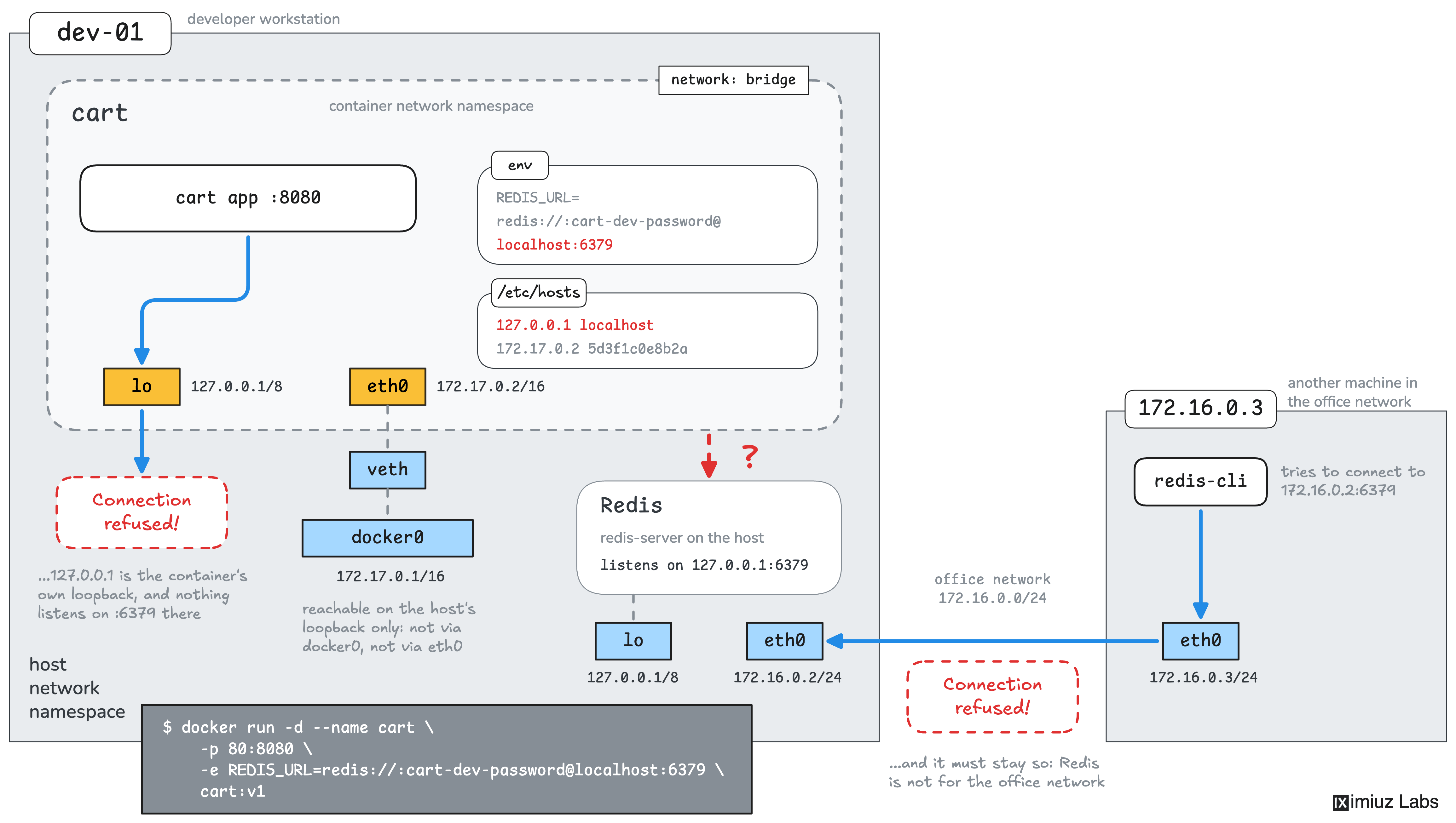
Your task is to recreate the cart container so that it keeps the carts in Redis running on the host, and then add an item to the cart.
As in the previous challenge, the whole team is going to use your docker run command on their own workstations,
so it has to work on all of them without changes.
Also note that the workstations are connected to a shared office network (172.16.0.0/24),
and other machines in it must not be able to connect to Redis on your workstation.
For the sake of reproducibility, keep the cart:v1 image as it is, and keep the container's name and its published port 80.
Hint 1
Inside a container, localhost refers to the container's own network namespace,
so the cart service looks for Redis in the wrong place.
As in the previous challenge, the --network host flag would be the quickest fix, but it is also the least secure one,
and this challenge requires a more elegant solution.
Hint 2
Unlike the inventory API from the previous challenge, Redis listens on the loopback addresses only:
sudo ss -lntp
A container cannot reach the host's loopback interface even with the --add-host <name>:host-gateway trick.
Hint 3
There are two ways to make Redis reachable from the container.
Redis can listen on one more address of the host, or a relay can accept connections on such an address and forward them to Redis on localhost.
Hint 4
The Redis server configuration lives in /etc/redis/redis.conf,
and the bind directive there takes a space-separated list of addresses the Redis server should listen on.
Right now it's only localhost, but you can add any other host address to it.
Avoid 0.0.0.0 and the address of eth0 though - this would make Redis reachable by other machines in the corp network,
which is not what you want.
The address of the docker0 bridge is a good candidate: it is the one that host-gateway resolves to,
and the office network has no route to it.
Note that redis reads this file only at startup, so restart the redis-server systemd service after modifying redis.conf.
Hint 5
If you prefer to leave the Redis configuration as it is, a TCP relay can listen on the address of the docker0 bridge
and pass every connection to Redis on localhost.
The socat tool is preinstalled on the workstation,
and the Forward a Port Using socat challenge practices this skill.