Optimize Container Images with Multi-Stage Builds

Premium Challenge
Upgrade your membership to unlock this and all other premium materials.
This challenge is a sequel to Build and Compile Applications in Dockerfiles. In that challenge, you containerized a Go backend and a TypeScript frontend using single-stage Dockerfiles that both build and run the applications.
While those Dockerfiles produced working images, they have a significant problem: the final images are bloated with unnecessary build tools and dev dependencies.
The problem with single-stage builds
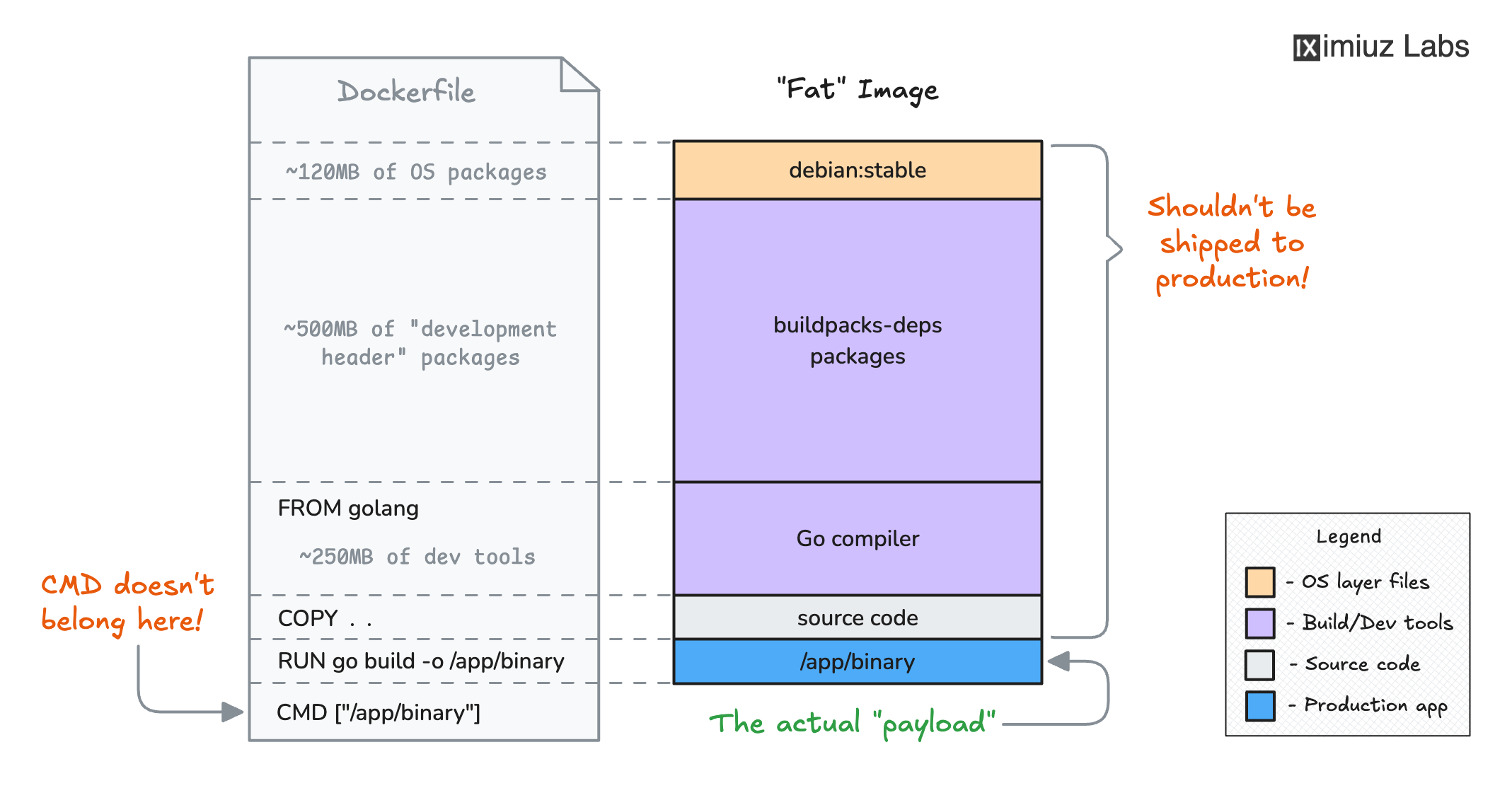
When you use the golang image to compile and run a Go application in the same stage,
the final image inherits the entire Go compiler toolchain -
over 800MB of packages and hundreds of CVEs that you don't need at runtime:
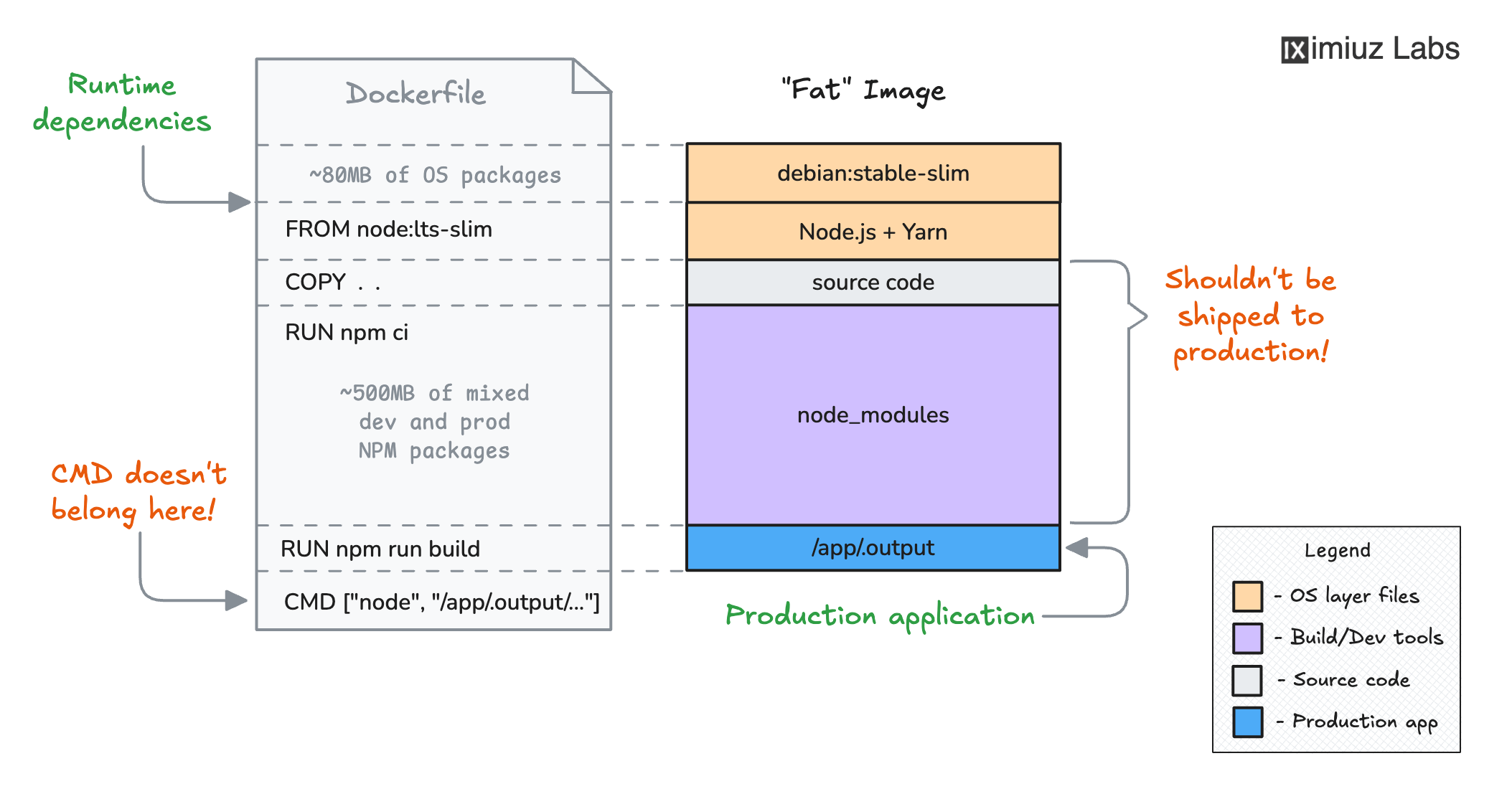
Similarly, when you build a TypeScript frontend in a single stage, the TypeScript compiler, type definitions, and all other dev dependencies remain in the final image even though they're only needed during compilation:
The solution: Multi-Stage Builds
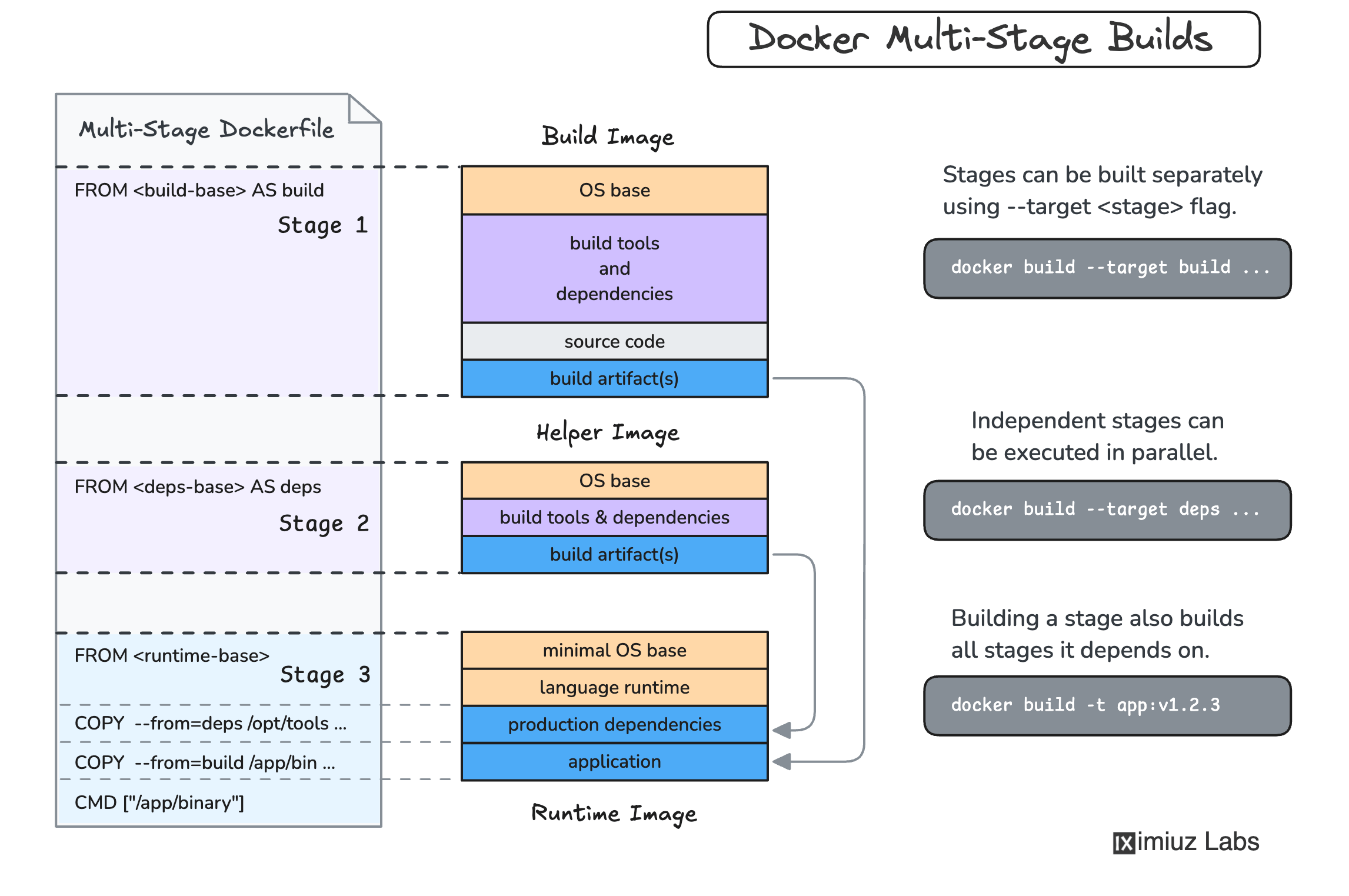
Multi-stage builds solve this by allowing multiple
FROM instructions in a single Dockerfile - one for building the application
and another for running it. The COPY --from=<build-stage> instruction
lets you cherry-pick only the build artifacts you need into the final runtime image:
Explore the applications
The applications are the same as in the previous challenge:
The backend source is in ~/backend/. It's a Go HTTP server
with a couple of API endpoints:
cat ~/backend/main.go
The build command: go build -o server . (produces a binary).
The task
Your goal is to write multi-stage Dockerfiles that produce slim, production-ready images:
- Create a multi-stage
Dockerfilein~/backend/and build a Docker image namedmy-backend:v1.0.0. - Create a multi-stage
Dockerfilein~/frontend/and build a Docker image namedmy-frontend:v1.0.0. - Both images should start correctly, respond on their respective ports, and be free of unnecessary build tools.
You can test your images at any point:
docker run -p 8080:8080 my-backend:v1.0.0
docker run -p 3000:3000 my-frontend:v1.0.0
Go backend
Backend multi-stage hint
Your Dockerfile needs two stages:
- A build stage that starts
FROMan image with the Go compiler to compile the source code. - A runtime stage that starts
FROMa minimal base image and copies only the compiled binary from the build stage.
The runtime stage should NOT use the golang image as its base.
Backend debugging hint
If the container crashes, run it in the foreground to see the error:
docker run my-backend:v1.0.0
Backend size hint
A compiled Go binary is self-contained - it doesn't need the Go compiler or standard library
sources at runtime. Pick a minimal base image for your runtime stage (think Alpine, Debian slim,
or even a distroless image). With CGO_ENABLED=0, the binary is statically linked
and can run on virtually any base.
TypeScript frontend
Frontend multi-stage hint
Your Dockerfile needs two stages:
- A build stage that installs all dependencies (including dev ones like the TypeScript compiler), then compiles the TypeScript source into JavaScript.
- A runtime stage that installs only the production dependencies and copies the compiled JavaScript files from the build stage.
The key is ensuring that dev dependencies like typescript don't end up in the final image.
Frontend debugging hint
If the container crashes, run it in the foreground to see the error:
docker run my-frontend:v1.0.0
Frontend optimization hint
The compiled JavaScript needs production dependencies like express to run,
but it does NOT need dev dependencies like typescript.
Think about which npm install options control whether dev dependencies are included.