How I added dynamic social preview images to my site for almost nothing
Most people probably take this functionality for granted, but social preview images (og:image) for a site with dynamic content aren't trivial to build.
For quite some time, I had been putting off building them for iximiuz Labs, but adding author profiles, and then learner profiles, finally made me reconsider. After all, people would want their profile links to look nice when shared on social media.
Services that screenshot web pages certainly exist, but I've always been wary of unnecessary dependencies, especially if they want you to pay as you go. At the same time, running my own headless browser 24/7 just to generate an occasional preview image seemed wasteful.
After several iterations, I ended up with a solution that uses headless Chrome, stores generated images in object storage, and scales the image generation service down to zero when it's not needed. The result costs me just a few cents per month, with no need to depend on a third-party screenshot API.
Here's how I built it, in case someone else finds the design useful or entertaining.
Preview Card URL (HTML page)
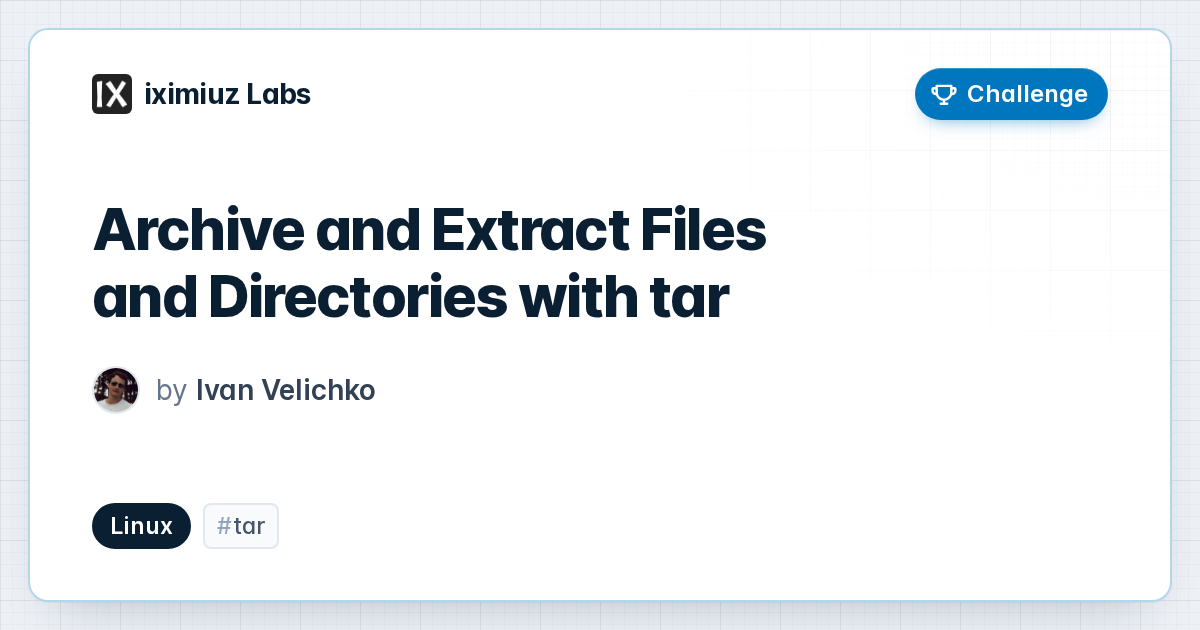
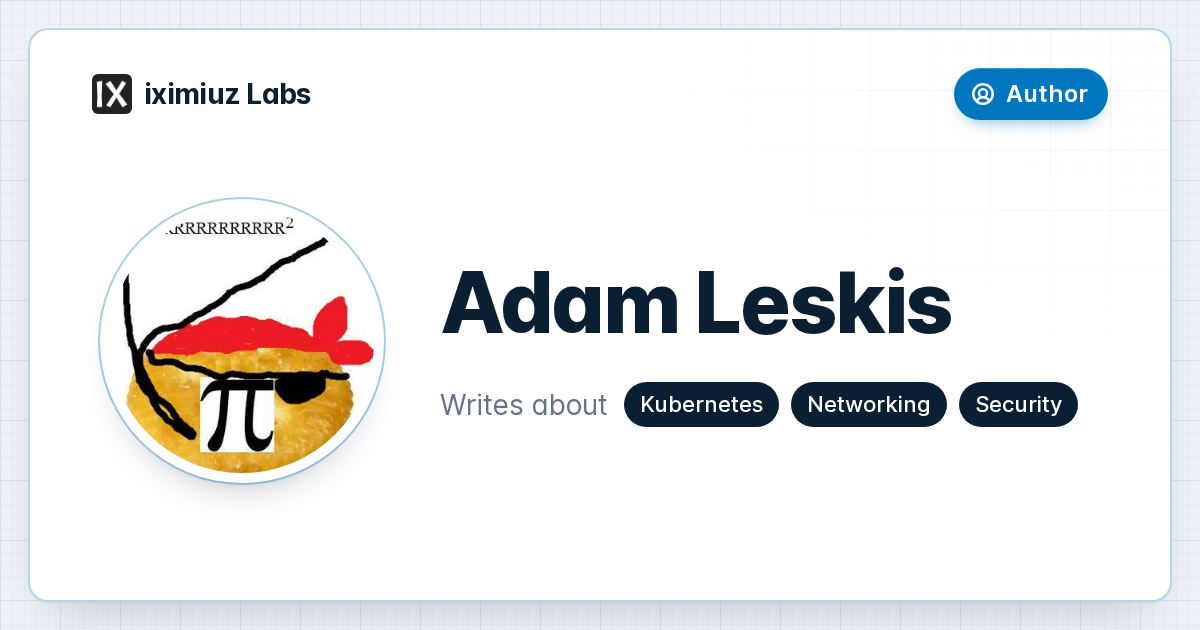
Each page that requires a dynamic social preview image got a simplified "card" view - a companion page that includes only the information I'd want to see on the preview image. The card is built with HTML and CSS and populated from the same API endpoints the rest of the site uses, so I can shape it any way I like. Some examples:
- /challenges/linux-tar-basics → /og/card/challenges/linux-tar-basics
- /a/adam-leskis → /og/card/a/adam-leskis
- /u/iximiuz → /og/card/u/iximiuz
The general pattern is that the card URL is constructed by adding the special /og/card/ prefix to the target page's path:
https://labs.iximiuz.com/some/path -> https://labs.iximiuz.com/og/card/some/path
Only some of the site's pages have a card, to reduce the risk of abuse.
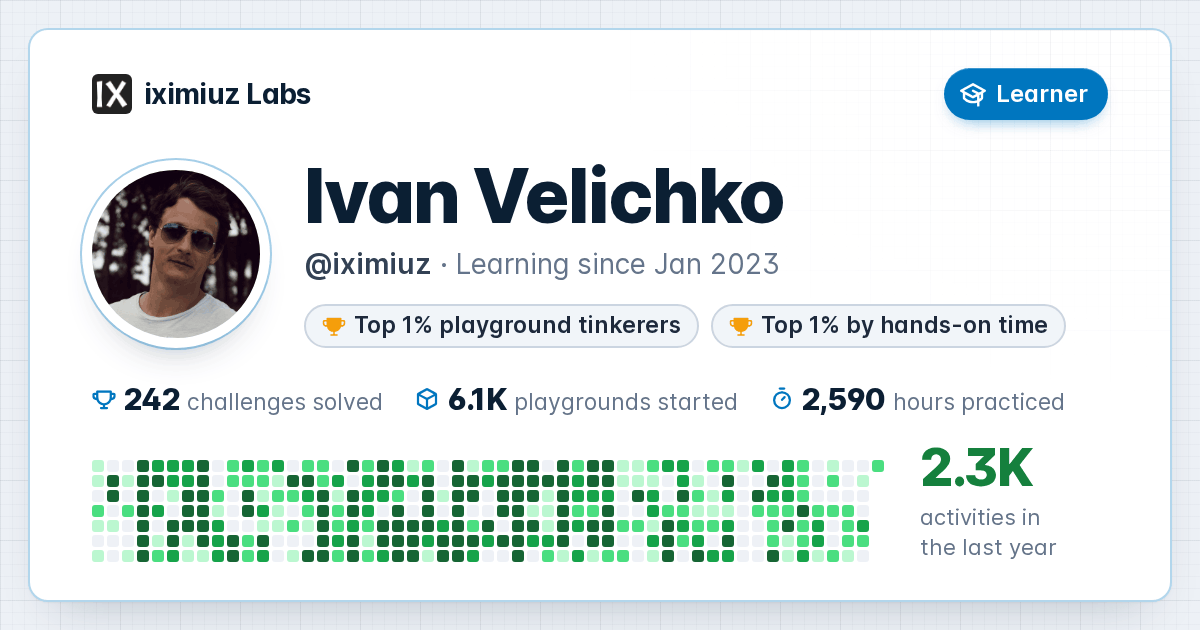
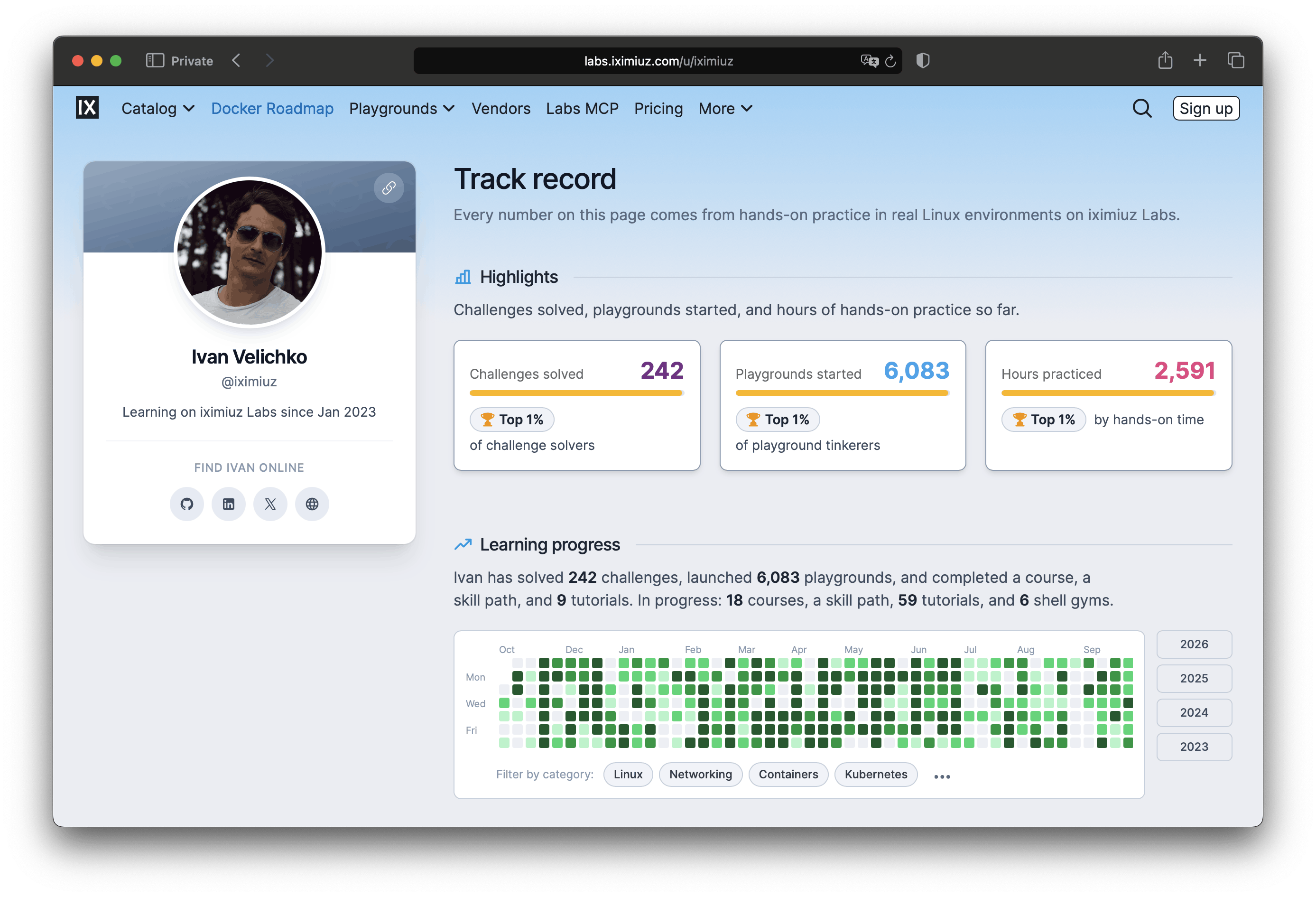
Preview Image URL (PNG image)
Similarly, each /og/card/<page> URL got a corresponding /og/image/<page>/<hash>.png URL, which returns the same card, rendered as a PNG image. For example:
- /og/card/challenges/linux-tar-basics → /og/image/challenges/linux-tar-basics/da61fa9c.png
- /og/card/a/adam-leskis → /og/image/a/adam-leskis/6b669832.png
- /og/card/u/iximiuz → /og/image/u/iximiuz/15f1f108.png
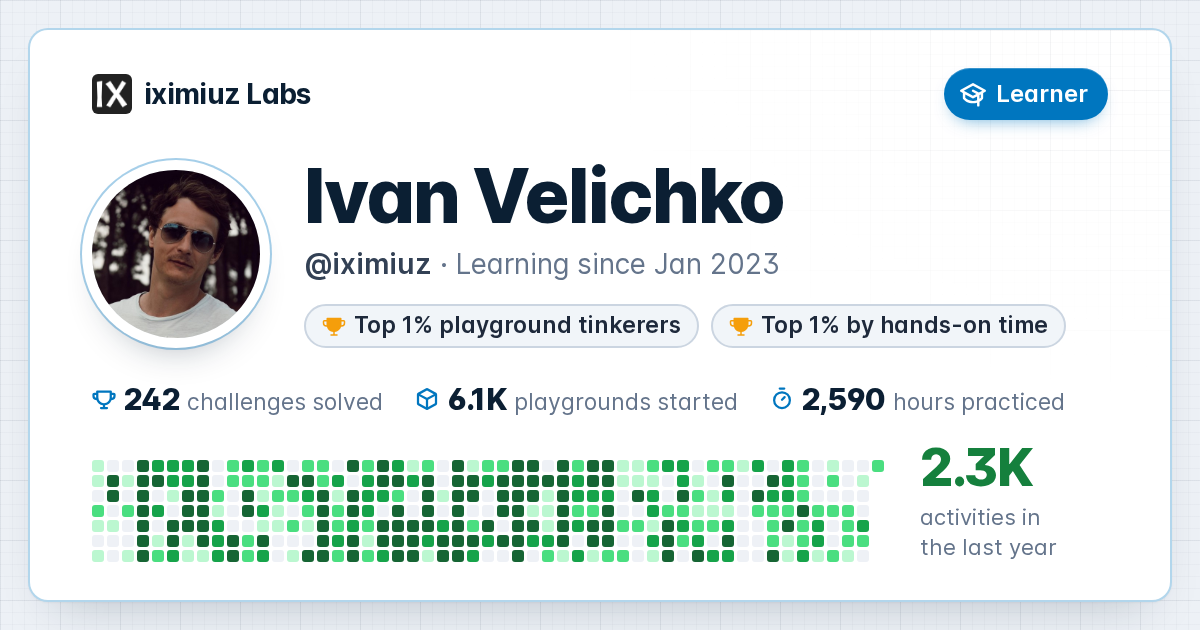
The <hash> part is the key ingredient of the dynamic preview images - it is derived from the information displayed on the card. Social networks and CDNs cache images by URL, so a new URL is the most reliable way to make them fetch a fresh image. Learner profile cards, for instance, include the daily activity log (a GitHub-style calendar), so their hash takes into account the date and the number of solved challenges. This way, the card keeps up with the user's progress on iximiuz Labs. The hash also changes when I redesign the look of the cards.
Pages that need a dynamic social preview image include the standard og:image meta tag that points to their /og/image/<page>/<hash>.png URL. For example, my learner profile page https://labs.iximiuz.com/u/iximiuz uses the following tag (the hash is current at the time of writing):
<meta property="og:image" content="https://labs.iximiuz.com/og/image/u/iximiuz/15f1f108.png">
There is one caveat though: social networks seem to cache the Open Graph metadata of the page itself, so changing the image URL doesn't force them to revisit the page. However, whenever they do, the new URL ensures they won't reuse an outdated image.
Headless Chrome-as-a-Service
This is probably the most interesting part. The /og/image/<page>/<hash>.png endpoint is handled by the main iximiuz Labs frontend application (Nuxt, hence JavaScript), which already has a mechanism for serving static assets, including images. Whenever a request comes in, the endpoint performs an S3 (well, R2) GetObject call, and if it succeeds, streams the raw body back to the client. Given the right response headers, such static assets are usually aggressively cached by the Cloudflare CDN, so the frontend application rarely needs to serve the same blob more than once.
The magic happens when the GetObject call fails because the corresponding storage object doesn't exist (NoSuchKey), which is always the case when a page with a dynamic social preview image is shared for the first time. When that happens, the frontend application forwards the request to Paparazzi, a service I built for generating preview images.
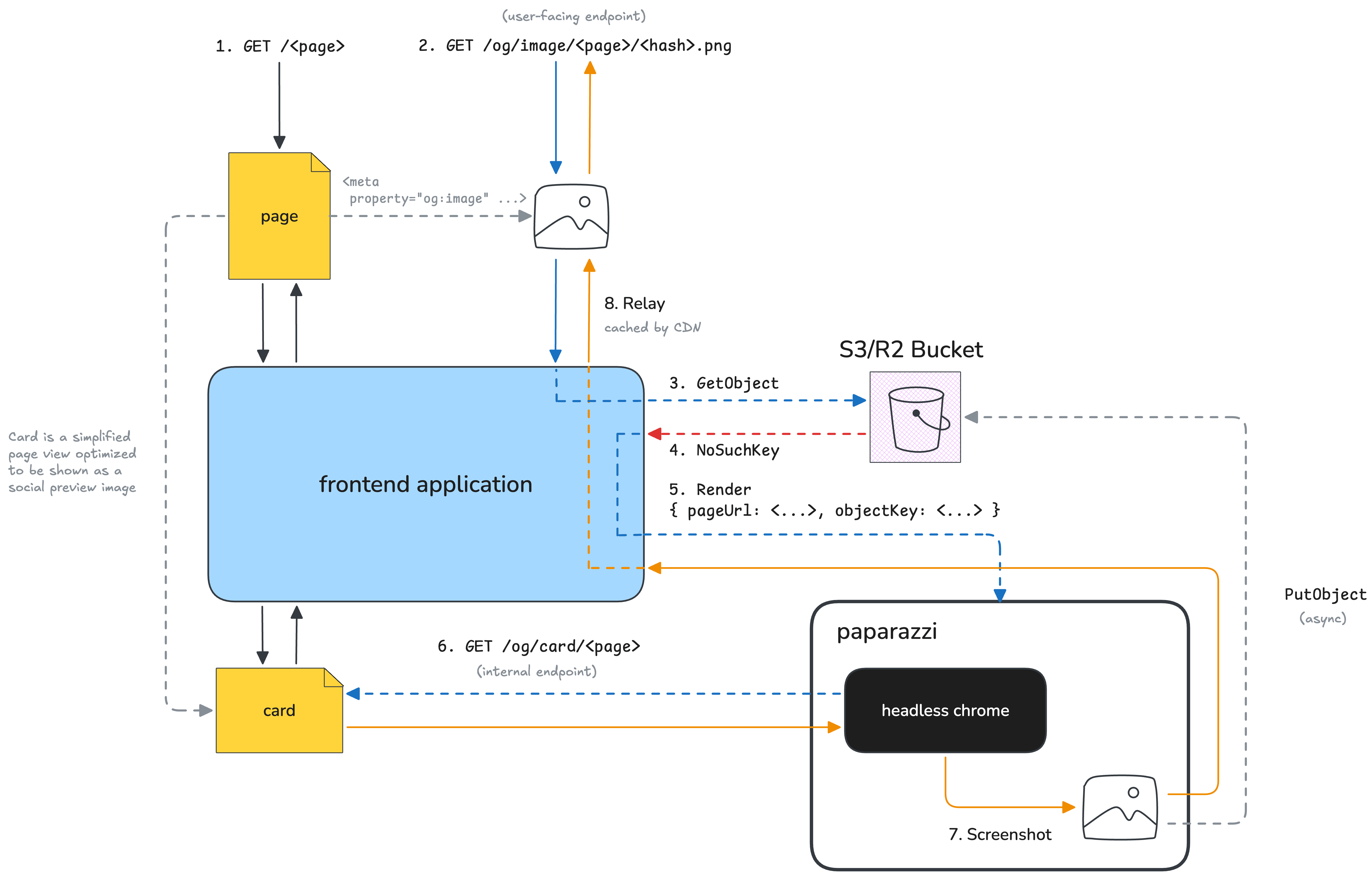
The first request for a new preview image goes through all eight steps. Later requests for the same image end at step 3 with a successful GetObject call, or the CDN answers them without reaching the frontend at all.
The sole purpose of this service is to run headless Chrome and take PNG screenshots of HTML pages. It knows nothing about the pages it captures or what happens to the images later. The only thing it does with the images, apart from returning them, is store them in S3/R2. The frontend application sends it the card page URL and the S3/R2 object key to store the image under. This is the same key the frontend uses in its GetObject calls.
Once Paparazzi screenshots the card page, the generated PNG is streamed back to the frontend, which then relays it to the client. In the background, Paparazzi also uploads each PNG to S3/R2, so the next request for the same image normally won't reach Paparazzi - the frontend serves it from object storage. Of course, requests that arrive before the upload completes (or a failed upload) can trigger duplicate renders, but the S3/R2 storage writes are idempotent anyway.
The frontend app checks whether the requested <hash> matches the page's current hash before asking Paparazzi to render anything. If it doesn't, the application returns a stub image instead. This prevents bots and misbehaving crawlers from triggering unnecessary image generation by requesting arbitrary URLs. Previously generated images are still served from object storage, even if their hashes are no longer current.
Paparazzi is written in Go, and its code is fairly simple and short (a few hundred lines). It relies on the github.com/chromedp/chromedp package to drive headless Chrome. Here is what it takes to navigate to a page and screenshot it:
url := "https://labs.iximiuz.com/og/card/u/iximiuz"

_ = chromedp.Do(ctx,
    chromedp.EmulateViewport(1200, 630),
    chromedp.Navigate(url),
    chromedp.WaitReady("[data-og-ready]"),
)

png, _ := chromedp.Run(tab, chromedp.CaptureScreenshot())
I chose Go and a separate service for two pragmatic reasons:
- Reducing the attack surface and isolating failures
- Minimizing infrastructure costs
Puppeteer and Playwright can drive headless Chrome from JavaScript, so in theory I could have put it right into the frontend application. However, my rule of thumb for JavaScript projects has always been to avoid unnecessary dependencies to the best of my ability, because every extra npm package adds to the attack surface. I certainly didn't feel like bringing a bunch of 3rd-party code into the main application only to handle this secondary functionality (the site can definitely work without preview images). And even if I generated the code myself, running a headless Chrome process alongside the main application sounded risky because it could start competing for resources or crash the server.
The other reason is cost. The frontend application currently runs on 2-3 sizeable Fly machines, ~$37/mo each. Simply launching headless Chrome in these VMs would require adding at least 1 GB of memory to one of them, which I would be billed for the entire month, even though PNG images are only rendered (quite) sporadically.
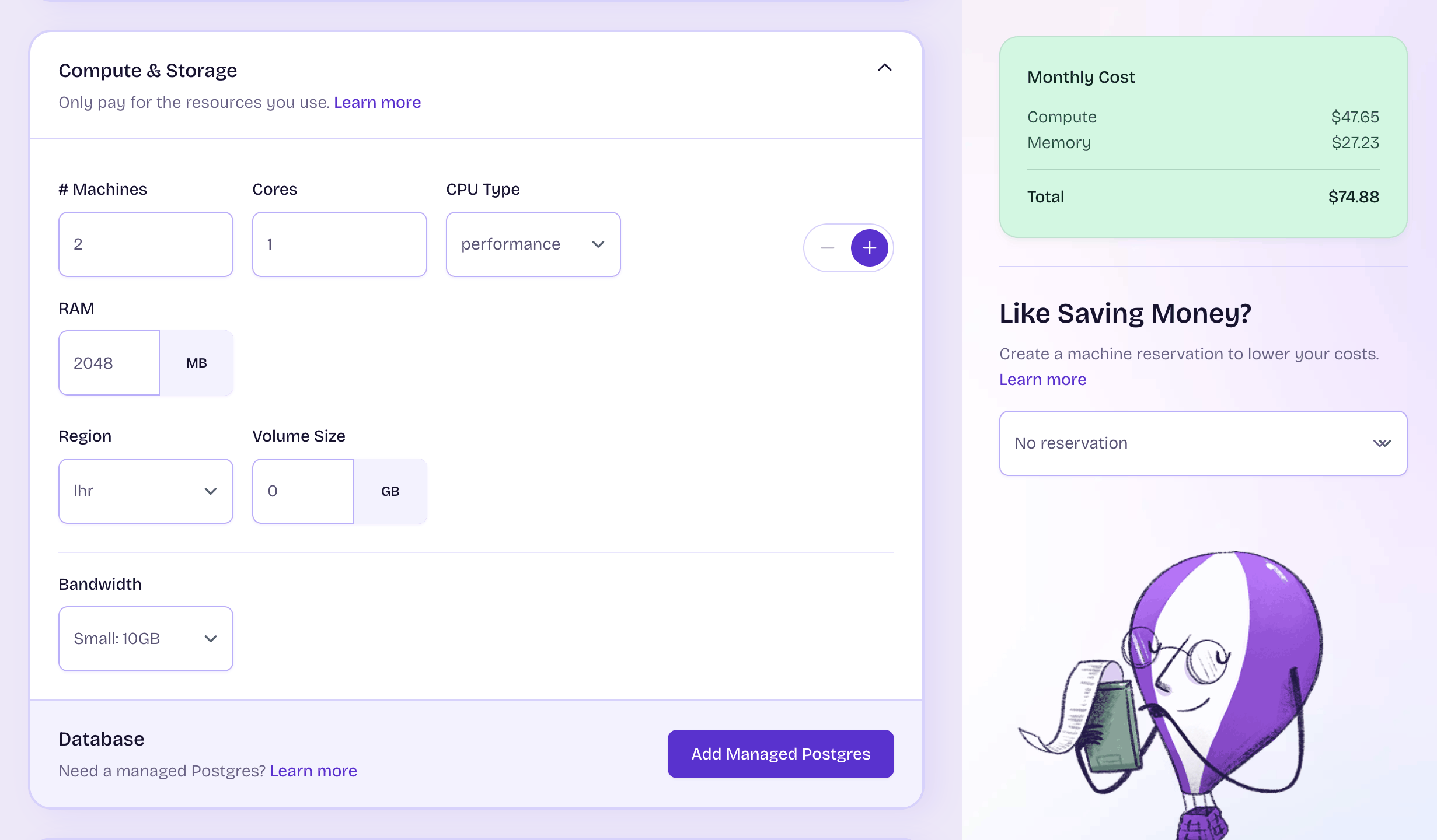
Two performance-1x machines with 2 GB of memory each cost ~$75/mo, and more than a third of that is memory.
At the same time, creating a new Fly application is free, and its machines can be scaled down to 0 when there are no requests (which for Paparazzi is 99% of the time). Fly machines with up to 2 GB of memory can be suspended on stop (instead of full termination), so auto-starting them adds only a few hundred milliseconds of latency. Here is what it looks like in Paparazzi's fly.toml:
app = "iximiuz-labs-paparazzi"

[build]
  dockerfile = "Dockerfile"

# Request-driven: the frontend requests an image on a storage miss.
# Fly suspends the idle machine (with a warm Chrome) and resumes it
# on the next request.
[http_service]
  internal_port = 8080
  auto_stop_machines = "suspend"
  auto_start_machines = true
  min_machines_running = 0

# 2 GB is the sweet spot - less gets Chrome OOM-killed,
# and more wouldn't work with the (faster) "suspend" strategy.
[[vm]]
  size = "shared-cpu-1x"
  memory = "2gb"
The Dockerfile behind the Paparazzi Fly machine is rather trivial - it's built FROM chromedp/headless-shell and only adds a single statically linked Go binary (plus installs the CA certs and an emoji font):
FROM golang:${GO_VERSION} AS build

# ...typical Go app build stage...

FROM chromedp/headless-shell:${CHROME_VERSION}

# The base image has no CA bundle (needed for HTTPS to R2).
# The emoji font is for card text.
RUN apt-get update \
  && apt-get install -y --no-install-recommends ca-certificates fonts-noto-color-emoji \
  && rm -rf /var/lib/apt/lists/*

COPY --from=build /src/bin/paparazzi /paparazzi

CMD ["/paparazzi"]
The best part is that running Paparazzi costs me only a few cents per month. Most of the time the service is idle, so Fly scales its machines to 0 and only charges me for the used disk space (peanuts). And with just a single Fly machine (1 shared CPU / 2 GB), the cost is capped at ~$15/mo, which I'd only pay if something goes utterly wrong and Paparazzi starts getting steady traffic from the main application (it's not exposed publicly, so bots can't access it directly). So there's no risk of accidentally running up a massive compute bill by generating a gazillion images (compared to using a pay-as-you-go SaaS for generating preview images). Storage and network traffic are separate concerns, of course, but this is the risk iximiuz Labs constantly takes with its main workload (Linux playgrounds).
Happy building!
Written by Ivan Velichko