Reading Every Secret Straight From etcd — and Closing the Door

The Idea
Extract the Secret from etcd, then enable encryption at rest and prove the same dump no longer exposes the plaintext — while learning exactly where that protection stops. The control auditors demand it. This lab shows its real boundary.
Use a disposable, self-managed kubeadm cluster. You need a cluster-admin kubeconfig and shell access to the control-plane node. Part 3 changes the API server configuration and briefly restarts it, so do not run this lab against a production control plane.
Keep two terminals open:
- Development machine: where your cluster-admin
kubectlworks. - Control-plane node: where
/etc/kubernetesand the static Pod manifests live.
The headings below tell you which terminal to use. Part 3.4 briefly opens a third shell inside the AWS CLI Pod.
Part 1: The attack: base64 is not encryption
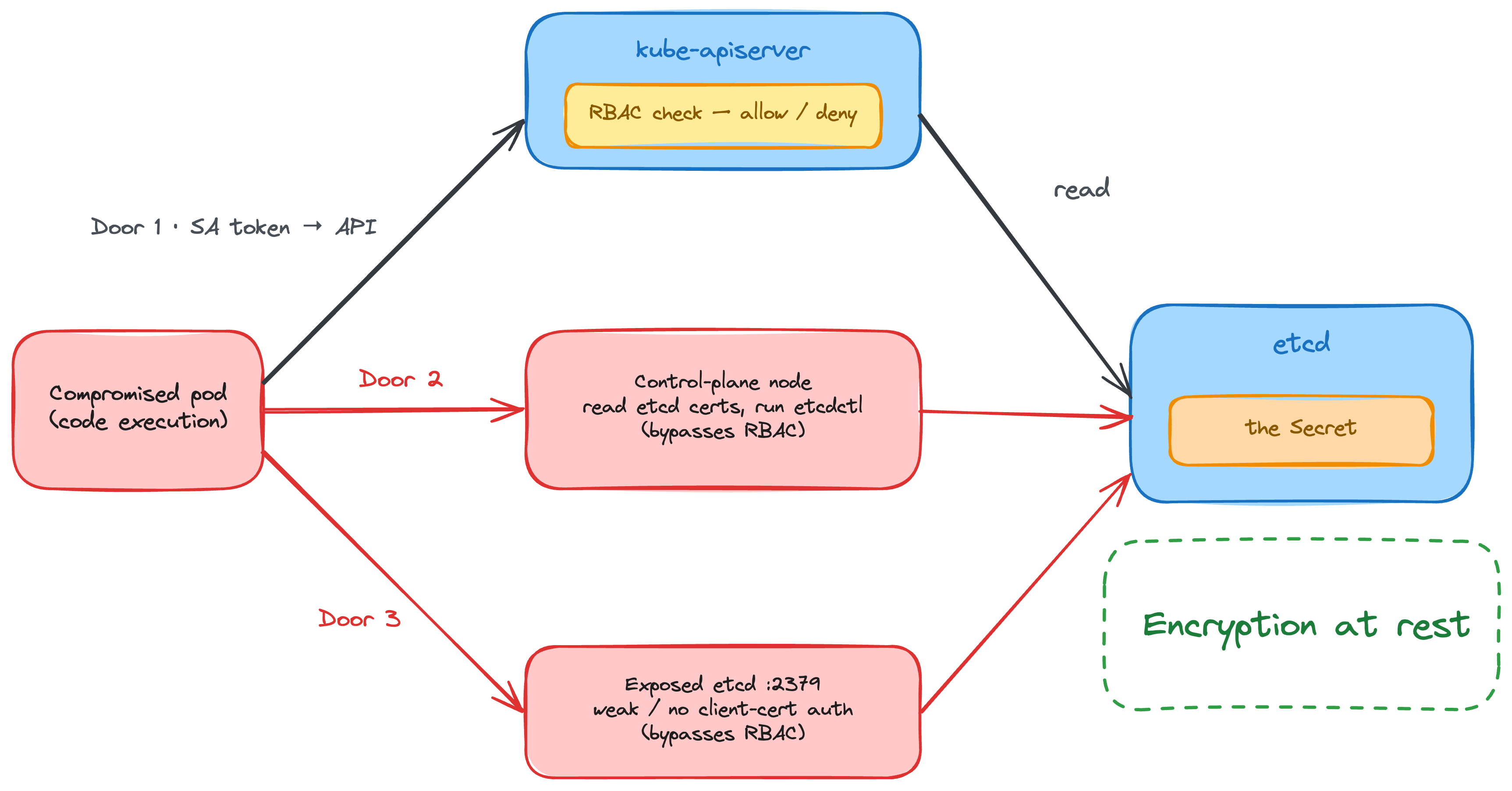
The diagram is the threat model. This lab uses cluster-admin access to reproduce Door 2 safely: control-plane access plus a trusted etcd certificate. Door 3 is a separate misconfiguration; kubeadm's local etcd requires client-certificate authentication by default.
1.1 Create the Secret (development machine)
Make sure your current namespace is default; the etcd key used later assumes it.
kubectl create secret generic db-credentials \
  --from-literal=username=admin \
  --from-literal=password='S3cr3t-P@ss'

# What kubectl shows you — base64, NOT encryption
kubectl get secret db-credentials -o jsonpath='{.data.password}' | base64 -d
# S3cr3t-P@ss
The point to make early is that base64 is an encoding, not encryption. Without encryption at rest, the Secret is stored in etcd in plaintext, and anyone with access to etcd can read it.
1.2 Read it straight from etcd (development machine)
With the default storage prefix, namespaced Kubernetes objects generally live under /registry/<resource>/<namespace>/<name>. Secrets live at /registry/secrets/<namespace>/<name>. Cluster-scoped objects omit the namespace segment. See the Kubernetes etcd documentation for guidance on secure access.
# Run etcdctl inside the kubeadm etcd pod
ETCD=$(kubectl -n kube-system get pod -l component=etcd -o jsonpath='{.items[0].metadata.name}')

kubectl -n kube-system exec "$ETCD" -- etcdctl \
  --endpoints=https://127.0.0.1:2379 \
  --cacert=/etc/kubernetes/pki/etcd/ca.crt \
  --cert=/etc/kubernetes/pki/etcd/server.crt \
  --key=/etc/kubernetes/pki/etcd/server.key \
  get /registry/secrets/default/db-credentials | hexdump -C
Here, the endpoint is the etcd server. --cacert verifies the server against the etcd CA. The server.crt and server.key files belong to the etcd server and are also valid for client authentication in kubeadm's PKI. The kube-apiserver normally uses the separate apiserver-etcd-client.crt and key. The output shows the Secret data in plaintext, proving that the API server stores it without encryption at rest by default.
Part 2: Reaching etcd: AuthN, AuthZ, and the RBAC boundary
Reaching etcd isn't unauthenticated. In this kubeadm layout, etcd wants a trusted client certificate before it will answer. The catch is that etcd's idea of "authorised" is separate from Kubernetes RBAC: once a request reaches etcd with credentials it accepts, the API server is not in the path. With etcd authorization disabled, there is no per-Secret, per-namespace, or per-user Kubernetes check down here. That gap is the whole lab.
How etcd actually gates access — two distinct layers:
Transport / AuthN: Mutual TLS. The client verifies etcd with --cacert and presents --cert and --key. Client traffic uses port 2379; peer traffic uses a separate TLS endpoint on 2380. This is on for kubeadm's local etcd, so a trusted client certificate is required.
Authorization (etcd RBAC): etcd's own user, role, and permission model, scoped to key ranges (etcdctl user add, role grant-permission). kubeadm does not enable it, so an accepted client certificate grants full access to every key.
Show the boundary with two commands (development machine)
The API server enforces RBAC. etcd does not enforce Kubernetes RBAC. You can watch the same Secret come back forbidden through the API and in plaintext through direct etcd access.
Ask the API whether an unprivileged identity may read Secrets. Your lab kubeconfig is cluster-admin, so the impersonation flag works:
kubectl auth can-i get secrets \
  --as=system:serviceaccount:default:lowpriv -n default
# no

kubectl get secret db-credentials \
  --as=system:serviceaccount:default:lowpriv -n default
# Error from server (Forbidden): secrets "db-credentials" is forbidden
Now read that same Secret straight from etcd using the etcd certificate and key:
ETCD=$(kubectl -n kube-system get pod -l component=etcd -o jsonpath='{.items[0].metadata.name}')

kubectl -n kube-system exec -i "$ETCD" -- etcdctl \
  --endpoints=https://127.0.0.1:2379 \
  --cacert=/etc/kubernetes/pki/etcd/ca.crt \
  --cert=/etc/kubernetes/pki/etcd/server.crt \
  --key=/etc/kubernetes/pki/etcd/server.key \
  get /registry/secrets/default/db-credentials | hexdump -C
Forbidden through the API, but etcd returns the Secret in plaintext. This is not a privilege escalation for the lowpriv identity: your cluster-admin access is what allows kubectl exec into the etcd Pod. It proves the boundary instead. Anyone who gains control-plane host access or usable etcd client credentials can read etcd without Kubernetes RBAC being consulted. If etcd's own authorization is enabled, its key-range permissions still apply.
Part 3: Encryption at rest and the KMS boundary
3.1 Turn on encryption at rest (control-plane node)
This creates the encryption config without printing the key or leaving a copy in /tmp.
Warning: Do not overwrite an existing config. If you lose a key that is already in use, you lose the encrypted data with it.
CONFIG=/etc/kubernetes/pki/encryption-config.yaml

if sudo test -e "$CONFIG"; then
  echo "$CONFIG already exists; keeping its current key."
else
  KEY="$(head -c 32 /dev/urandom | base64 | tr -d '\n')"

  sudo tee "$CONFIG" >/dev/null <<EOF
apiVersion: apiserver.config.k8s.io/v1
kind: EncryptionConfiguration
resources:
  - resources:
      - secrets
    providers:
      - aescbc:
          keys:
            - name: key1
              secret: ${KEY}
      - identity: {}
EOF

  sudo chmod 600 "$CONFIG"
  unset KEY
  echo "Created $CONFIG"
fi
identity lets the API server read older Secrets that are still in plaintext. This lab uses aescbc because its prefix is easy to spot in etcd. It is not recommended for production; use KMS v2 there.
Kubeadm already mounts /etc/kubernetes/pki into the API server Pod. Back up the manifest, then add the encryption flag:
MANIFEST=/etc/kubernetes/manifests/kube-apiserver.yaml
BACKUP=/etc/kubernetes/kube-apiserver.yaml.before-encryption

sudo test -e "$BACKUP" || sudo cp "$MANIFEST" "$BACKUP"

if sudo grep -q -- '--encryption-provider-config=' "$MANIFEST"; then
  echo "An encryption provider flag already exists:"
  sudo grep -n -- '--encryption-provider-config=' "$MANIFEST"
else
  sudo sed -i \
    '/^[[:space:]]*- kube-apiserver$/a\
    - --encryption-provider-config=/etc/kubernetes/pki/encryption-config.yaml' \
    "$MANIFEST"
fi

sudo grep -n -- '--encryption-provider-config=' "$MANIFEST"
The last command should print - --encryption-provider-config=/etc/kubernetes/pki/encryption-config.yaml. The kubelet will then restart the API server automatically.
Switch to the development machine. Wait a few seconds and check readiness. If the connection is refused, try again:
kubectl get --raw=/readyz
# ok
If it does not return, switch to the control-plane node and restore the backup:
sudo cp /etc/kubernetes/kube-apiserver.yaml.before-encryption \
  /etc/kubernetes/manifests/kube-apiserver.yaml
3.2 Prove that new writes are encrypted (development machine)
Create a new Secret and refresh the etcd Pod name:
kubectl create secret generic db-credentials-v2 \
  --from-literal=password='S3cr3t-P@ss'

ETCD=$(kubectl -n kube-system get pod -l component=etcd -o jsonpath='{.items[0].metadata.name}')
Now read it directly from etcd:
kubectl -n kube-system exec -i "$ETCD" -- etcdctl \
  --endpoints=https://127.0.0.1:2379 \
  --cacert=/etc/kubernetes/pki/etcd/ca.crt \
  --cert=/etc/kubernetes/pki/etcd/server.crt \
  --key=/etc/kubernetes/pki/etcd/server.key \
  get /registry/secrets/default/db-credentials-v2 | hexdump -C
Look for k8s:enc:aescbc:v1:key1: in the dump. The password is gone, but the API can still decrypt it for an authorised client:
kubectl get secret db-credentials-v2 \
  -o jsonpath='{.data.password}' | base64 -d; echo
3.3 Migrate the Secrets that already existed (development machine)
Encryption happens on write, so the original db-credentials is still in plaintext. Dump it once more, then rewrite all Secrets through the API:
kubectl -n kube-system exec -i "$ETCD" -- etcdctl \
  --endpoints=https://127.0.0.1:2379 \
  --cacert=/etc/kubernetes/pki/etcd/ca.crt \
  --cert=/etc/kubernetes/pki/etcd/server.crt \
  --key=/etc/kubernetes/pki/etcd/server.key \
  get /registry/secrets/default/db-credentials | hexdump -C

kubectl get secrets --all-namespaces -o json | kubectl replace -f -
If you get a conflict, run the replace command again. Then dump the original Secret:
kubectl -n kube-system exec -i "$ETCD" -- etcdctl \
  --endpoints=https://127.0.0.1:2379 \
  --cacert=/etc/kubernetes/pki/etcd/ca.crt \
  --cert=/etc/kubernetes/pki/etcd/server.crt \
  --key=/etc/kubernetes/pki/etcd/server.key \
  get /registry/secrets/default/db-credentials | hexdump -C
The original Secret now has the encryption prefix and no visible password. That rewrite closes the old plaintext gap.
This lab keeps identity as a recovery fallback. In production, remove it only after you have verified that every relevant object is encrypted.
3.4 Watch key wrapping with a mock KMS
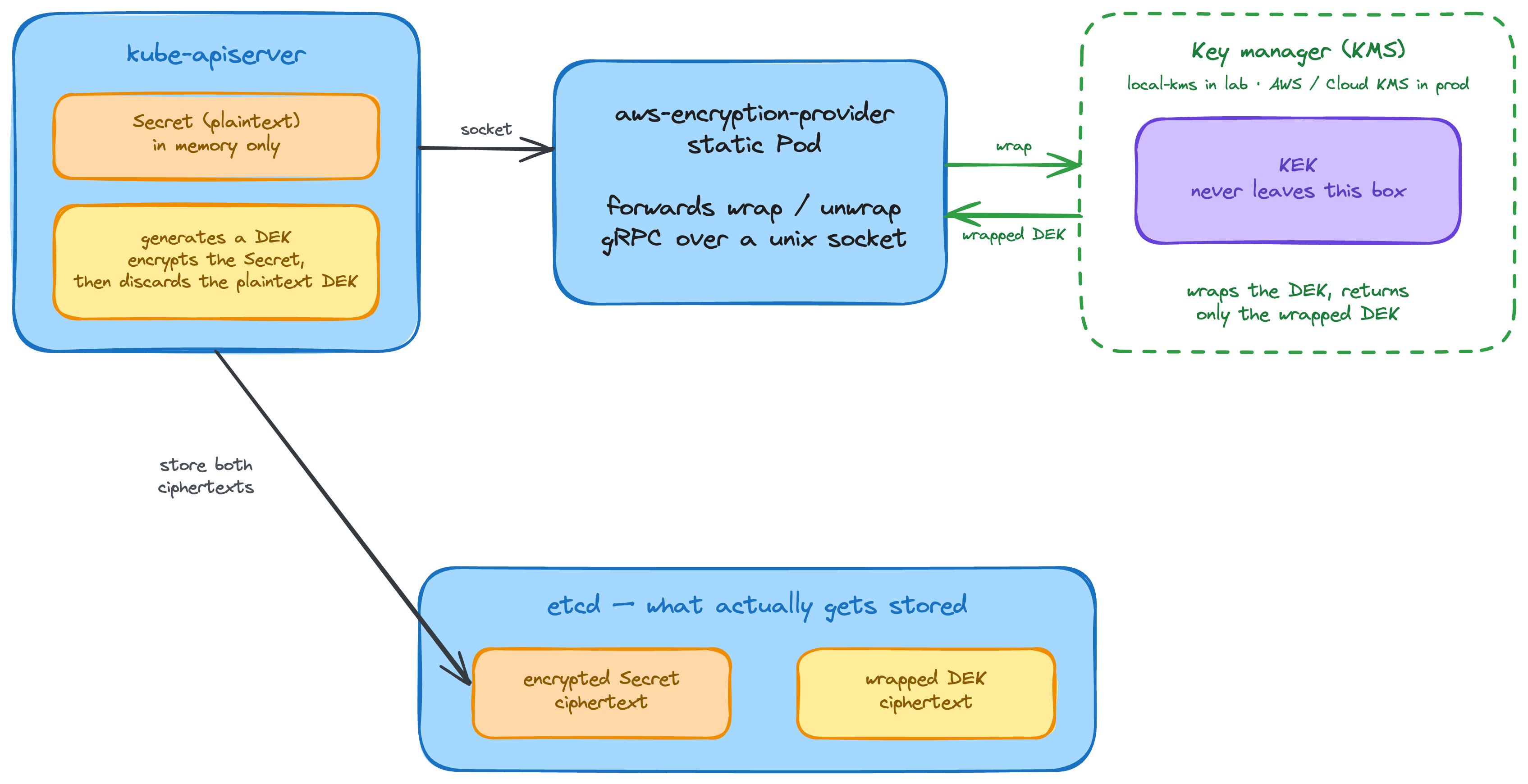
Local KMS mocks the AWS KMS API and performs real AES operations. It is not AWS KMS or a Kubernetes KMS plugin. The diagram shows the full model, but this exercise only runs the AWS CLI-to-KMS key-wrapping part. Kubernetes is still using aescbc from Part 3.1.
Warning: This is a local demonstration. Use only the dummy values shown below. Do not enter real AWS access keys, secret keys, session tokens, or production KMS key material. Real credentials can remain in shell history, terminal logs, or lab output.
Run on the development machine. Start Local KMS and an AWS CLI Pod. The last command opens a shell in the AWS CLI Pod:
kubectl run local-kms --image=nsmithuk/local-kms --port=8080
kubectl expose pod local-kms --port=8080
kubectl run awscli --image=amazon/aws-cli --command -- sleep infinity

kubectl wait --for=condition=Ready pod/local-kms pod/awscli --timeout=120s

kubectl exec -it awscli -- env \
  AWS_ACCESS_KEY_ID=x \
  AWS_SECRET_ACCESS_KEY=x \
  AWS_DEFAULT_REGION=eu-west-2 \
  AWS_PAGER="" \
  sh
Run inside the AWS CLI Pod. Generate one data encryption key (DEK), then ask Local KMS to unwrap it:
kms() { aws kms --endpoint-url http://local-kms:8080 "$@"; }

KEK=$(kms create-key --query KeyMetadata.KeyId --output text)

DATA_KEYS=$(kms generate-data-key --key-id "$KEK" --key-spec AES_256 \
  --query '[Plaintext,CiphertextBlob]' --output text)

PLAIN_DEK=$(echo "$DATA_KEYS" | cut -f1)
WRAPPED_DEK=$(echo "$DATA_KEYS" | cut -f2)

echo "$WRAPPED_DEK" | base64 -d > /tmp/dek.bin
UNWRAPPED_DEK=$(kms decrypt \
  --ciphertext-blob fileb:///tmp/dek.bin \
  --query Plaintext --output text)

echo "plaintext : $PLAIN_DEK"
echo "wrapped   : $WRAPPED_DEK"
echo "unwrapped : $UNWRAPPED_DEK"

[ "$PLAIN_DEK" = "$UNWRAPPED_DEK" ] && \
  echo "MATCH: the wrapped DEK opens with the KEK"
The matching values prove that KMS can unwrap the stored DEK. Real Kubernetes KMS v2 talks to a host-side plugin over a Unix socket; that plugin talks to the external KMS. This mock has no AWS IAM boundary, so it demonstrates the flow but does not protect the cluster.
What the lab proved
Before encryption, grabbing etcd gave you the Secret in plaintext. After enabling the provider and rewriting the old objects, the same direct read returned ciphertext. Kubernetes RBAC still decided who could use the API, and the API still returned plaintext to an authorised client.
Encryption at rest changes what an etcd thief gets, not what an authorised API client gets. A local key protects a stolen etcd snapshot, but not a compromised control-plane host. A real external KMS moves the KEK out of the cluster, but it still cannot fix over-broad RBAC or a compromised API server. That is the boundary.
We will explore AWS KMS further in the next lab. For now, Local KMS shows the key-wrapping idea without needing an AWS account.
Further reading
- Kubernetes — Encrypting Confidential Data at Rest (provider order,
identity, and migration) - Kubernetes — Using a KMS provider for data encryption
About the Author
More tutorials you might like
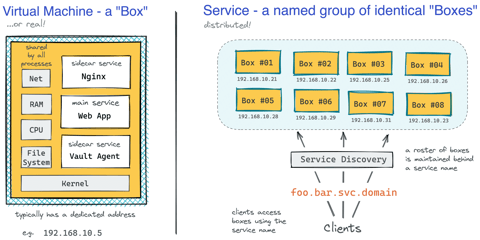
How Kubernetes Reinvented Virtual Machines - In a Good Sense
How Virtual Machines were used to deploy services. What old problems containers solve and what new problems create. How Kubernetes used containers to recreate Virtual Machines in a better way?

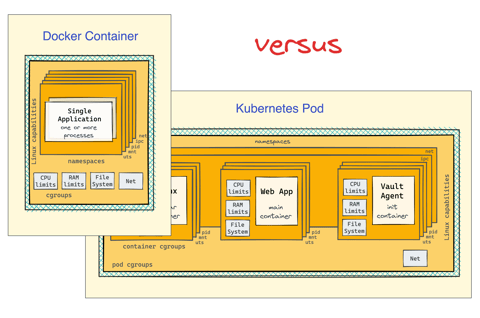
Docker Containers vs. Kubernetes Pods - Taking a Deeper Look
Can a Kubernetes Pod be created with plain Docker commands? Learn the difference between Containers and Pods by exploring how they are implemented under the hood.
Making Sense Out of Native Sidecar Containers in Kubernetes
Understand the "native" sidecar containers, learn their difference from regular and init containers and discover their advantages in this focused and highly practical tutorial.
Getting Started with VictoriaMetrics on Kubernetes
Deploy VictoriaMetrics on Kubernetes using the VM Operator, configure metrics scraping with CRDs, and query cluster metrics.

Learn by doing, not just by reading or watching
Sign up for a free account to start a VM playground right on this page, track your progress, and get notified about new learning materials.