Tutorial  on  NetworkingObservability

Accelerating Transparent Ingress Proxy with eBPF and Envoy

In the previous lab we learned what role different features—such as eBPF TC programs, SO_ORIGINAL_DST, and SO_MARK—play in transparently redirecting traffic to Envoy between the client and the server application.

That said, putting a middleman like Envoy into the network path inevitably hurts the performance.

So the real question, then, is how much of this performance tax we can realistically eliminate—if any.

In this lab, we focus on optimizing transparent redirection on the receiving pod using eBPF socket acceleration. We show how eBPF can significantly speed up communication between the Envoy proxy and the application, mitigating much of the performance overhead introduced by the proxy.

The Bottleneck

A side effect of introducing a transparent proxy like Envoy is that packets traverse the kernel networking stack twice, as well as connections being terminated, processed, and forwarded by the proxy.
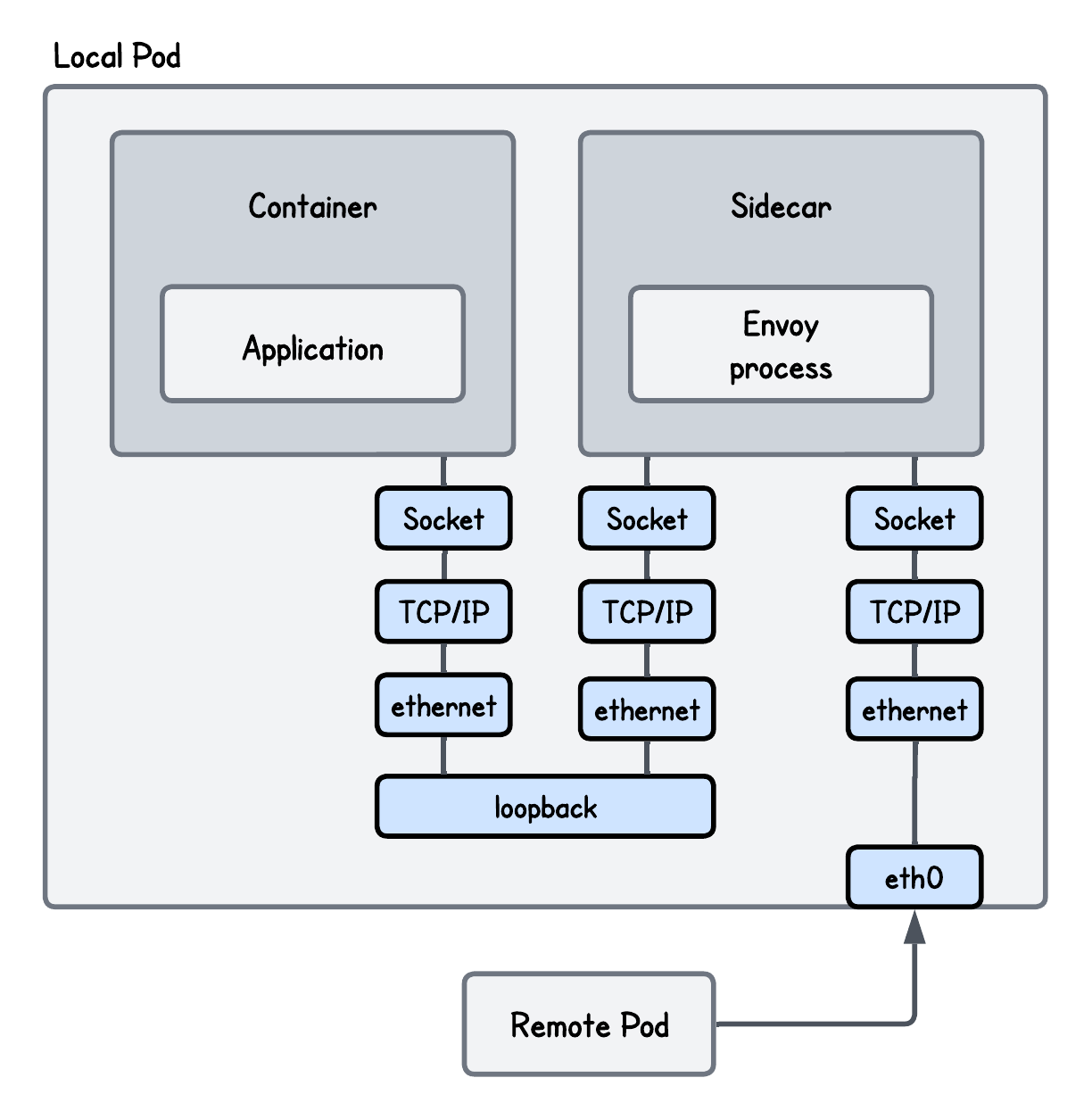
Base Setup - Network Packet Path

Let's say you don't take my word for it - here are the benchmark results performed using iperf3 and sockperf comparing the setup with and without Envoy in-between.

[object Object]

💡 Although the benchmark was run in a controlled environment, the absolute numbers are less meaningful because they depend on the specific setup; what really matters is the relative difference between the results.

So almost 20% lower network throughput and more than 2x larger network latency!

A lot of room for improvement and one way to optimize this setup is using eBPF socket acceleration.

eBPF Socket Acceleration

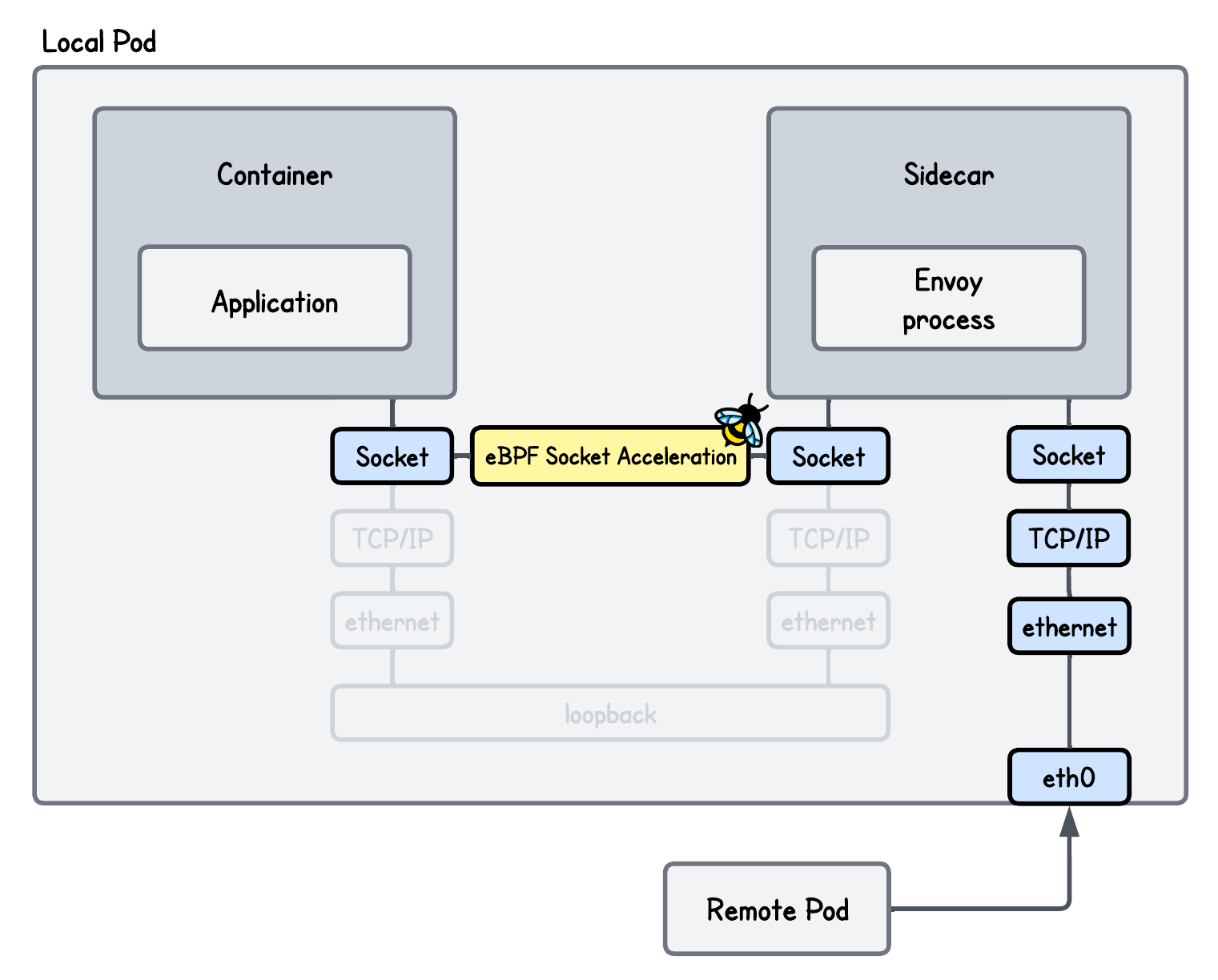
If you take any two processes communicating over the localhost like our Envoy proxy and the server (application container), for them to send data from one to another:

  • The sending process (Envoy) passes data to the TCP layer, which segments it, adds TCP headers, and may compute checksums.
  • The packets are then passed to the IP layer, where IP headers are added and the loopback interface is selected.
  • On the receiving side, the process is reversed: IP and TCP headers are removed, checksums are verified, and the data is reassembled into a byte stream.

And all of these operations consume CPU cycles and have an impact on network latency and throughput.

Many organizations, including Cloudflare and Cilium have faced this problem and addressed the overhead by introducing eBPF socket acceleration.

Setup with eBPF Socket Acceleration - Network Packet Path

This technique allows data to be copied directly from the sending socket buffer to the receiving socket buffer, from which the application can read it, avoiding traversal of the full network stack for every packet.

How does this really work internally?

Normally, a receiving socket in the Linux kernel has a receive queue called sk_receive_queue.

When packets are sent, they traverse the networking stack, and the transport layer (Layer 4) enqueues them into this queue as sk_buff structures, which contains the packet payload along with associated metadata, such as protocol headers.

When the application reads from this queue, the kernel processes these sk_buff structures and converts them into a message that is delivered to the application.

But when using eBPF socket acceleration to redirect data between sockets, instead of sending the data through the networking stack and converting a message into packets and then back into a message again, data is handled as message objects (sk_msg) and placed DIRECTLY into a separate queue (ingress_msg) that the target application can read from.

Here's an illustration to help you understand this better.

eBPF Socket Acceleration Internals

eBPF Implementation Breakdown

To utilize eBPF socket acceleration in our setup, we must address two questions:

  • How do we identify and store references to the specific pair of sockets that should exchange data?
  • How do we move data directly between these socket buffers to bypass the overhead of the standard TCP/IP networking stack?

Both are hard to answer if you don't know a bit of kernel networking internals, so let’s take it slow.

Every TCP socket on the system transitions through several states (e.g., SYN_SENT, SYN_RECV, ESTABLISHED) during its lifecycle. When a connection is established, sockets on both ends can send and receive data.

TCP Connection States

The important part here is that, if we want to implement a feature that accelerates the communication, the best moment to “grab” a reference to the socket is just when the connection is established, since:

  • If we store the references to sockets too early, the connection may fail or close immediately due to a handshake error, leading to wasted processing.
  • If we hook the socket after data has already begun to flow, the initial packets will have already traversed the slow path (the full networking stack), resulting in a "partial acceleration".

So how can we capture this moment in the kernel?

To get a hand on the sockets at these "lifecycle moments", we use an eBPF sockops program type:

lab/ebpf/tproxy.c
// Declate an eBPF Socket map to store references to sockets
struct {
    __uint(type, BPF_MAP_TYPE_SOCKHASH);
    __uint(max_entries, 65535);
    __type(key, struct port_pair);
    __type(value, __u64);
} sock_map SEC(".maps");

SEC("sockops")
int sockops_prog(struct bpf_sock_ops *ctx) {
  ...
  // Key under which to socket will be stored 
  // Since we are only accelerating connections through the localhost
  // it is sufficient to only use destination and source port
    struct port_pair key = {
        .dport = ctx->remote_port,
        .sport = bpf_htonl(ctx->local_port),
    };

    switch (ctx->op) {
        // An active socket is connecting to a remote active socket using connect()
        case BPF_SOCK_OPS_ACTIVE_ESTABLISHED_CB:
        // A passive socket is not connected, but rather awaits an incoming connection,
        // which will spawn a new active socket once a connection is established using listen() and accept()
        case BPF_SOCK_OPS_PASSIVE_ESTABLISHED_CB:
            // Store the reference to the socket of our interest into the socket eBPF map
            bpf_sock_hash_update(ctx, &sock_map, &key, BPF_NOEXIST);
            break;
    }

    return 1;
}
More information about the eBPF Sockops Program Type

💡 This eBPF program is triggered whenever certain operations occur on sockets (in a given cgroup to which it is attached)—such as:

  • Connection establishment (active and passive)
  • Retransmissions and timeout-related events
  • State transitions in the TCP state machine (e.g., SYN, ESTABLISHED, CLOSE)
  • Changes to socket parameters (e.g., congestion control or window updates)

Documentation for all these different events for which this program is triggered can be found here.

More information about the eBPF Socket Map(s)

There are actually two types of eBPF maps that can hold references to sockets: BPF_MAP_TYPE_SOCKMAP and BPF_MAP_TYPE_SOCKHASH.

Both are specialized eBPF map types designed to store references to kernel sockets, but they differ in how sockets are indexed and looked up:

FeatureBPF_MAP_TYPE_SOCKMAPBPF_MAP_TYPE_SOCKHASH
Key TypeFixed 4-byte integer (u32) representing an array indexArbitrary/custom key (e.g., 5-tuple, port pair, socket cookie)
Lookup MethodIndex lookupHash-based lookup
PerformanceTrue O(1): no hashing overheadAmortized O(1): requires hashing
FlexibilityLow: users must manually track which index maps to which socketHigh: sockets can be looked up by arbitrary combination of variables
Helper Functionsbpf_sk_redirect_map, bpf_msg_redirect_map, bpf_sock_map_updatebpf_sk_redirect_hash, bpf_msg_redirect_hash, bpf_sock_hash_update
Typical Use CaseSmall, static socket sets (e.g., simple load balancers)Dynamic environments with many connections (e.g., service meshes)

In practice, choosing between the two comes down to a trade-off between raw performance and operational flexibility:

  • BPF_MAP_TYPE_SOCKMAP is slightly faster, but requires you to manually manage and track socket indices.
  • BPF_MAP_TYPE_SOCKHASH is slower due to hashing, but allows sockets to be addressed using meaningful keys such as 5-tuple.

One important detail is that both map types hold soft references to sockets. This means the map entries do not keep sockets alive: when a socket is closed on the system, the corresponding entry in the map is not useful anymore.

Attaching the Sockops program to a cgroup where our Envoy proxy and the Application container are, we can easily deduct when the sockets of the two establish a connection (by reading the ctx->op field).

Whenever such events occur, we store references to the sockets into the eBPF socket map (sock_map).

Okay, so now that we know how to hold socket references in our eBPF program, but how can we accelerate communication and directly copy data between them?

To our advantage, there's an eBPF Socket Message program type which is triggered for every sendmsg or sendfile syscall - called when the socket is trying to send data to a target socket.

lab/ebpf/tproxy.c
SEC("sk_msg")
int sk_msg_prog(struct sk_msg_md *msg) {
  ...
    // Build a key using a destination and source port
    struct port_pair key = {
        .dport = bpf_htonl(msg->local_port), 
        .sport = msg->remote_port,
    };

    // Redirect the message to the socket directly
    // Returns:
    // - 1 => SK_PASS on success, or 
    // - 0 => SK_DROP on error
    return bpf_msg_redirect_hash(msg, &sock_map, &key, BPF_F_INGRESS);
}
More information about the eBPF Socket Message program

The eBPF Socket Message program type is commonly used together with helper functions such as bpf_msg_redirect_hash to accelerate communication between sockets. At the same time, its return value can be used to enforce policies:

  • Returning SK_PASS (1) allows the message to proceed, optionally after being redirected to another socket.
  • Returning SK_DROP (0) drops the message and can be used to enforce policies, such as restricting which sockets are allowed to communicate with each other.

In our case, we take a small shortcut and simply return the value of bpf_msg_redirect_hash. Alternatively, it might be better to just return SK_PASS. Meaning even if the message cannot be accelerated, it would still be delivered to its destination via the regular kernel networking stack.

Whenever this program triggers, we identify the socket by source and destination port and trigger the bpf_msg_redirect_hash helper function that does all the hardwork for us to directly copy data to the target socket receive buffer as provided to this function.

More information about the `bpf_msg_redirect_hash` helper function

The bpf_msg_redirect_hash helper function accepts four parameters:

  • a pointer to the struct sk_msg_md,
  • the BPF_MAP_TYPE_SOCKHASH eBPF map,
  • a key identifying the destination socket in the eBPF map, and
  • and either:
    • BPF_F_INGRESS flag that redirects data into the destination socket's receive queue
    • BPF_F_EGRESS flag that pushes data directly into the destination socket's transmit queue

Now we understand all the pieces of the puzzle, let's see it in action.

Running the Accelerated Transparent Ingress Proxy

This simple playground has two machines on two different networks:

  • client in network 10.0.0.20/16
  • server in network 192.168.178.10/24
  • gateway between networks 192.168.178.2/24 and 10.0.0.2/16
Accelerated Transparent Ingress Proxy Playground

💡 While we focused above on how this concept fits into a Kubernetes cluster to avoid adding complexity, it’s equally valid to think of Pods as nodes and containers as processes in this playground.

First, start an HTTP server on the server node (server tab):

python3 -m http.server

Open the second server tab and run an Envoy proxy (under lab directory):

sudo envoy -c envoy.yaml

Then, open another server tab and under lab directory, build and run our transparent proxy setup:

go generate
go build
sudo ./tproxy -i eth0 -ports 8000

Lastly, query the server from the client node (client tab) using:

curl http://192.168.178.10:8000

To verify the redirection actually worked, check the Envoy logs (server tab) and see that the request was indeed accelerated.

{"route_name":null,"host_header":"192.168.178.10:8000","protocol":"HTTP/1.1","response_flags":"-","path":"/","method":"GET","request_id":"0272d0f1-0e7c-4bcb-aff9-57ae9986567a","response_code":200,"duration_ms":2,"upstream_host":"127.0.0.1:8000","virtual_cluster":null,"downstream_remote":"10.0.0.20:47998","start_time":"2026-04-04T20:58:03.433Z","upstream_cluster":"original-dst"}

One nice thing about this setup is that it functions completely in-parallel with our previous setup, so NO additional changes are actually required to our tc and cgroup/getsockopt eBPF program that we covered in the previous lab.

But now, while theoretically this should speed up things, let's validate this with numbers to be absolutely sure.

Performance Evaluation

Using iperf3 to measure throughput we get the following results:

[object Object]
MetricBaseEnvoy Proxy OnlyEnvoy Proxy + eBPF
Average Throughput11.3 Gbits/sec9.10 Gbits/sec17.3 Gbits/sec
Cwnd402 KBytes5.05 MBytes3.62 MBytes
Peak Interval Bitrate11.8 Gbits/sec9.79 Gbits/sec17.8 Gbits/sec
Lowest Interval Bitrate11.2 Gbits/sec8.58 Gbits/sec17.1 Gbits/sec

While it makes a lot of sense that the setup with eBPF Socket Acceleration has a higher throughput than the one without, it's also higher than the base setup (client to server directly). Weird, right?

In short, Envoy is able to drain the received data from the client much faster. Consequently, Linux TCP autotuning expands the receive buffer (rcv_space), increasing the advertised Receive Window (RWIN).

A larger advertised receive window permits the client to keep significantly more data in-flight without stalling for acknowledgments (TCP ACKs), which in turn increases the TCP send window (SWIN) and overall throughput.

Although the iperf3 server processes received data at roughly the same rate as in the base setup, the lower latency between Envoy and the application—achieved via eBPF socket acceleration—helps offset this, enabling more efficient data flow.

In contrast, slower data consumption in base setup (iperf3 receive side) causes a backlog of unread data to build up (Recv-Q); the kernel interprets this as an application bottleneck and restricts buffer growth, clamping the advertised window and throttling the sender.

Lower Latency, Higher Throughput
Longer and a lot more detailed explanation

In order to understand why the setup with eBPF socket acceleration has a higher throughput than the base setup. we need a brief summary of different TCP Windows types. Namely:

  • Receive Window (RWIN) is the amount of data the receiver is willing to accept at a given moment advertised by the receiver to the sender and prevents the sender from overwhelming the receiver. In other words, it reflects how quickly the receiving application can drain data from the socket.
  • Congestion Window (CWND) limits how much data the sender can inject into the network which was implemented to avoid overrunning some routers in the middle of the network path.
  • Send Window (SWIN) is the amount of data the sender is allowed to send right now derived from min(RWIN, CWND).

Meaning the maximum achievable throughput is SWIN / RTT.

💡 While Congestion Window (CWND) plays a role in this, I'm leaving it out for simplicity.

In my test environment, the RTT (round-trip time) is stable, so differences in throughput are primarily driven by how fast the client can send data and how fast the server can receive and consume it.

These factors then directly influence the advertised receive window (RWIN) and, as a result, the effective send window (SWIN).

Why is this so important to understand?

By default, iperf3 attempts to maximize throughput by continuously sending and receiving data.

And with smaller data payloads, the client must issue more send-related syscalls (write()/send()) and the server more receive-related syscalls (read()/recv()) to transfer the same amount of data, increasing syscall overhead.

Each of these syscalls requires a transition from user space to kernel space and the execution of networking and TCP stack code, consuming CPU cycles for every chunk processed.

In CPU-bound scenarios, an excessive syscall rate can limit how quickly data is sent and how effectively the receiver can drain its socket buffer. If the receive buffer is not drained fast enough, the advertised TCP receive window shrinks, throttling the sender and reducing the maximum achievable throughput.

💡 For simplicity, I’m omitting details like kernel buffering, offloads, and optional iperf3 settings (e.g., zero-copy), which can significantly affect behavior. The goal of this benchmark is to show how to implement the redirection itself, not to optimize application-specific tuning, which can vary widely across use cases.

We can test different payload sizes and validate how syscall overhead diminishes with larger payload sizes and the network bottleck becomes the primary factor of the network throughput:

Network Throughput by Payload Size
Payload SizeBase SetupEnvoy OnlyEnvoy + eBPF Socket Acceleration
64 B320 Mbps324 Mbps424 Mbps
1448 B1.22 Gbps1.67 Gbps1.61 Gbps
16 KB6.30 Gbps9.3 Gbps11.2 Gbps
64 KB9.15 Gbps10.1 Gbps15.0 Gbps
1 MB14.6 Gbps12.8 Gbps18.1 Gbps

But this still doesn't explain why the setup with eBPF socket acceleration (or even Envoy Proxy without acceleration for certain payload sizes) has a higher throughput than the base setup, because the larger the packets, the higher the throughput all setups have.

The reason for this is that Envoy acts as an aggressive "vacuum," draining received data much faster than the iperf3 server-side in the base setup, which results in Envoy advertising a much larger TCP receive window (RWIN) and consequently a much larger TCP send window (SWIN).

We can confirm this using the ss (Socket Statistics) CLI (snapshot while the benchmark is running):

MetricBaseEnvoy + eBPF Socket AccelerationTechnical Impact
Recv-Q65,160~0Envoy drains the buffer instantly; Base setup leaves data sitting.
rcv_space262,1442,229,188The Envoy + eBPF Socket Acceleration has 10x more receive buffer room.
snd_wnd (SWIN)64,2566,152,064100x increase in the amount of data the peer can send per RTT.

The output of ss does not directly expose the advertised TCP receive window (RWIN). Instead, it provides related signals that allow us to reason about it. In particular:

  • Recv-Q shows how much data is currently queued in the socket receive buffer.
  • rcv_space is a dynamically adjusted autotuning target representing how much receive buffer space the kernel believes is necessary to fully utilize the connection, based on the application’s observed consumption rate.

Meaning, a low Recv-Q together with a high rcv_space suggests that a large portion of the receive buffer is available, allowing the kernel to advertise a larger window to the sender.

But shouldn’t the Envoy → iperf3 connection ("second leg") throughput still be throttled, as in the Base (or Envoy Proxy only) setup?

Not really, because we have changed how the server receives that data from Envoy - using eBPF socket acceleration.

The extra work performed by the networking stack in the non-accelerated case directly adds latency. And for a given TCP window size, higher latency reduces the maximum achievable throughput.

We can confirm this by comparing latency (with and without eBPF socket acceleration) just between two processes using sockperf (avoiding the complexity of our setup):

[object Object]
MetricLocalhost (Process → Process)eBPF Socket Acceleration
Avg Latency (µs)14.78910.015
Std Dev (µs)2.8052.083
Observations321,827475,190
Min Latency (µs)8.9195.289
25th Percentile (µs)12.1158.975
50th Percentile (µs)15.1799.304
75th Percentile (µs)15.2749.399
90th Percentile (µs)18.35913.584
99th Percentile (µs)21.99418.364
99.9th Percentile (µs)25.73420.159
99.99th Percentile (µs)38.53927.724
99.999th Percentile (µs)61.16448.784
Max Latency (µs)69.44489.719

Based on this results, we can see that the average network latency (in the "second leg" between Envoy and the application) is ~32% lower in the case of eBPF socket acceleration, which increases the amount of data that can be transferred for a given TCP window size.


While we have validated the throughput is in fact "the best" when using Envoy with eBPF socket acceleration (in this benchmark setup), could we say the same for the latency?

Using sockperf we get the following results:

Network Latency Comparison
MetricBaseEnvoy Proxy OnlyEnvoy Proxy + eBPF
Avg Latency (µs)22.72047.44940.134
Std Dev (µs)1.1892.8205.073
Observations209,562100,476118,784
Min Latency (µs)14.97938.97423.719
25th Percentile (µs)22.37946.80436.639
50th Percentile (µs)22.47447.06439.259
75th Percentile (µs)22.63947.68441.759
90th Percentile (µs)23.00450.58446.934
99th Percentile (µs)26.69953.79452.359
99.9th Percentile (µs)29.61961.90463.114
99.99th Percentile (µs)72.684123.479115.604
99.999th Percentile (µs)81.509181.849130.653
Max Latency (µs)143.303210.904132.144

These results make sense: adding a middleman like Envoy nearly doubles latency compared to the baseline, while eBPF socket acceleration recovers part of that overhead—though not completely.

Now, one might wonder how it is possible for the Envoy + eBPF Socket Acceleration setup to achieve higher throughput than the Base setup despite having higher end-to-end latency?

While these two metrics are indirectly related, the primary driver here is the TCP window size, as dictated by the formula: Throughput ≈ SWIN / RTT.

In the Envoy + eBPF socket acceleration setup, we observe:

  • Client to Envoy: There is higher latency, but Envoy acts as an aggressive "vacuum," draining the receive buffer instantly. This allows the kernel to advertise a massive TCP receive window, more than compensating for the latency.
  • Envoy to Server: There is lower throughput because the iperf3 server consumes data more slowly (advertising a smaller RWIN), but compensated by a much lower latency due to the eBPF socket acceleration.

By contrast, the Base setup suffers from the worst of both worlds: it experiences the higher latency of the standard network path without the benefit of the massive window sizes seen in the eBPF socket accelerated setup.

Congrats, you've came to the end of this lab 🥳