Skill Path (EasyMedium)

Master SSH Tunnels: Local and Remote Port Forwarding

Learn how to reach an internal port on a remote machine from the local system, jump through a bastion into a private VPC, expose a development server to the Internet through a reverse tunnel, publish a home network device, and spin up a full-fledged SOCKS proxy with nothing but a regular SSH connection.

Introduction

SSH tunnels are extremely handy when you need to reach services across network boundaries without changing firewall rules, opening public ports, or installing extra proxy software.

With nothing but the standard ssh client, you can reach a port bound to localhost on a remote machine, jump through a bastion into a private VPC, expose a service running on your laptop to the outside world, or turn one SSH connection into a proxy for an entire network.

However, there are different types and flavors of SSH tunnels, and picking the right one for the job and constructing the required ssh command can be challenging. Local (ssh -L) and remote (ssh -R) tunnels look deceptively similar, but they open listening ports on opposite sides of the SSH connection. Static and dynamic tunnels come with different sets of tradeoffs. Bastions and jump hosts add another layer of indirection.

The good news is that once you understand where the listening socket is created, where the target service lives, and which side initiates the connection, the flags stop being magic. This skill path is designed to build that understanding through practice.
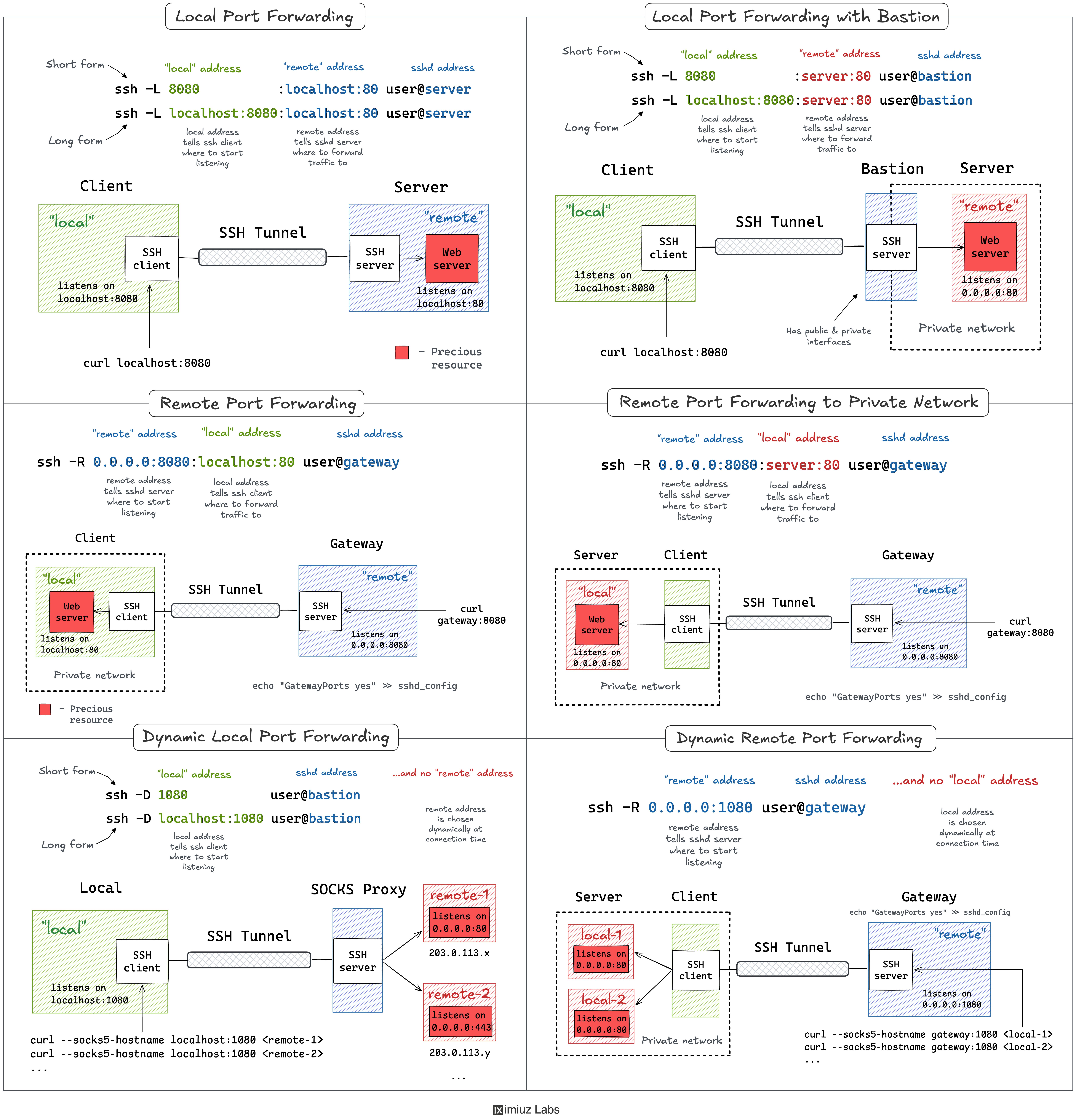
SSH Port Forwarding Cheat Sheet: local and remote port forwarding, with and without a bastion.

The skill path opens with a comprehensive tutorial and then moves through six hands-on challenges, each running in a real multi-host network topology:

  1. Reach an internal debug port on a remote VM with local port forwarding.
  2. Query a private VPC service through an SSH bastion host.
  3. Expose a local service to the Internet through a reverse tunnel.
  4. Publish a home network device on a public gateway with your workstation as a jump host.
  5. Reach a whole VPC through a single SSH SOCKS proxy (dynamic local forwarding).
  6. Expose a whole home network through a reverse SOCKS proxy (dynamic remote forwarding).

By the end of this skill path, you'll be able to look at a network topology, decide whether you need a local or remote tunnel, choose between static and dynamic forwarding, and build the SSH command that reaches or exposes the service on the correct side of the firewall.

Prerequisites

  • Linux command-line knowledge
  • Basic familiarity with ssh (connecting to a host, key-based authentication)
  • A rough idea of TCP ports and the localhost vs. external-interface distinction

A Practical Guide to SSH Tunnels

Loading tutorial...

This tutorial explains SSH port forwarding in a clean and visual way, and it comes with a cheat sheet that you'll want to keep open while solving the challenges.

It starts with local port forwarding - the -L flag - for reaching a port that is only accessible from the remote machine, and then moves on to remote port forwarding - the -R flag - for exposing a local service through a remote host. Along the way it shows which sshd settings (GatewayPorts, AllowTcpForwarding) may need adjusting, and offers a simple mental model for remembering which port goes on which side.

If you prefer learning by doing, you can jump straight into the challenges and come back to the relevant section of this tutorial whenever a flag or a direction doesn't add up.

Access an Internal Debug Port Through an SSH Tunnel

The most common type of SSH tunnels is also the simplest one to start with. Here is a typical problem.

A remote machine runs a service that is deliberately bound to 127.0.0.1 - a debugging endpoint, an admin panel, a database - so that it can't be reached from the outside. However, you want to access this port using local tools (e.g., your browser or a GUI client). Luckily, if you can SSH into this machine, you can make this port accessible locally through a tunnel.

An application running on a remote VM with a debugging port opened on its localhost.

In this challenge, a remote VM serves an app on port 80 and keeps an internal debugging port bound to 127.0.0.1. Your task is to reach that debugging port from your workstation using SSH local port forwarding, without opening it on the VM's external interface.

Reach a Private VPC Service Through an SSH Bastion

In the previous challenge, the target port was listening on the same machine you SSH into. Real production setups are rarely that convenient: the database or internal API you need usually sits deep inside a private VPC, reachable only from a public-facing bastion (jump) host that you are allowed to log into.

A private OpenSearch cluster inside a VPC, unreachable from a workstation that has no route into the VPC.

This challenge builds on the previous one: a production search cluster lives inside a private VPC and is reachable only from within it. Your task is to use SSH local port forwarding through the public-facing bastion host to query the cluster's API from your dev machine, with the tunnel terminating on a host the bastion can see but you can't.

Expose a Local Service Through an SSH Reverse Tunnel

So far, we used tunnels to make a remote port accessible from the local machine. Remote port forwarding does the opposite: it takes a service running on your own machine and publishes it on a remote host - the trick you reach for when something needs to receive inbound traffic but you can't expose it directly.

A loopback-bound webhook receiver on a workstation that the payment provider cannot reach from the Internet.

In this challenge, a payment webhook receiver runs as a local build on your development machine, bound to 127.0.0.1 and invisible from the Internet. Your task is to use SSH remote port forwarding to publish it on a public-facing gateway VM so that a payment provider can send a test request to it.

Expose a Home Network Device Through an SSH Reverse Tunnel

The previous challenge exposed a service running on the same machine that opened the tunnel. But the device you want to reach can also be somewhere else on a network with no inbound route - a homelab box, a NAS, a Raspberry Pi behind a home router - and your workstation is the only host that can talk to both it and the public gateway.

A status dashboard on an isolated home-network device that the Internet cannot reach, with the workstation as the only machine on the LAN.

In this challenge, a status dashboard runs on an isolated device in your home network, with no inbound route from the Internet. Your task is to use SSH remote port forwarding with your workstation as a jump host to publish the dashboard on a public-facing gateway VM, forwarding to the device's address rather than to localhost.

Reach a Whole VPC Through an SSH SOCKS Proxy

A plain -L tunnel forwards one local port to one fixed destination. That gets tedious when you need to reach a dozen internal services, each on its own host and port. Dynamic port forwarding solves this: instead of a fixed target, SSH turns your local port into a SOCKS proxy, and the remote side decides where each connection goes.

Several internal microservices inside a VPC, each reachable only from within it, with the workstation having no route into the VPC.

In this challenge, several internal microservices live inside a private VPC and are reachable only from within it. Your task is to use SSH dynamic local port forwarding to turn your dev machine into a single SOCKS proxy that reaches all of them through one bastion host - no per-service tunnel, just one connection and a proxy-aware client.

Expose a Whole Home Network Through an SSH Reverse SOCKS Proxy

The final challenge combines the two ideas from the rest of the path: the reverse direction of a remote tunnel and the one-proxy-for-everything convenience of dynamic forwarding. The result is a SOCKS proxy that lives on a public host but routes connections back into a network it could never reach on its own.

Several self-hosted services on isolated home-network devices, unreachable from the Internet, with the workstation as the only machine on the LAN.

In this capstone challenge, several self-hosted services run on isolated devices in your home network, with no inbound route from the Internet. Your task is to use SSH dynamic remote port forwarding to turn a public-facing gateway VM into a single SOCKS proxy that reaches all of them - so anyone with access to the gateway's proxy port can talk to your whole home network through one tunnel.