Skill Path (EasyMedium)

Docker 101: Pull and Push Container Images

Introduction

This skill path covers the everyday workflows that revolve around the docker pull and docker push commands, plus the less obvious cases you'll inevitably run into: immutable digest references, foreign platforms, private registries with multiple credentials, offline servers, and multi-platform images. You'll learn how to:

  • Pull container images from Docker Hub, GitHub Container Registry, and other registries
  • Pin an image with an immutable digest instead of a mutable tag
  • Pull images built for a CPU architecture different from the host's
  • Inspect a remote image without pulling its filesystem layers
  • Tag local images with fully-qualified references and publish them to multiple registries
  • Authenticate to private registries with docker login and manage credentials side-by-side
  • Mirror a container image from one repository to another with a pull + tag + push chain
  • Transfer container images to a server that has no Internet access using docker save and docker load
  • Assemble and publish a multi-platform image from two independent single-platform variants

By the end of this skill path, you'll be comfortable moving container images between any two registries - public or private, online or air-gapped, single- or multi-platform.
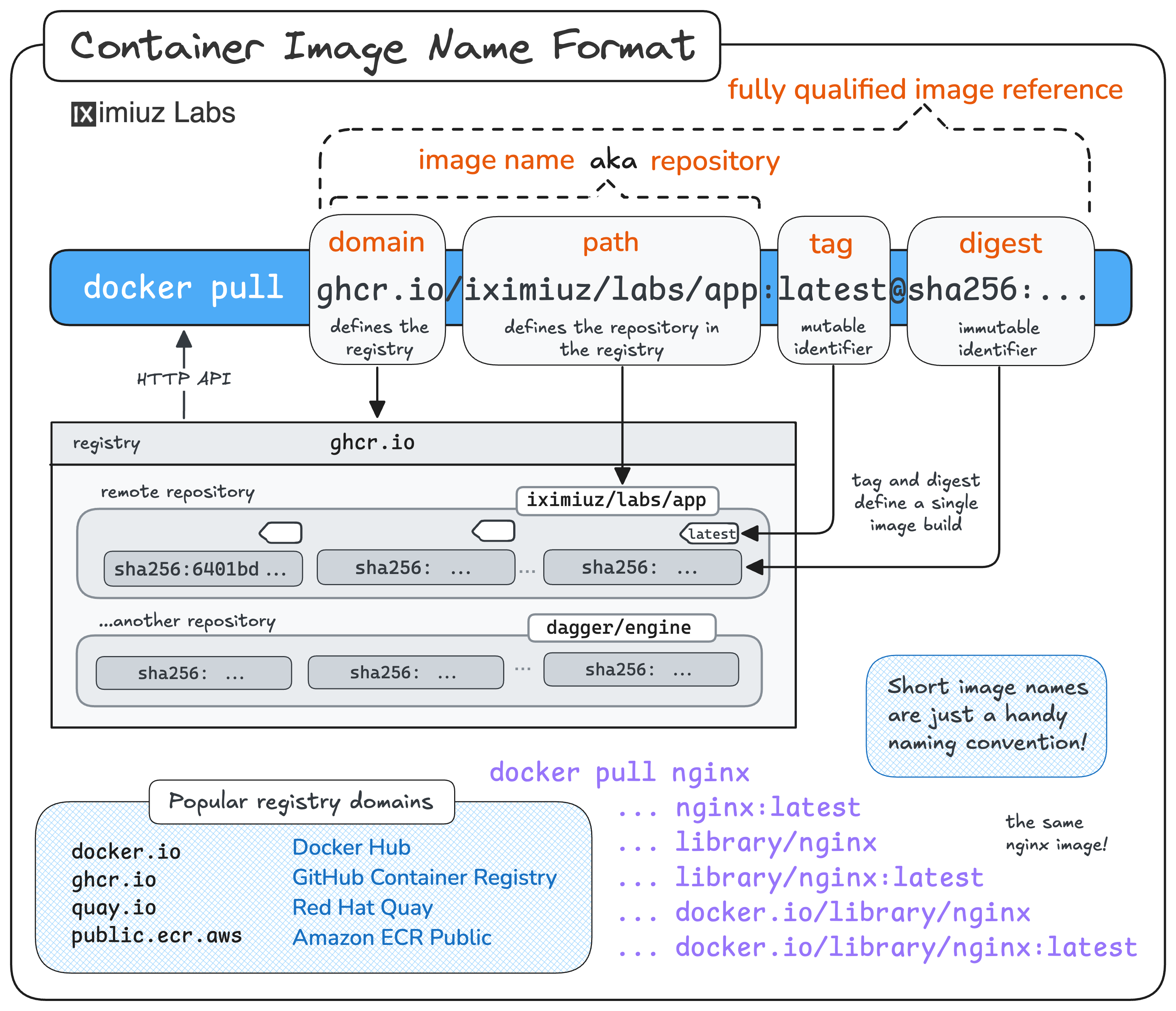
Container image name format: registry domain, repository path, tag, and digest.

Prerequisites

Pull Container Images from Different Registries

Most container images live in a repository inside some registry, and the image reference you type into docker pull tells Docker exactly where to look. Once you understand how the image name maps to a registry, repository, and tag, pulling from Docker Hub, GitHub Container Registry, or any other registry becomes a simple one-command task.

In this challenge, you'll pull several images from different registries and see how the image name determines the source registry, repository, and tag:

Pull a Container Image by Digest

Tags are mutable - the image behind nginx:latest today may be different tomorrow. For reproducible deployments, security-sensitive workloads, or production rollouts, you want an immutable reference instead. That's exactly what an image digest gives you: a content-addressable hash that always points to the same bytes.

In this challenge, you'll practice pulling a container image by its sha256 digest instead of a tag, and see how Docker handles digest-based references:

How Container Images Actually Work

Loading tutorial...

Pulling and pushing images becomes much less mysterious once you know what's actually traveling over the wire. This tutorial takes a deep dive into the OCI image format - filesystem layers, image configuration, image manifest, and image index - and explains how docker pull and docker push use registry APIs to fetch and store these pieces. You'll also learn why an image can have multiple digests across registries while its ID stays the same, and how multi-platform images glue several single-platform variants together under one tag.

Pull a Container Image for a Specific Platform

Many popular images on Docker Hub are multi-platform: a single tag like nginx:latest hides several variants under the hood, one per CPU architecture. By default, Docker picks the variant that matches your host - but sometimes you need a different one. For example, you might want to pull an arm64 image on an amd64 machine to inspect it, to test cross-platform behavior, or to prepare it for transfer to an ARM-based server.

In this challenge, you'll use the --platform flag to pull a non-native variant of a multi-platform image and see how Docker stores and runs it:

Inspect a Container Image Without Pulling It

Sometimes you want to know what's inside a remote image - which platforms it supports, which layers it has, what command it runs by default - without actually downloading the filesystem. This is where the registry API and tools like docker buildx imagetools inspect come in: you can fetch just the OCI image index, manifests, and config blobs from the registry and answer most questions about an image without touching a single layer.

An OCI Image Index points to multiple OCI Image Manifests (one per platform), and each manifest points to its config blob and layer blobs.

In this challenge, you'll explore a multi-platform image entirely over the registry API, without ever pulling its layers into the local Docker daemon:

Tag and Push Container Images to Registries

Building an image locally is only half the job - to share it with anyone (or any server) else, you need to push it to a registry. And before you can push, the image must be tagged with a fully-qualified reference that includes the target registry, the repository path, and the tag.

In this challenge, you'll re-tag a local image with different fully-qualified references and publish it to several registries:

Authenticate to Private Container Registries

Public registries are convenient, but most real-world container images live behind authentication: company-internal registries, paid plans on Docker Hub or GHCR, or self-hosted registries serving private repositories. Before you can pull from or push to any of these, you need to authenticate with docker login.

In this challenge, you'll log in to multiple private registries with different credentials, inspect how Docker stores those credentials, and pull and push images across all of them:

Copy a Container Image Between Repositories with Docker

Mirroring an image from one repository to another is one of the most common DevOps chores - think of caching public images in a company-internal registry, dodging Docker Hub's rate limits, or moving images between team accounts. With nothing more than the classic docker pull + docker tag + docker push combo, you can already handle the simple single-platform, single-tag case.

In this challenge, you'll practice copying a container image from one repository to another using only the docker CLI:

Transfer Container Images to an Air-Gapped Environment

Not every host can reach a container registry. Restricted production networks, on-premise customer environments, and security-sensitive systems often have no route to the Internet - yet they still need to run containers. For these cases, Docker offers a registry-free alternative: package an image into a portable tar archive on one host and load it into the daemon on another.

An air-gapped Docker host with no Internet access receives container images via tar archives copied from a connected host.

In this challenge, you'll use docker save and docker load to ship images to a server that can't talk to any registry:

Assemble and Publish a Multi-Platform Container Image

A multi-platform image isn't a single artifact - it's an OCI image index that points to one image manifest per supported platform. Most of the time you'd produce one with docker build --platform linux/amd64,linux/arm64 ..., but sometimes the per-platform variants are built separately (different codebases, different Dockerfiles, or even different teams) and you need to stitch them together into a single index tag at the end.

A logical view of an OCI Image Index pointing to several OCI Image Manifests (one per platform).

In this capstone challenge, you'll combine two independently built single-platform images into one multi-platform image and push it to a registry: