Write a TCP Echo Server From Scratch

Premium Challenge
Upgrade your membership to unlock this and all other premium materials.
A TCP echo server is the "hello, world" of network programming: it accepts a
connection, reads whatever bytes the client sends, and writes those exact same
bytes back. Even though it may sound trivial, building one touches
every step of the sockets workflow -
creating a socket, bind()-ing it to a port, marking it as
listen()-ing, accept()-ing connections, and recv()-ing and send()-ing bytes from/to the client.
In this challenge, you'll implement such a server from scratch and launch it.
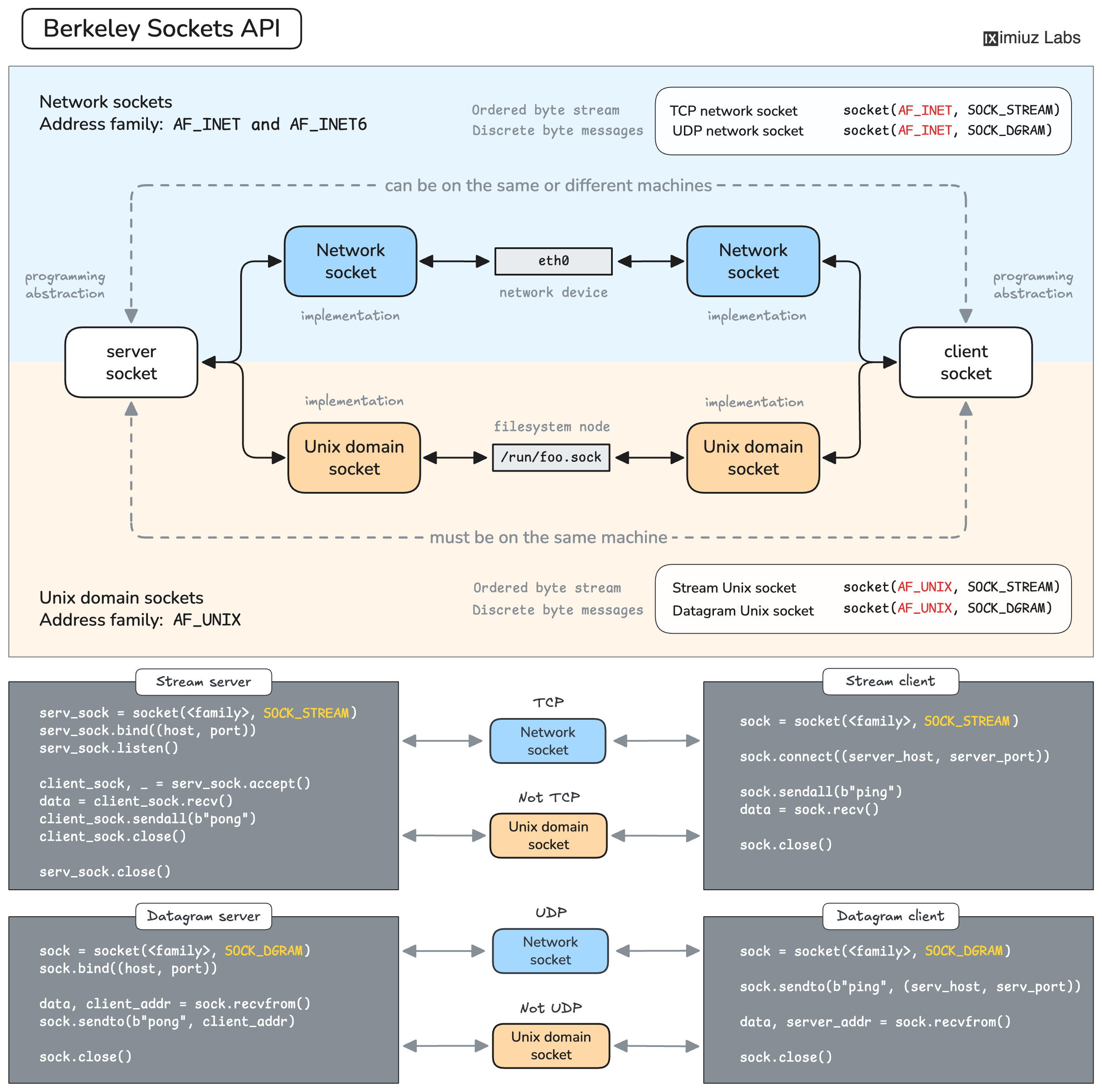
Berkeley Sockets API Cheat Sheet.
Your task is to write a TCP echo server and launch it so that it:
- Listens on
127.0.0.1:4000(or0.0.0.0:4000). - Echoes back every byte it receives from a client. A client connects, sends some bytes, half-closes its sending side to signal "I'm done sending", and reads the reply - the server must send back exactly the bytes it received, then close the connection.
- Appends one line to the access log at
/var/log/echo-server/access.logfor every client it finishes serving. Each line reports the total number of bytes received from that client, in this exact shape:
[client 1]: received 5 bytes
[client 2]: received 7 bytes
...
You're free to use any language to implement the server. The playground already has gcc (for C/C++), Python, Node.js, and Go installed. Prefer a different stack? You will need to install it yourself.
Concurrency is optional. A simple, one-client-at-a-time server - accept() a
connection, serve it to completion, close(), then loop back to accept() the
next one - is a perfectly valid solution. Handling multiple clients at once is
welcome but not required.
Hint 1: The socket workflow
A TCP server always goes through the same "ritual": create a socket, bind() it
to an address and port, listen(), then accept() connections in a loop. For
each accepted client, read bytes from the connection socket (requests) and send some data back (responses).
The How Servers Work: A Hands-On Introduction to TCP Sockets tutorial walks through every one of these steps in Python.
Hint 2: Reading a whole message
A single recv()/read() returns as soon as some bytes are available, which is rarely all of them for a large message.
This is why when designing an application-level protocol on top of TCP, you either need to:
- Make all messages of a fixed size
- Use a delimiter (e.g. a newline) to signal the end of a message
- Prefix each message with its length
For the sake of simplicity, in this challenge, clients half-close their sending side to signal the end of the message.
Keep recv()-ing in a loop until it returns 0 bytes / EOF,
accumulating everything you got into a buffer. Only then echo the full buffer back.