Start a systemd Service on the First Connection (TCP Socket Edition)

Premium Challenge
Upgrade your membership to unlock this and all other premium materials.
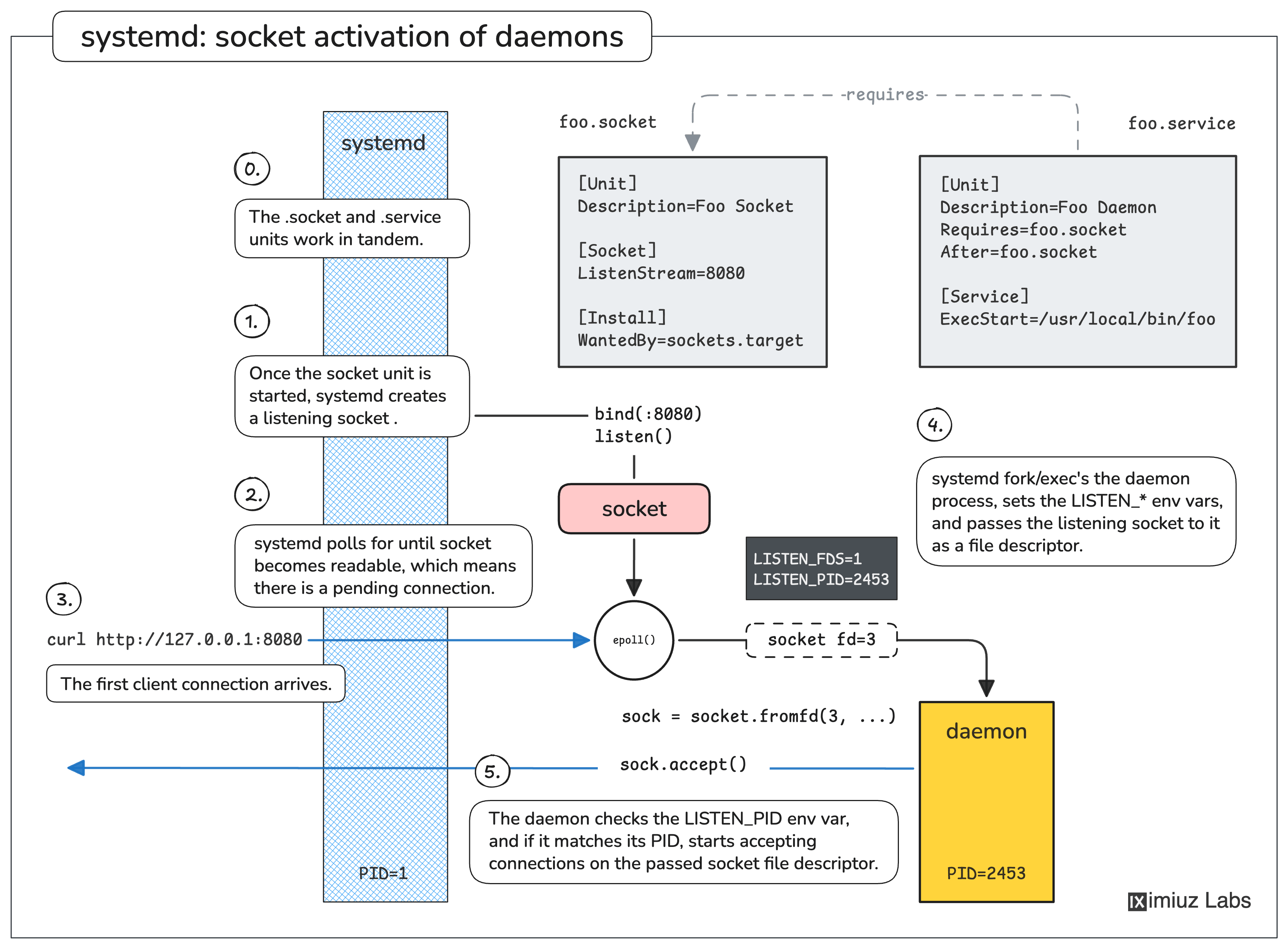
One of the key applications of systemd is to start and manage long-running background processes - daemons. Daemons are registered as systemd service units and are typically started on system boot. However, if a service is not needed immediately after boot and it exposes a TCP or Unix socket API, it can be more efficient to start such a service only when the first client connects. This technique is called socket activation.
A special socket unit tells systemd to create a listening socket and hold it open until the first client tries to connect.
Once the first connection arrives, systemd starts the service using its regular service unit and passes the listening socket to it as an inherited file descriptor.
The daemon then should be able to accept() the first and all subsequent connections using the received file descriptor as a usual server socket.
Your task
A daemon named napd has been installed at /usr/local/bin/napd. It exposes a simple HTTP API on a TCP socket.
The napd daemon supports both modes: when socket-activated, it will receive the listening socket as an inherited file descriptor;
otherwise it creates its own listening socket on TCP port 8080.
Create two systemd unit files for napd:
/etc/systemd/system/napd.socket- starts a TCP listener on port 8080 and activates the service when a connection arrives./etc/systemd/system/napd.service- a usual service unit that runs/usr/local/bin/napdas the main process.
Enable and start the socket unit (not the service directly) so that:
- Port 8080 accepts connections immediately, before the daemon starts.
napdis launched on the first incoming connection.- After a host reboot, the socket comes back automatically.
Hint: Socket and Service systemd units
To create a socket-activated service, you need two systemd unit files: the regular service unit and the additional socket unit:
Service unit:
[Unit]
Description=...

[Service]
ExecStart=...
Socket unit:
[Unit]
Description=...

[Socket]
ListenStream=<port>

[Install]
WantedBy=sockets.target
Note that the .service and .socket units share the same base name (foo in the above example).
Refer to man systemd.socket and man systemd.service for the full list of directives.
Hint: Enabling and starting the socket unit
After placing the unit files under /etc/systemd/system/, tell systemd to re-scan its unit directories.
Then enable the socket unit (not the service unit) and start it. The good news is that working with socket units is
very similar to working with service units. Check the Create a systemd Service for a Long-Running Process challenge if you need a refresher.
Check the state of the socket and the service units. Is the napd daemon currently running?
Hint: Checking the state of the socket and service units
You can use systemctl is-active napd.service to check if the napd daemon is currently running.
And since daemons are just regular processes on the host, you can also use the traditional tools
like ps or pgrep to find out if the daemon process exists.
Now check if the TCP port 8080 is currently open and listening for connections:
It's time to trigger napd by sending it the very first request:
curl http://127.0.0.1:8080/
The final test is to confirm the socket survives a host reboot. Because napd.socket is enabled
with WantedBy=sockets.target, systemd starts it early in the boot sequence before any client connects.
Reboot server-01 and wait for it to come back:
sudo reboot
Re-activate the service by sending another request:
To avoid blocking the lab, only send the curl request once a clean reboot has been detected,
and the previous task is marked as completed.
curl http://127.0.0.1:8080/