Expose a Local Service Through an SSH Reverse Tunnel

Premium Challenge
Upgrade your membership to unlock this and all other premium materials.
You're integrating Acme's checkout with a payment provider. The provider
delivers webhook callbacks to a public URL, but your webhook receiver is still
a local dev build running on your workstation,
bound to 127.0.0.1:3000. You don't want to deploy it to production just to
test a few callbacks - you'd rather receive them on your dev machine, where you can debug things easily.
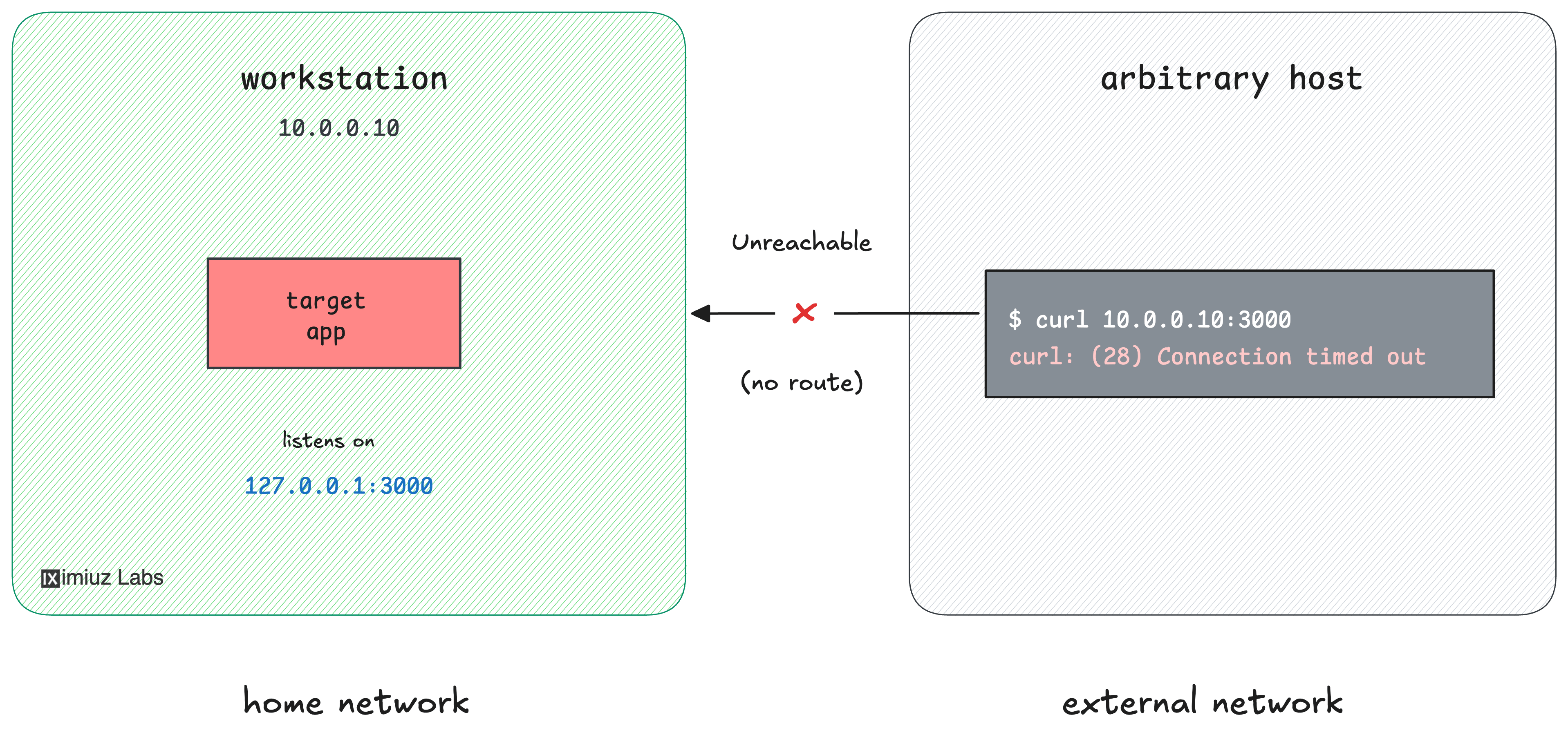
The issue is that the webhook receiver is loopback-bound, and your workstation sits on the internal corp network with no public address, so provider's webhooks cannot reach it.
You can verify it using an arbitrary internet-host -
a machine out on the public internet that is not part of the corp network:
curl --connect-timeout 3 10.0.0.10:3000 # workstation, from the outside
curl: (28) Connection timed out after 3001 milliseconds
There is, however, a public-facing gateway VM
(gateway, 203.0.113.20) that you can SSH into,
and that the rest of the internet can reach. Right now nothing is listening on its port 8080, though:
curl --connect-timeout 3 203.0.113.20:8080 # gateway
curl: (7) Failed to connect to 203.0.113.20 port 8080 after 0 ms: Could not connect to server
Your task: set up remote (reverse) port forwarding so that the workstation's
127.0.0.1:3000 becomes reachable at the gateway's public address 203.0.113.20:8080,
where the payment provider can deliver its webhooks:
Hint: How remote port forwarding works
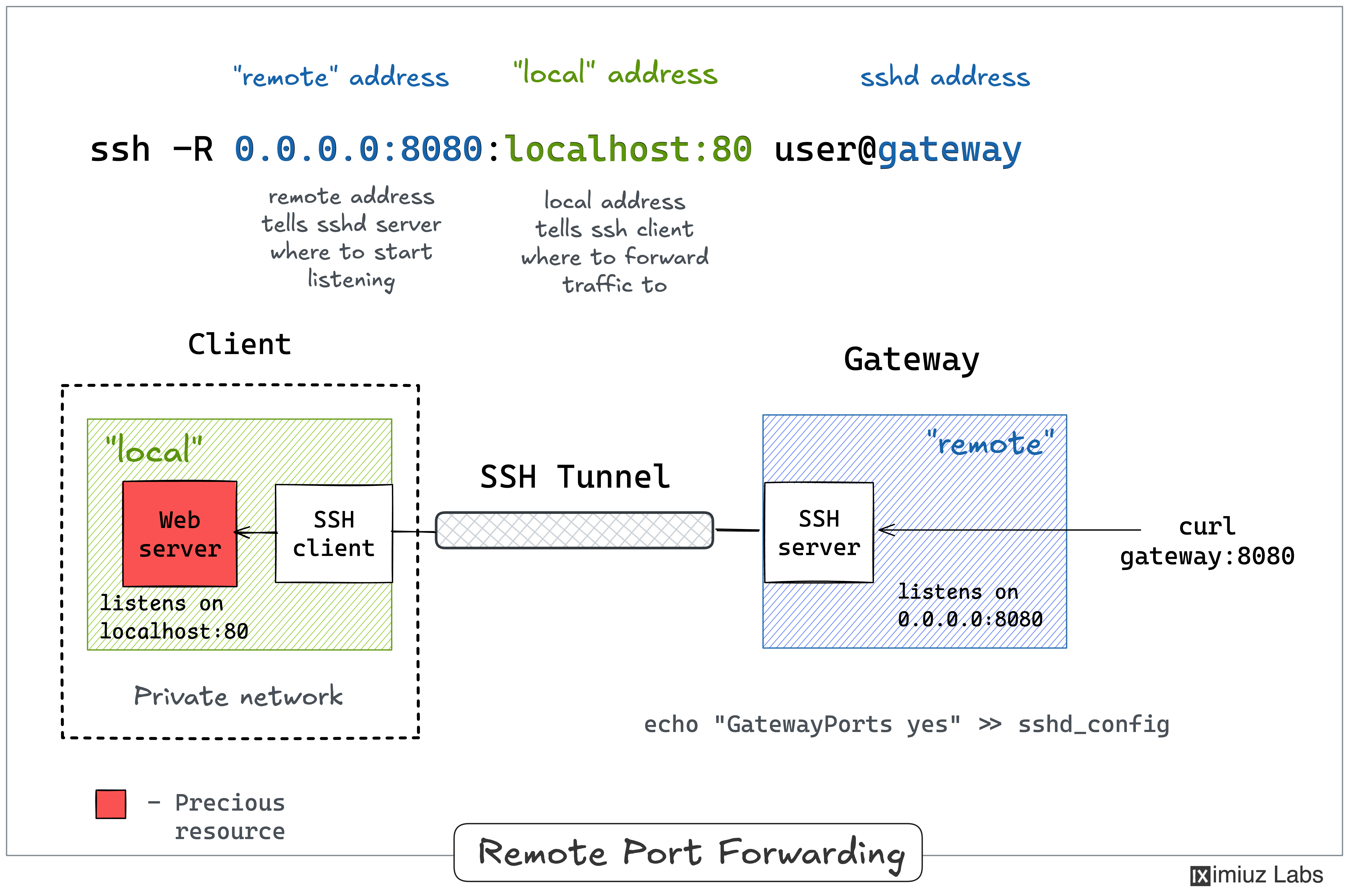
SSH remote port forwarding (ssh -R) is an inverse to local forwarding:
instead of opening a listening port on your local machine, it
asks the SSH server to open a listening port and tunnel everything that arrives
there back to a destination reachable from your local side - here, the
workstation's own 127.0.0.1:3000.
The mnemonic is ssh -R remote_port:local_addr:local_port - the left-hand side
is the port that opens on the gateway.
Run man ssh and read the -R section, or walk through the example in the
SSH Tunnels tutorial.
Hint: Bind the forwarded port to all interfaces
By default, ssh -R makes the forwarded port listen only on the gateway's own
localhost, so it would be reachable from inside the gateway but not from the
internet. To publish it on all of the gateway's interfaces, bind the remote side
of the forward to 0.0.0.0 (e.g. 0.0.0.0:8080:...) instead of letting it
default to the loopback.
Hint: The gateway refuses the non-loopback bind
Asking the gateway to listen on 0.0.0.0 only works if its sshd is allowed to
open forwarded ports on non-loopback addresses. That is controlled by the
GatewayPorts option,
which defaults to no.
You have sudo on the gateway. Set GatewayPorts yes in its sshd configuration
(the main /etc/ssh/sshd_config or a drop-in under /etc/ssh/sshd_config.d/)
and reload sshd so the change takes effect, then establish the tunnel.