Purge an Accidentally Pushed Image From a Container Registry

Premium Challenge
Upgrade your membership to unlock this and all other premium materials.
A debug build was accidentally pushed to your team's container registry
under the tag debug-42 in the acme/search-indexer repository.
It turned out that this image contains private credentials.
Credentials were promptly revoked, but the leaked build in the registry
keeps setting off security alerts that identify the image as a potential risk.
Your task is to purge the build from the registry so it can no longer be pulled.
As always, there is a catch: a tag is just a movable label. Deleting it makes the image disappear from the tag list, but the image - and the blob with the leaked secret - is still sitting in the registry's storage, pullable by anyone who knows its digest. You need to delete the tag and purge the underlying blobs so the data is truly gone.
Use the registry HTTP API to:
- List the tags in the
acme/search-indexerrepository and confirmdebug-42is there. - Resolve the
debug-42tag to its own digest and the digests of the blobs it references. - Delete the
debug-42tag from the repository using the corresponding API endpoint. - Query the image by its digest and confirm it's still there even without a tag.
- Query the configuration and rootfs layer blobs referenced by the image (using their corresponding digests from the manifest).
- Find a way to purge all the image's blobs from the registry, so that they cannot be retrieved by digest anymore.
- Query the same set of digests again to confirm they are gone from the registry.
The other tags (latest, v1.0.0, v1.1.0, stable) must stay intact -
only debug-42 and the blobs behind it should disappear.
How you purge the blobs is up to you - the verifier only checks that none of the image's blobs are retrievable by digest anymore (and that the other tags still work).
The registry is a standard distribution/distribution
instance, served over HTTPS with Basic Auth:
https://registry-1.corp      (the CA is trusted in this environment)
username: iximiuzlabs
password: rules!
The registry runs as a Docker container named registry on the registry-1 host -
switch to that host if you decide to use registry-side maintenance tooling.
Everything else can be done with curl from the workstation VM.
Hint 1: Talking to the registry API
A registry is just an HTTP server speaking the
OCI Distribution Spec API.
With the credentials you were given, a plain curl is enough to explore it -
for example, listing the repository's tags:
curl -s -u iximiuzlabs:'rules!' \
    https://registry-1.corp/v2/acme/search-indexer/tags/list
Everything else in this challenge can be done with more requests to the same API.
Hint 2: A tag is only a label
A reference like acme/search-indexer:debug-42 is just a movable label that resolves to a specific digest:
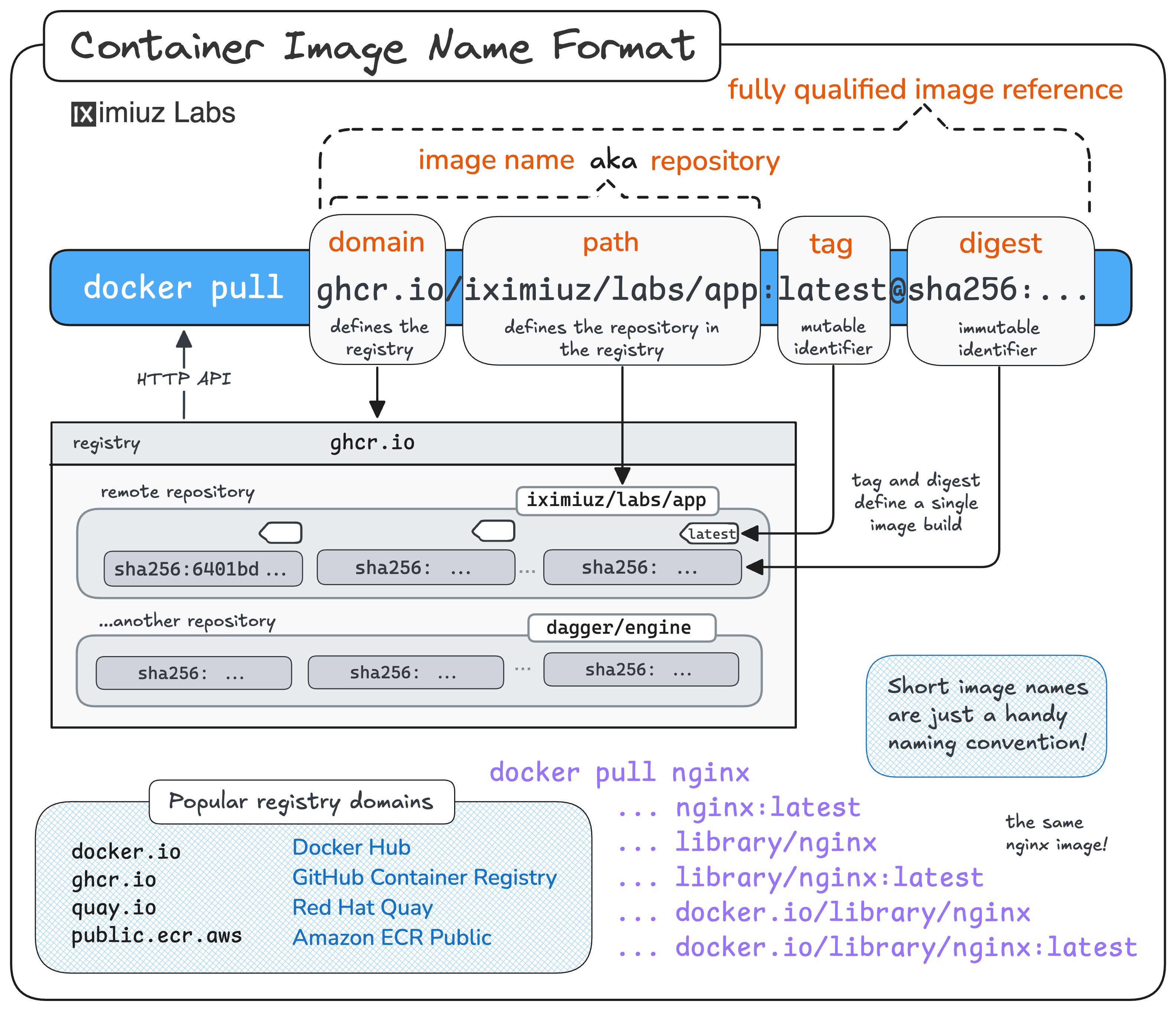
That digest addresses an OCI Image Manifest (or, for multi-platform images, an OCI Image Index that in turn points to manifests):
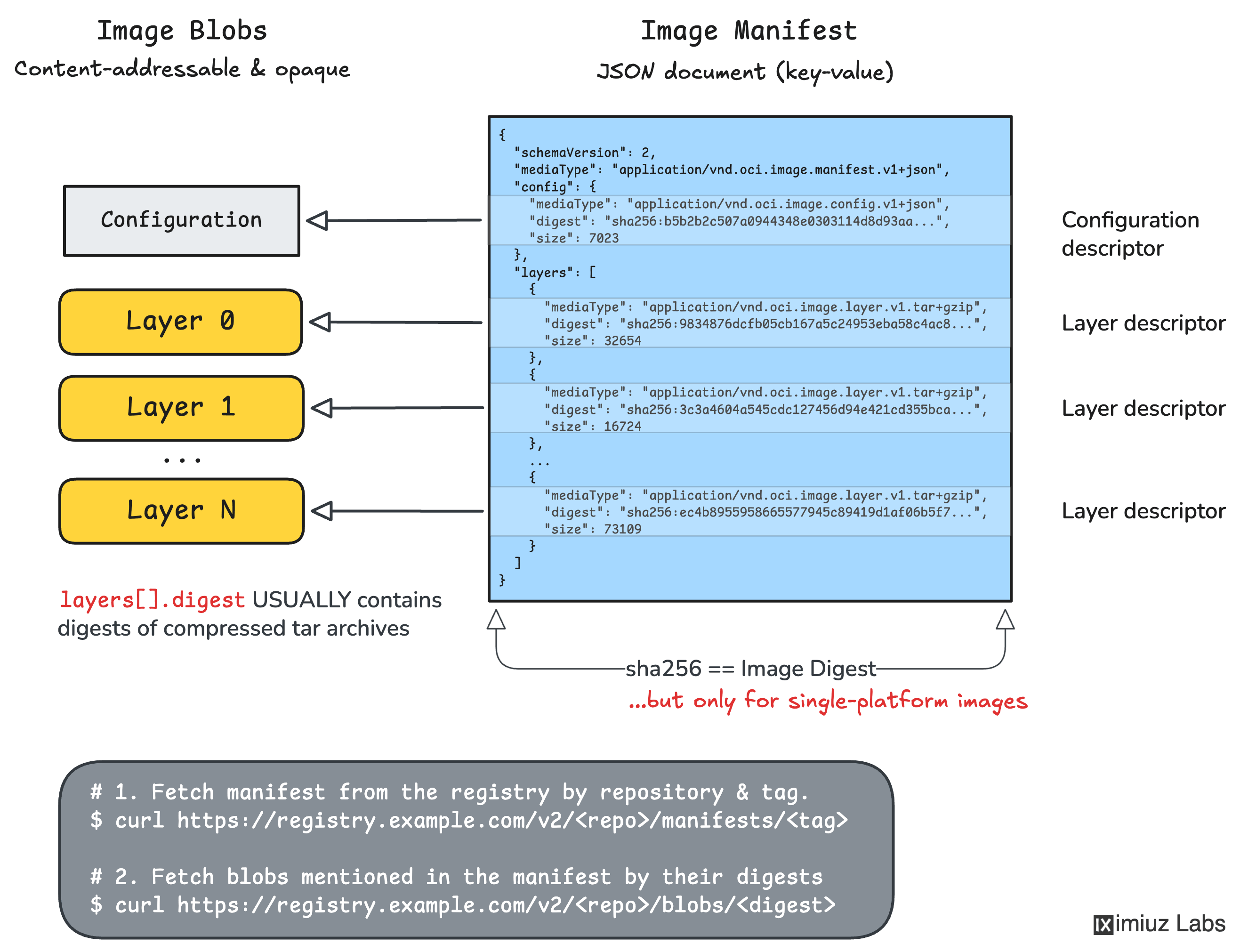
Before proceeding to deletion step(s), explore the manifest (or index) the debug-42 tag points to.
Hint 3: Deleting the tag
The OCI Distribution spec has a dedicated
Deleting Tags
operation: DELETE /v2/<repository>/manifests/<tag>.
After this, the tag is gone from the tag list - but is the manifest (or index) it pointed also gone?
Hint 4: The tag is gone, the bytes are not
Deleting the tag only removes the label from the manifest (or index).
The manifest (or index) it pointed to is still there and can be retrieved by digest.
The same API endpoint can be used to delete the manifest (or index) by digest
DELETE /v2/<repository>/manifests/<digest>, but don't rush to do it yet.
Deleting the manifest (or index) may not be enough because the blobs referenced by the manifest (or index) may still be retrievable by digest:
Fetch the (still reachable) manifest and read out the blob digests it references:
curl -s -u iximiuzlabs:'rules!' \
    -H 'Accept: application/vnd.oci.image.manifest.v1+json' \
    https://registry-1.corp/v2/acme/search-indexer/manifests/sha256:<image-digest> \
    | jq '{config: .config.digest, layers: [.layers[].digest]}'
Each of those config and layers digests is a blob you can fetch using a
direct API call at /v2/<name>/blobs/<digest>. So you will need take care of them separately.
Now when you have all the blob digests, it's safe to remove the manifest (or index) by digest:
curl -s -o /dev/null -w '%{http_code}\n' -u iximiuzlabs:'rules!' \
    -X DELETE https://registry-1.corp/v2/acme/search-indexer/manifests/sha256:<image-digest>
Hint 5: Blobs can be deleted by digest too
DELETE /v2/<name>/blobs/<digest> removes an individual blob from the
registry's storage (assuming storage deletion is enabled in the registry's configuration).
Repeat it for each of the config blob and every layer digest you collected, and they stop being
retrievable by digest.
Hint 6: A safer alternative: let garbage collection do its job
Deleting blobs one by one works but is tedious and easy to get wrong. For example, if the same (rootfs layer or config) blob is referenced by multiple manifests, deleting it by digest will break other manifests that reference it.
The distribution/distribution registry ships an offline garbage-collect subcommand that
can sweep unreferenced blobs for you. A simpler and safer option is to execute
it on the registry-1 host - inside the registry container.
By default it keeps untagged images (and their blobs), so you need its
--delete-untagged option here.
If the registry keeps serving blobs after garbage collection, restart the registry container to clear its cache.