Bypass a Broken VPN with a Routing Trick to Restore SSH Access to a Dual-Homed Server

This challenge explores the same weak end host behavior demonstrated in Reach a Linux Service Through an Interface It Doesn't Listen On, but in a more complex network topology.
In the original scenario, a client and a dual-homed Linux server shared the same network segment. A static route allowed the client to reach a service bound to the server's management IP through its corporate network interface. But this "bypass" isn't limited to machines on the same network segment. The client and server can be separated by one or more routers. As long as packets can reach the server through one of its interfaces and the replies can find their way back, the same trick can work across a more complex network topology.
Today, your task is to leverage this behavior in a three-machine setup to restore SSH access to a server when its management network is unreachable.
The scenario
Your team manages a server in a datacenter. Normally, you access it over SSH through a VPN connected to the datacenter's management network.
Today, the VPN is down due to an incident, and you urgently need SSH access to the server. Fortunately, the datacenter's application network is still reachable from the office.
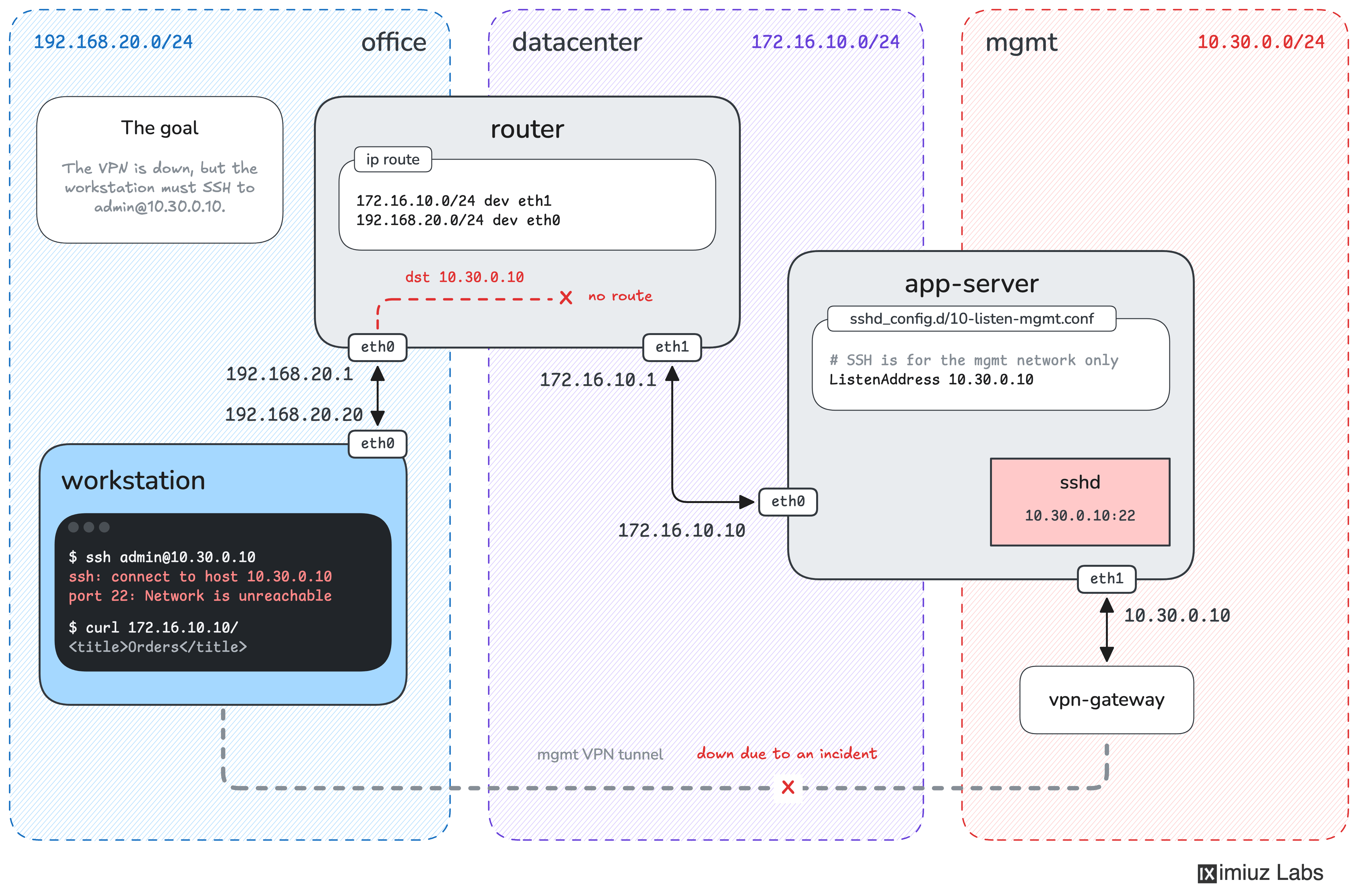
The lab consists of three machines sitting in three networks:
| Machine | Interface | Address | Network |
|---|---|---|---|
workstation | eth0 | 192.168.20.20 | Office (192.168.20.0/24) |
router | eth0 | 192.168.20.1 | Office |
router | eth1 | 172.16.10.1 | Datacenter (172.16.10.0/24) |
app-server | eth0 | 172.16.10.10 | Datacenter |
app-server | eth1 | 10.30.0.10 | Management (10.30.0.0/24) |
The workstation machine uses router as its default gateway.
The router forwards traffic between the office and datacenter networks,
allowing the workstation to access any services on 172.16.10.10.
The app-server machine is dual-homed. It has two network interfaces:
eth0(172.16.10.10) is connected to the datacenter's application network.eth1(10.30.0.10) is connected to the management network.
However, the router has no route to the management network,
so trying to reach 10.30.0.10 from the workstation fails.
The app-server's SSH daemon listens only on 10.30.0.10:22.
Connecting to 172.16.10.10:22 doesn't work because nothing is listening on that address and port.
Your task is to restore SSH access to app-server from workstation, without changing the server's configuration.
The SSH key of the laborant user on workstation is already authorized for the admin user on app-server.
To complete the challenge, successfully log in from workstation using:
ssh admin@10.30.0.10
You may only change the routing configuration of router.
You cannot modify app-server, and the server rejects SSH connections originating from the router itself,
so using it as a jump host won't help.
Hint 1
Start by checking whether workstation can reach the management IP of app-server:
ping -c 3 10.30.0.10
A Destination Net Unreachable reply from 192.168.20.1 means the router doesn't know where to send the packets.
Inspect the routing table on router:
ip route
The router knows how to reach the office and datacenter networks, but it has no route to 10.30.0.10.
Can you make the management IP reachable through the datacenter network instead?
Hint 2
Although router isn't connected to the management network, it can reach app-server through 172.16.10.10.
Remember that both 172.16.10.10 and 10.30.0.10 belong to the same Linux host.
As you saw in the first challenge, Linux accepts packets destined for any of its local IP addresses, regardless of which interface they arrive through.
What if the router forwarded packets destined for 10.30.0.10 to 172.16.10.10 instead?
You can achieve this with a static route on router, using the server's datacenter IP as the next-hop gateway.
Hint 3
On router, use ip route add to create a route to the management IP:
sudo ip route add <destination>/32 via <gateway>
Here:
<destination>is the management IP ofapp-server.<gateway>is the datacenter IP ofapp-server, whichroutercan already reach./32means the route applies to one specific IP address, rather than the entire management subnet.
The router doesn't change the destination IP address of the packets it forwards. It only uses the gateway to determine where to send them next.
When the packets arrive at app-server through eth0,
Linux recognizes 10.30.0.10 as one of its own IP addresses and delivers them locally to SSH.
You don't need to enable IP forwarding or NAT on app-server. Its existing default route provides the return path to workstation.