Inspect Network Interfaces, IP Addresses, and Routes on a Linux Host

Premium Challenge
Upgrade your membership to unlock this and all other premium materials.
Reading the network configuration of a Linux host is the first step of almost every networking task: before you can debug a connection, open a port, or figure out why a container cannot reach its database, you need to know which interfaces the host has, which addresses they carry, and where the routing rules send the packets.
You have access to two servers on the same office network. web-01 is a plain Ubuntu server with a single network interface. backup-01 is a Rocky Linux server that is also connected to a second, storage network. Nothing on either server needs to be changed. Your job is to inspect their interfaces, addresses, and routes and answer the questions below.
Part 1: A Server With a Single Interface
Start with web-01.
It has one network interface besides the loopback and no custom routing rules,
so the setup is as simple as it gets for a server connected to a network.
The diagram below shows what such a host looks like and how the output of the ip commands maps to it.
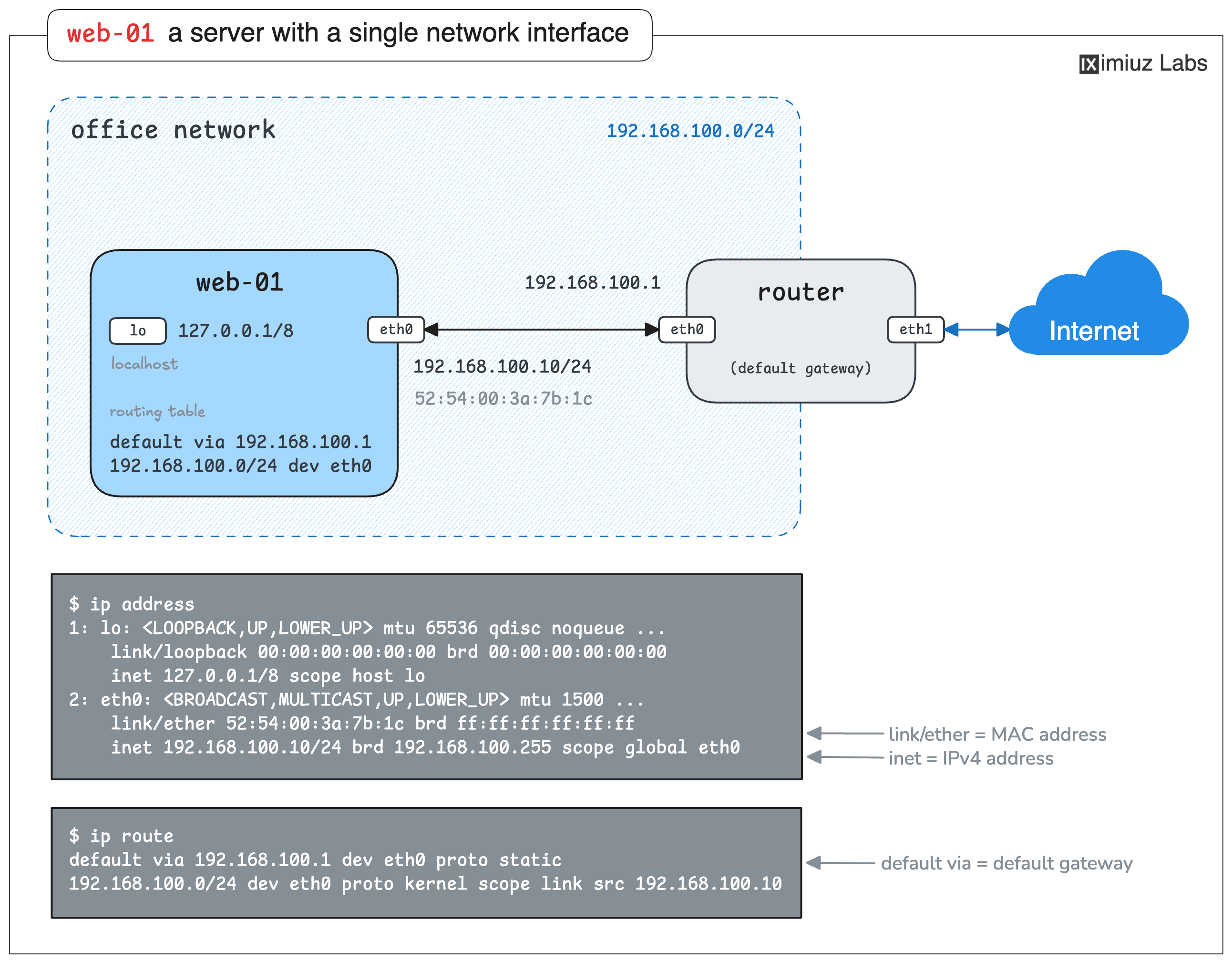
The values in the picture are an example. Run the commands on the real web-01 to answer the four standard first questions below.
Which interface carries the machine's IPv4 address?
What is the IPv4 address of web-01?
What is the MAC (hardware) address of that interface?
Which router does web-01 use to reach the hosts outside of the office network?
Hint 1
The ip command from the iproute2 package is the standard tool for this job.
The ip address subcommand lists the interfaces with their IP and MAC addresses,
and the ip route subcommand prints the routing table.
Hint 2
In the ip address output, the IPv4 address is on the inet line, and the MAC address is on the link/ether line.
The default gateway is the address after via on the line of the routing table that starts with default.
Part 2: A Server With Two Interfaces
Now switch to backup-01.
This server is connected to the office network (192.168.100.0/24, the same one web-01 is on)
and to a storage network (10.200.0.0/24).
Whoever set it up also added static routes to an archive network 10.210.0.0/16.
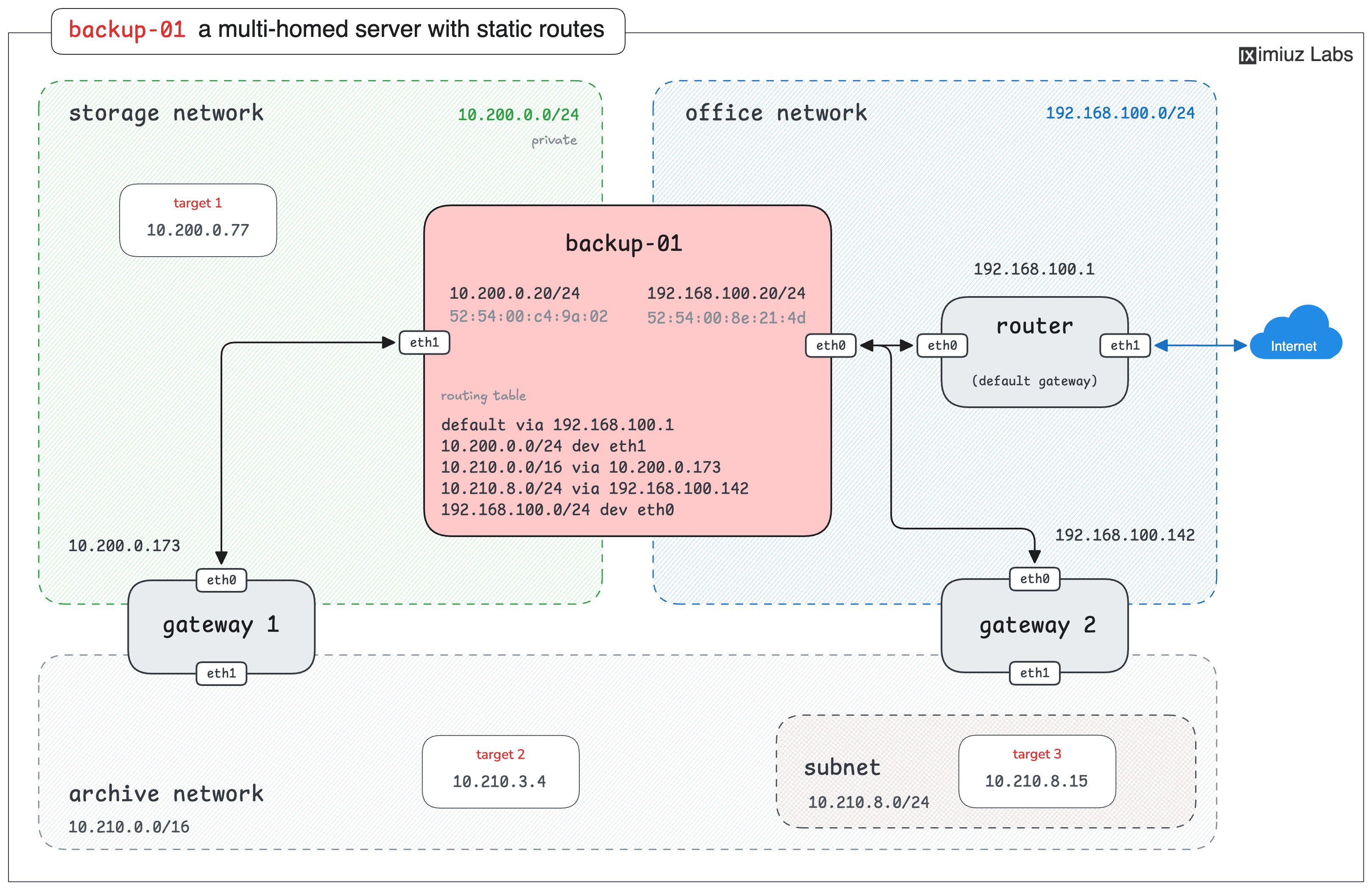
The playground sets static routes and gateway IP addresses randomly, so they may differ from the diagram.
The gateway addresses in the picture are an example - the routing table of the real backup-01 is the source of truth. Start with the same reconnaissance as before.
How many interfaces of backup-01 have an IPv4 address assigned?
Which interface connects backup-01 to the storage network?
What is the address of backup-01 on the office network?
Enter it in CIDR notation - the address followed by the prefix length,
the same way the ip tool prints it (for example, 192.0.2.1/24).
Hint 3
The ip -br address output is the quickest way to see all interfaces and their addresses at once.
Match the addresses against the two networks named above to tell the interfaces apart.
Once the interfaces and their addresses are known, it is time to look at the routing table. A multi-homed host has to decide for every outgoing packet which interface to use.
Through which interface does backup-01 send packets to 10.200.0.77?
Which gateway does backup-01 use for packets to 10.210.3.4?
Which gateway does backup-01 use for packets to 10.210.8.15?
Be careful - more than one route matches this destination, and only one of them is used.
Hint 4
Every line of the ip route output is a rule: a destination network (or a single host),
optionally a gateway (via), and the outgoing interface (dev).
Lines without via describe directly connected networks.
Hint 5
When several routes match a destination, the kernel picks the most specific one -
the route with the longest network prefix.
A /24 route wins over a /16 route for any address they both cover,
and the default route (/0) only applies when nothing else matches.
Hint 6
You don't have to do the prefix matching in your head.
The ip route get subcommand asks the kernel to resolve a destination address
and prints the exact route it would use, including the gateway and the outgoing interface.