Install and Configure containerd on a Linux Host

Premium Challenge
Upgrade your membership to unlock this and all other premium materials.
In this challenge, you will need to install and configure containerd on a Linux host. Follow the steps below to complete the challenge.
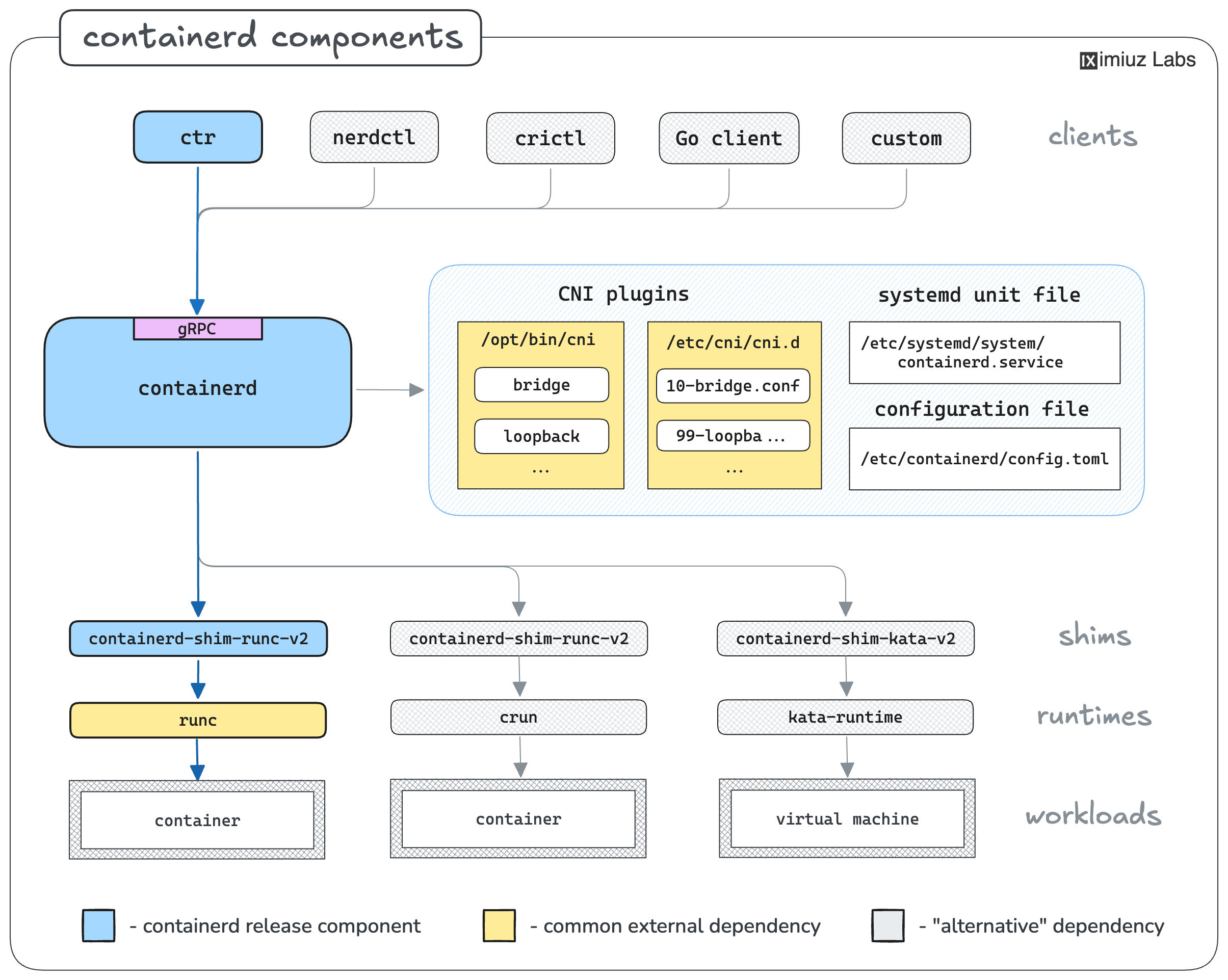
First things first, obtain relatively fresh containerd binaries:
Hint 1
One of the main installation options mentioned in the official Getting started with containerd guide is to download containerd binaries from the project's GitHub Releases page.
Hint 2
Installing the containerd.io package (maintained by Docker) is also an option,
but the package may lag behind the latest containerd release.
With the containerd binaries in place, start containerd as a systemd service:
Hint 3
The maintainers of the containerd project kindly provide a systemd unit file that you can use to launch containerd on your system.
Surprisingly or not, containerd itself cannot run any containers -
it needs a lower-level container runtime for that.
Install an OCI-compatible container runtime, such as runc or crun:
Hint 4
If you choose to install runc, it should be as simple as downloading a statically linked binary
from the GitHub Releases page,
placing it in one of the directories in your $PATH (the official containerd guide suggests /usr/local/sbin),
and making it executable.
Neither containerd nor runc can do container networking by themselves -
they need CNI plugins to be present on the host.
Install the CNI plugins and configure a bridge network with the following parameters:
- Bridge name:
bridge0 - Host-local IPAM
- Subnet:
172.18.0.0/24 - Gateway:
172.18.0.1
- Subnet:
Hint 5
To install the CNI plugins, you can download the release binaries from the
GitHub Releases page
and extract them to /opt/cni/bin.
Hint 6
containerd expects the CNI configuration files to be present in /etc/cni/net.d,
and ctr run --cni uses only the first of them in alphabetical order.
There are many ways to configure a bridge CNI network, but the following .conflist file is a good starting point:
{
  "cniVersion": "1.1.0",
  "name": "bridge",
  "plugins": [
    {
      "type": "bridge",
      "bridge": "bridge0",
      "isGateway": true,
      "ipMasq": true,
      "ipam": {
        "type": "host-local",
        "ranges": [
          [{"subnet": "172.18.0.0/24", "gateway": "172.18.0.1"}]
        ],
        "routes": [{"dst": "0.0.0.0/0"}]
      }
    }
  ]
}
Finally, start an Nginx container with full networking support using the ctr CLI:
Hint 7
With ctr, you have to explicitly pull the image
before you can start a container.
Hint 8
By default, ctr run will not enable networking for the container.
You can use the --cni flag to enable the use of CNI plugins.