Inspect OCI Image Layout of Single- and Multi-Platform Images

Premium Challenge
Upgrade your membership to unlock this and all other premium materials.
In this challenge, you will save two container images as OCI layouts and explore their structure:
ghcr.io/iximiuz/labs/oci/web:v1- a single-platform imageghcr.io/iximiuz/labs/oci/cli:v1- a multi-platform image
Both images are already pulled for you and ready to be saved:
docker images
What is an OCI layout?
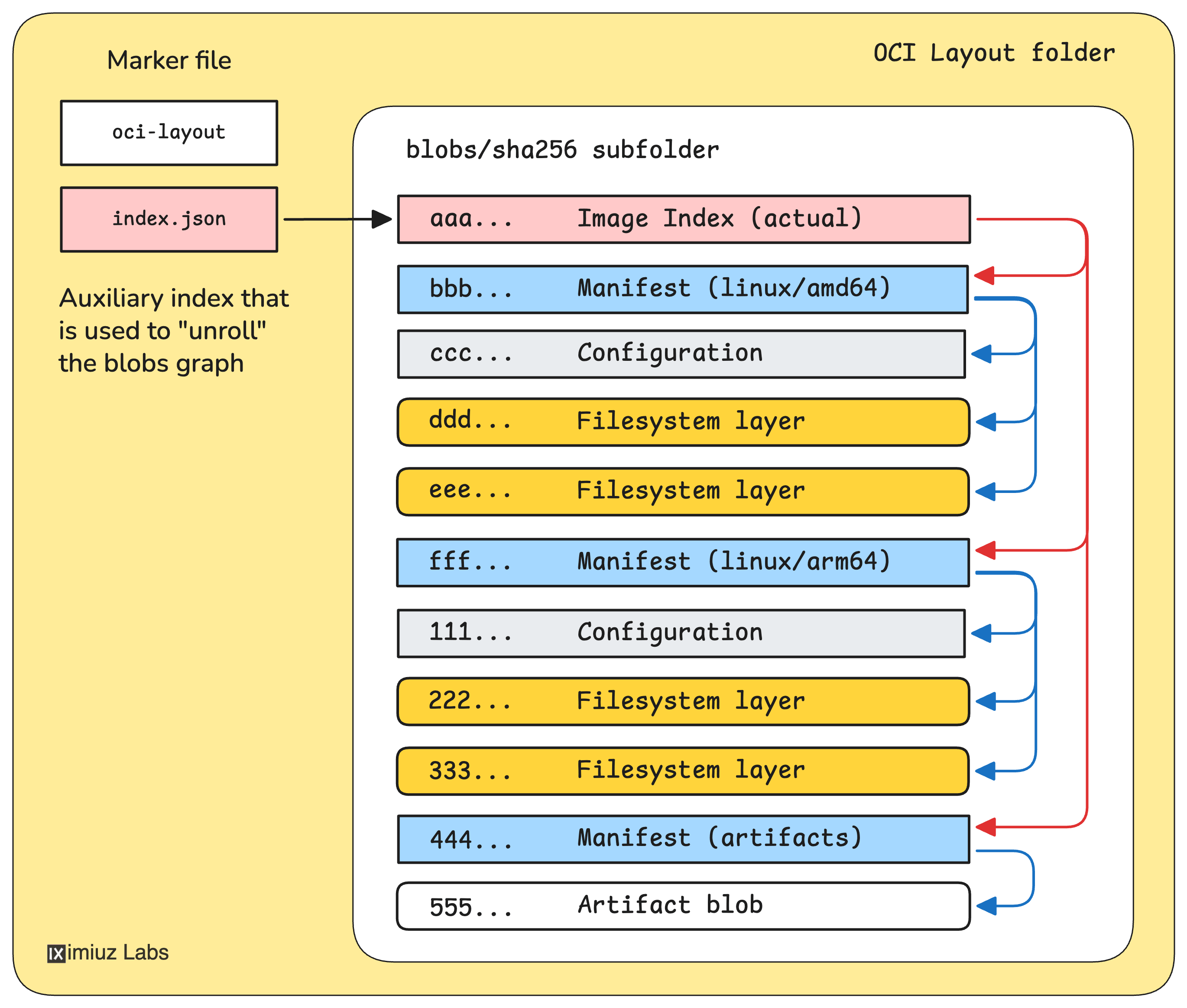
The OCI Image Layout is a standardized on-disk directory structure for storing and transferring container images. It takes the content-addressable registry representation of a container image and saves it into a regular local directory.
A typical OCI layout looks like this:
oci-layout          # marker file
index.json          # entry point listing top-level descriptors in the blobs directory
blobs/
└── sha256/
    ├── aaa...      # image config(s), manifest(s), index(es), or filesystem layer(s)
    ├── bbb...
    └── ...
Every blob in the blobs/sha256/ directory is named by its own SHA-256 digest,
and since image indexes and manifests address image parts by their digests,
you can follow references from such JSON documents by looking up the corresponding
file under blobs/.
Part 1: Single-platform image
Save the ghcr.io/iximiuz/labs/oci/web:v1 image as an OCI layout into ~/single-layout/:
Hint: Saving the image as an OCI layout
You can use docker save to export the image as a tar archive and then extract it
into the ~/single-layout/ directory.
Now explore the layout. Start with index.json - it's the entry point of every OCI layout.
The index.json file contains an array of descriptors in its manifests field.
Each descriptor has a mediaType, a digest, and a size.
The digest tells you which blob file to look at next.
What is the mediaType of the first (and only) entry in the index.json's manifests array?
Now follow the digest from index.json to find the OCI Image Manifest blob under blobs/sha256/.
The manifest specifies the image's configuration blob and one or more filesystem layer blobs.
How many Filesystem Layers does this image have?
Hint: Finding the manifest blob and counting the layers
Look for a file in the blobs/sha256/ directory which name matches the digest from the top-level index.json file.
This is the manifest blob of the image. Open it with your favorite JSON editor and count the entries in .layers array.
The manifest also references an OCI Image Configuration blob via its .config.digest field.
The config blob is a JSON file that describes the image's runtime configuration
and target platform.
What value does the architecture field have in the image config?
Hint: Finding the config blob and reading the architecture field
Follow the chain: index.json -> manifest blob -> config blob. Then read the architecture field.
The OCI Image Spec defines ImageID as the digest of the image configuration blob. Since the config pins the rootfs layers by their diff IDs and describes the runtime parameters, hashing it produces a unique identifier for the entire image.
What is the ImageID (i.e., the sha256:... digest of the config blob) for this image?
Hint: Finding the ImageID from the manifest blob
The ImageID is simply the .config.digest field from the manifest blob.
Docker starting with version 29 shows the Image ID as the digest of the manifest blob, which is not an OCI Image Spec compliant behavior. But Docker prior to version 29 and other container runtimes like Podman and crictl still show the Image ID as the digest of the config blob, matching the OCI Image Spec definition.
Part 2: Multi-platform image
Now let's look at a multi-platform image - ghcr.io/iximiuz/labs/oci/cli:v1.
This image contains variants for several platforms, and they all
have already been pulled into the local Docker daemon.
Save it as an OCI layout into ~/multi-layout/:
Start again with index.json. What is the mediaType of the top-level entry in the manifests array?
Follow the digest from index.json to find the OCI Image Index blob under blobs/sha256/.
Unlike a manifest, an image index doesn't describe layers directly.
Instead, it lists platform-specific manifests, each with a platform field
indicating its target os and architecture.
Do not confuse the top-level index.json file with the OCI Image Index blob in the blobs/sha256/ directory.
The former is required and always present, the latter is optional and only present for multi-platform OCI images.
And both have the same mediaType 🤦♂️
How many platform manifests does the image ghcr.io/iximiuz/labs/oci/cli:v1 index contain?
Hint: Finding the image index blob and counting the manifests
Look for a file in the blobs/sha256/ directory which name matches the digest of the only entry in the manifests array of the index.json file.
This is the OCI Image Index blob of the image. Open it with your favorite JSON editor and count the entries in .manifests array, with the platform.architecture field not set to unknown.
What is the sha256:... manifest digest for the linux/arm64 platform?
Hint: Finding the arm64 manifest digest from the image index blob
Look at the .manifests array in the OCI Image Index blob (in the blobs/sha256/ directory) and find the entry
whose .platform.architecture is arm64.
Finally, each platform manifest points to its own config blob. The ImageID is the digest of the config.
Do all platform variants of the ghcr.io/iximiuz/labs/oci/cli:v1 image have the same ImageID?
Answer yes or no.
Hint: Finding all image config blobs of a multi-platform image
From the image index blob, get the manifest digest for each platform.
Then read each manifest blob and compare their .config.digest values.
If the config digests differ, the ImageIDs differ.