Block Outbound Access with an Internal Docker Network

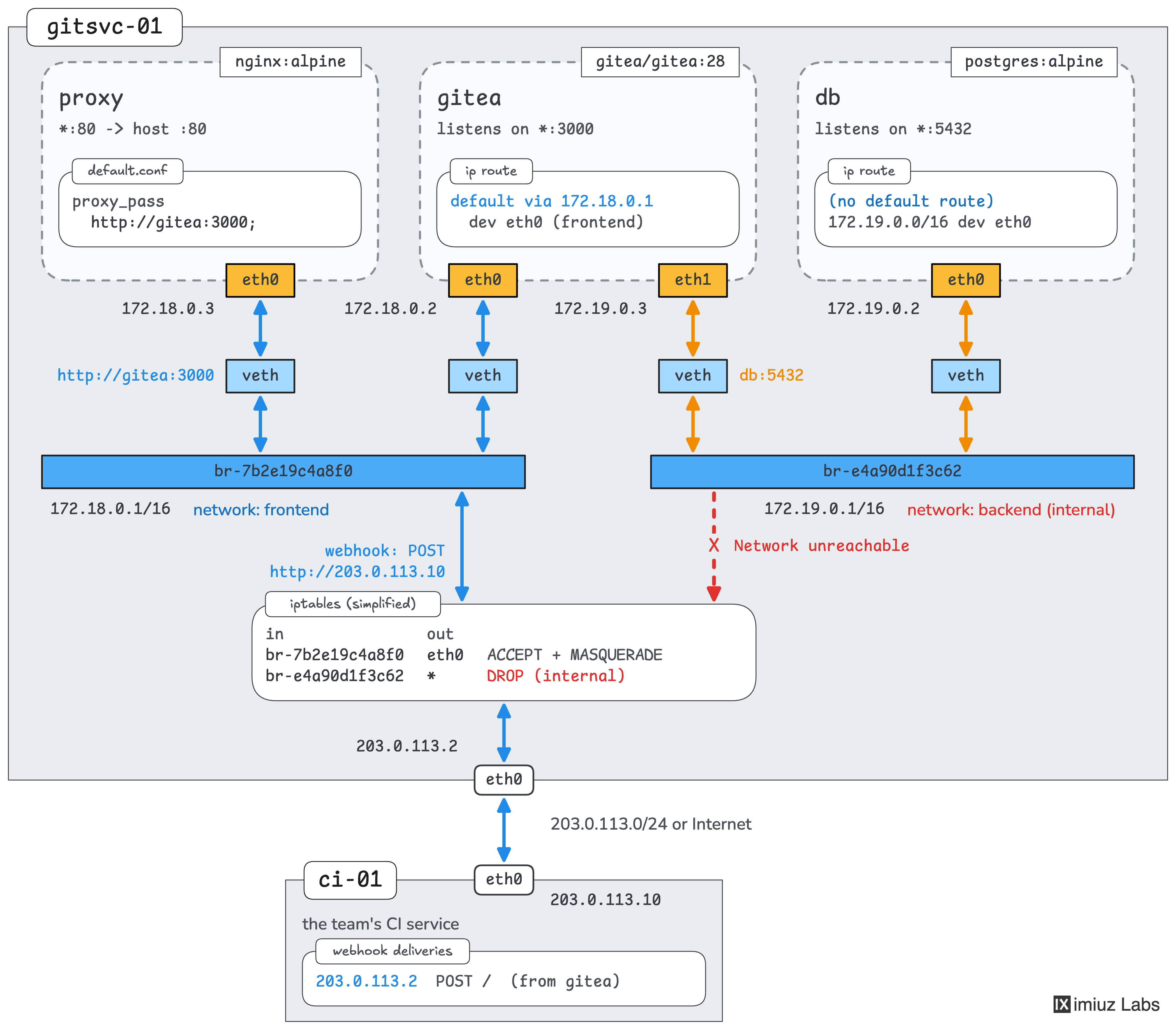
A small engineering team runs its Gitea server in three containers on gitsvc-01:
Nginx as the reverse proxy, Gitea itself, and PostgreSQL as its database.
At first, all three containers shared one network, so Nginx could connect straight to PostgreSQL,
although it only needs to talk to Gitea.
Nginx is the only container that receives requests from the network,
so if an attacker ever took it over, this direct path would bring them one step closer to the team's data.
To remove it, the team split the containers into two tiers:
the proxy and Gitea now share the frontend network, and Gitea and PostgreSQL share the backend network.
The containers were started with the following commands:
docker network create frontend
docker network create backend

docker run -d --name db --network backend \
    -e POSTGRES_USER=gitea \
    -e POSTGRES_PASSWORD=gitea-db-password \
    postgres:18-alpine

docker run -d --name gitea --network frontend --network backend \
    --env-file /srv/gitea/gitea.env \
    gitea/gitea:28.4

docker run -d --name proxy --network frontend \
    -p 80:80 \
    -v /srv/proxy/default.conf:/etc/nginx/conf.d/default.conf:ro \
    nginx:alpine
The team wants to continue hardening the setup, and the next thing to look at is the outgoing traffic.
Both networks are regular bridge networks, so the containers on them can connect to any server outside the Docker host.
For example, PostgreSQL can reach the team's CI service at 203.0.113.10:
docker exec db nc -zv 203.0.113.10 80
203.0.113.10 (203.0.113.10:80) open
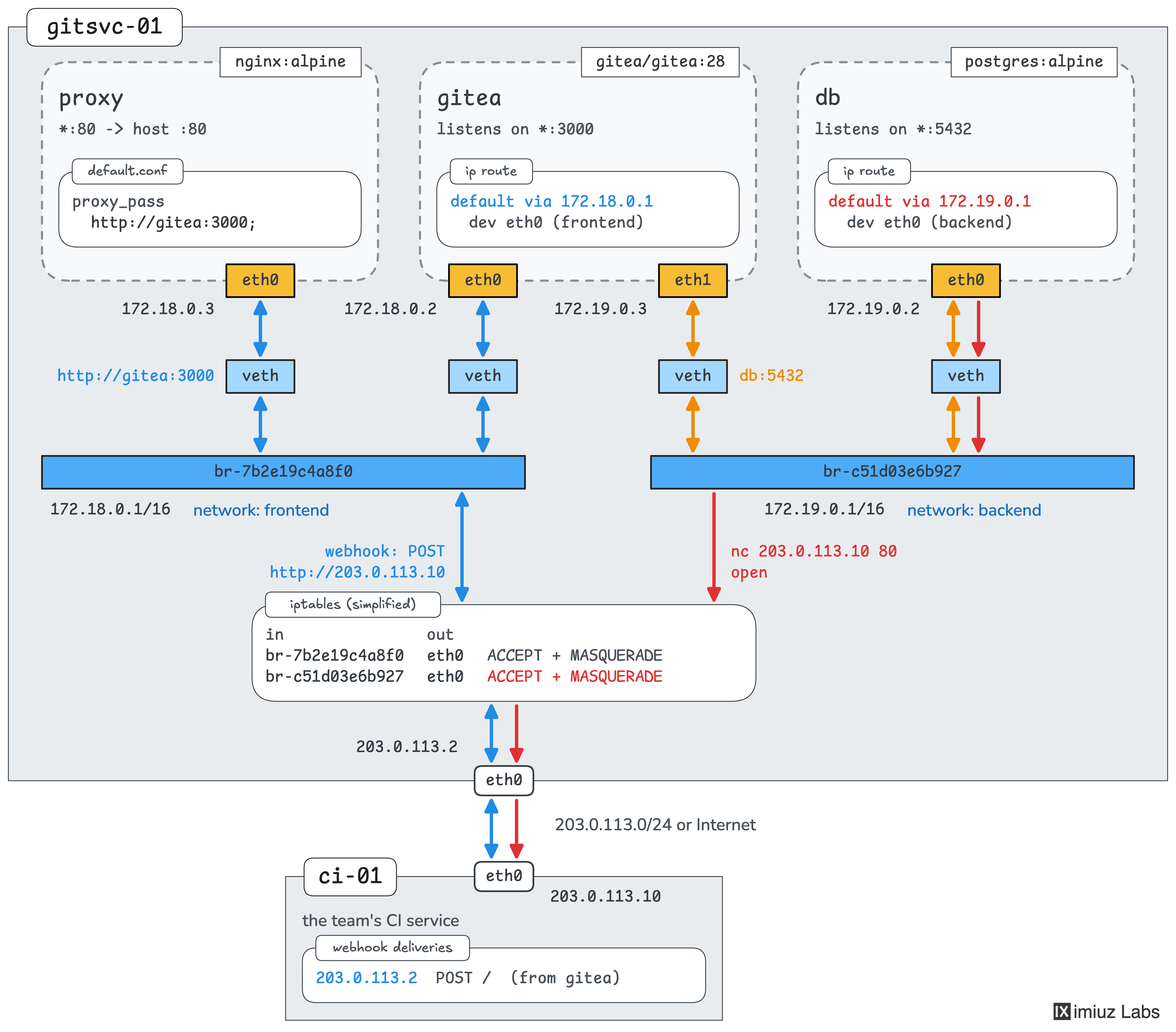
PostgreSQL talks only to Gitea, so it doesn't need any outside access. This access is a risk, though. If an attacker ever gained superuser access to the database, they could run shell commands in its container, and the outside access would let them download tools or send the team's data away.
Your task is to cut off the backend network from everything outside the Docker host,
so that PostgreSQL cannot connect to the CI service or any other external server.
The frontend network has to keep its outside access for two reasons:
- The proxy publishes port 80 on the host, and Docker doesn't publish the ports of a container attached only to a network without outside access.
- Gitea needs to be able to call external webhooks. It's attached to both networks, so it can make its outgoing connections through
frontend.
Keep the container names, the images, the networks and their members, and port 80 of the proxy published on the host. The setup holds no important data, so you can recreate any of the containers.
Hint 1
Docker can create a bridge network that has no access to anything outside the Docker host.
Look for the right option in the docker network create --help output.
Hint 2
The --internal option applies when a network is created, and Docker has no command to change the options of an existing network.
So the backend network has to be removed and created again.
Note that Docker refuses to remove a network while containers are still attached to it.
Hint 3
If you recreate Gitea, it may get a new address on the frontend network.
Nginx resolves the gitea name only when it starts, so the proxy may keep sending the requests to the old address.
Check docker logs proxy if the site shows an error.
Hint 4
To check the result yourself, try to reach the CI service from both containers:
docker exec db nc -zv -w 3 203.0.113.10 80
docker exec gitea nc -zv -w 3 203.0.113.10 80
The database should fail to connect, and Gitea should still succeed.