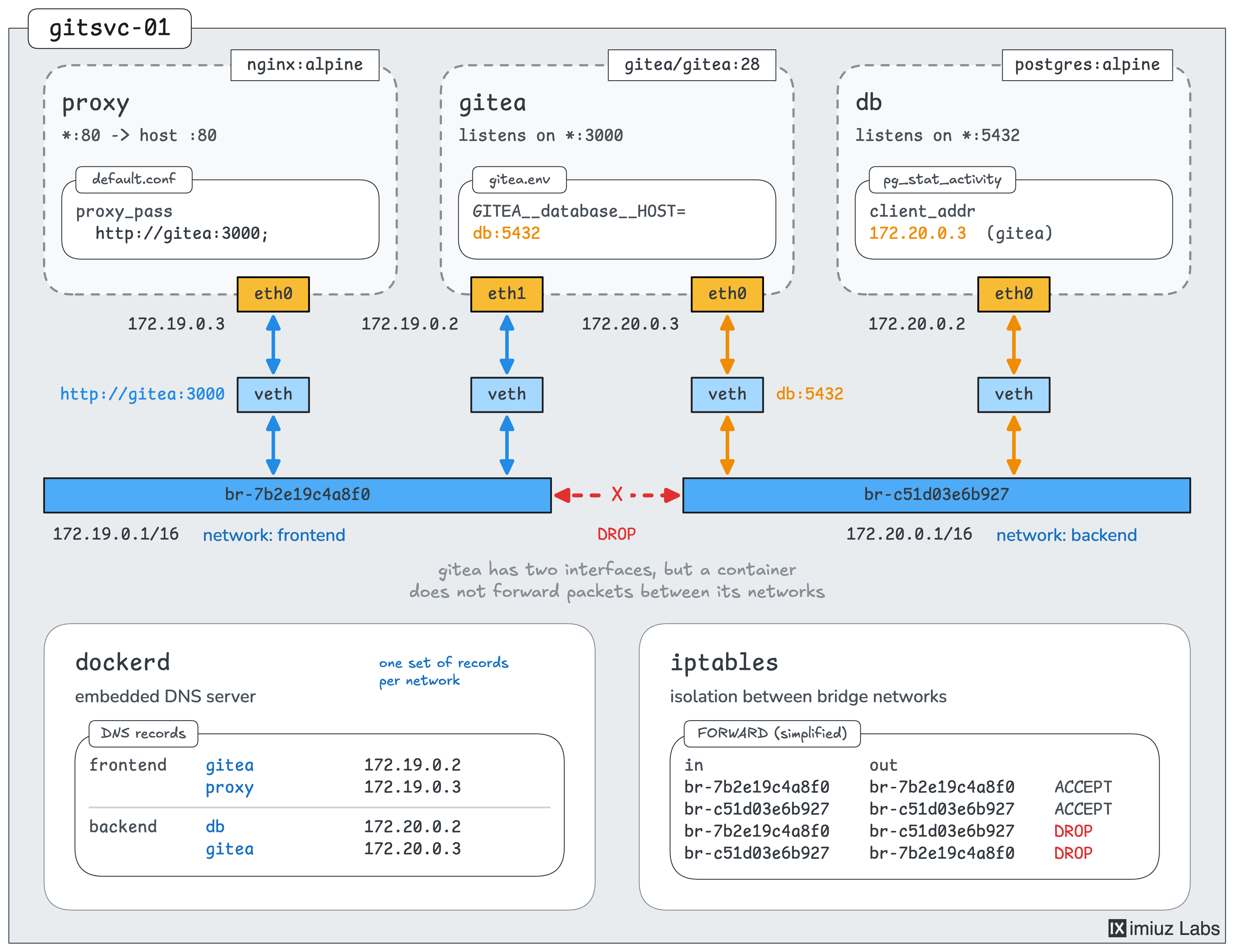
Connect a Container to Two Docker Networks to Isolate Application Tiers

In real projects, Docker Compose is often a handier way to solve this problem. Under the hood, Compose uses the same bridge networks as the commands in this challenge, so it's worth setting them up by hand a few times before you rely on Compose - to understand how it really works.
A small engineering team hosts its Git repositories on a self-managed Gitea server, gitsvc-01.
Some time ago, the team moved the server's Nginx reverse proxy into a container.
Since then, Gitea has moved into a container as well, and it now keeps its database in a PostgreSQL container.
The three containers were started with the following commands:
docker network create gitea-net

docker run -d --name db --network gitea-net \
    -e POSTGRES_USER=gitea \
    -e POSTGRES_PASSWORD=gitea-db-password \
    postgres:18-alpine

docker run -d --name gitea --network gitea-net \
    --env-file /srv/gitea/gitea.env \
    gitea/gitea:28.4

docker run -d --name proxy --network gitea-net \
    -p 80:80 \
    -v /srv/proxy/default.conf:/etc/nginx/conf.d/default.conf:ro \
    nginx:alpine
The containers find each other by name on the shared user-defined network.
The proxy forwards the requests to http://gitea:3000 (see /srv/proxy/default.conf),
and Gitea connects to the database at db:5432 (see /srv/gitea/gitea.env).
The Gitea site works, but the shared network gives Nginx more access than it needs. The proxy can also connect to PostgreSQL directly:
docker exec proxy nc -zv db 5432
db (172.18.0.2:5432) open
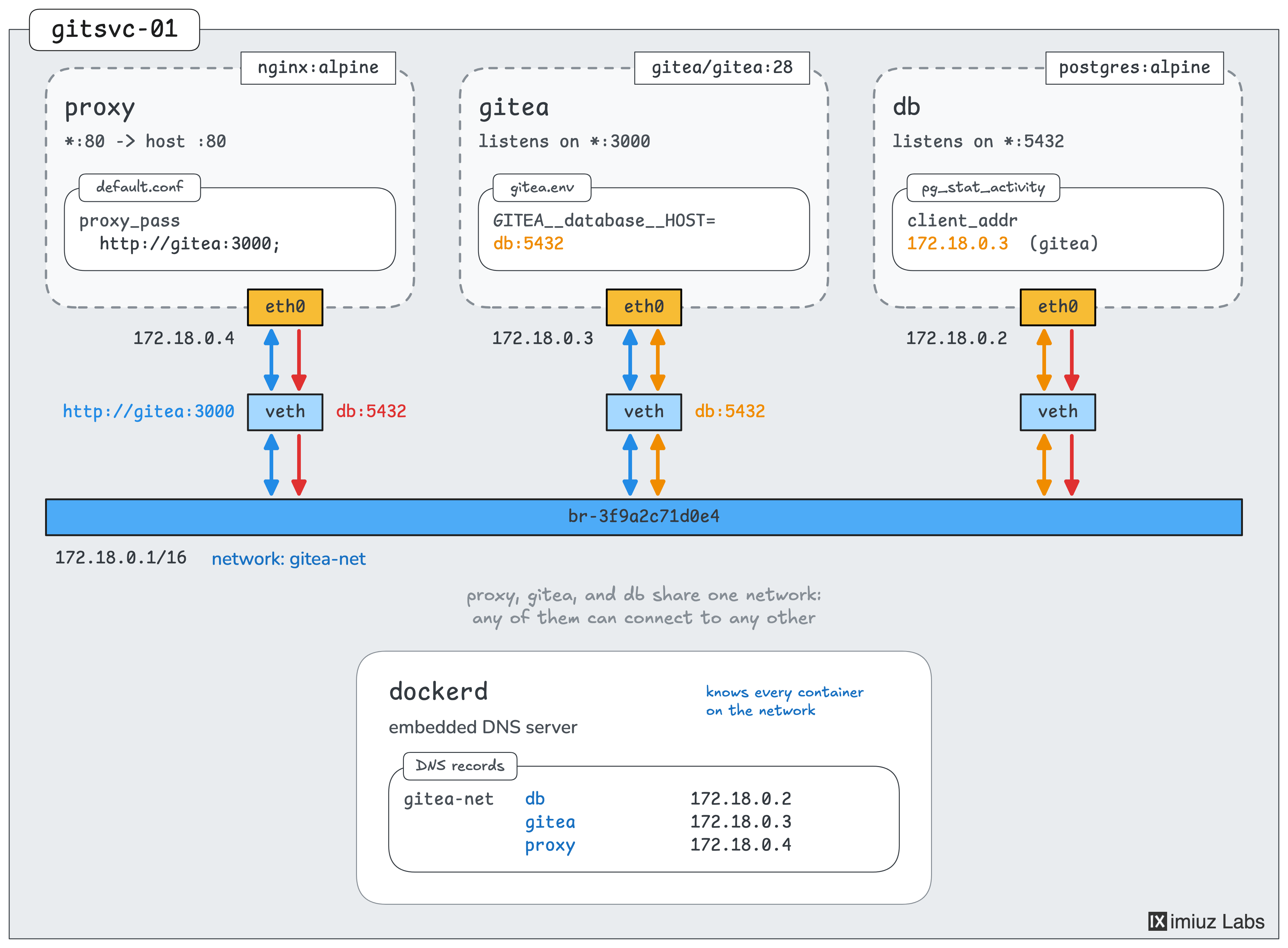
Nginx is the only container that receives requests from the network. If an attacker ever takes it over, the direct path to the database makes it easier for them to get to the team's data. The team wants to remove this unnecessary access while keeping the site available.
Your task is to split the containers between two networks, so that Gitea can talk to both Nginx and PostgreSQL, but Nginx cannot connect to PostgreSQL, even by its IP address.
- Network frontend: containers
proxyandgitea - Network backend: containers
giteaanddb
Keep the container names, the images, and port 80 of the proxy published on the host. Leave the ports of Gitea and PostgreSQL unpublished. The containerized setup is new and holds no data yet, so you can recreate any of the containers.
Hint 1
A container can be attached to several networks at once. It gets a separate network interface and IP address on each of them, and it can talk to the containers on all of them.
Hint 2
The docker network create command creates a new network,
and the --network flag of docker run attaches a new container to it.
To attach a container to several networks, repeat the flag:
docker run --network NETWORK_1 --network NETWORK_2 ...
Hint 3
The order in which you start the containers matters.
Nginx resolves the gitea name from its configuration when it starts, and it refuses to start if it cannot resolve the name.
It also keeps using the address that it got, even if the gitea container is recreated later.
If the proxy doesn't start or the site shows an error, check docker logs proxy.
Hint 4
To check the isolation yourself, find the IP address of the database with docker inspect db,
and try to connect to it from the proxy container:
docker exec proxy nc -zv -w 3 IP_ADDRESS 5432
The open word in the output means that the connection works.
A timeout means that the packets don't reach the database.