Docker 101: Reach a Container Without Publishing a Port

This challenge focuses on Docker Engine running directly on a Linux server, which is the setup most production Docker installations use. Docker Desktop runs Docker Engine inside a separate VM, so container IP addresses may not be reachable from your computer directly.
By default, Docker attaches every new container to the bridge network and gives it an IP address.
On a Linux Docker host, the host itself can connect to these addresses directly,
which is handy for a quick check of a containerized service.
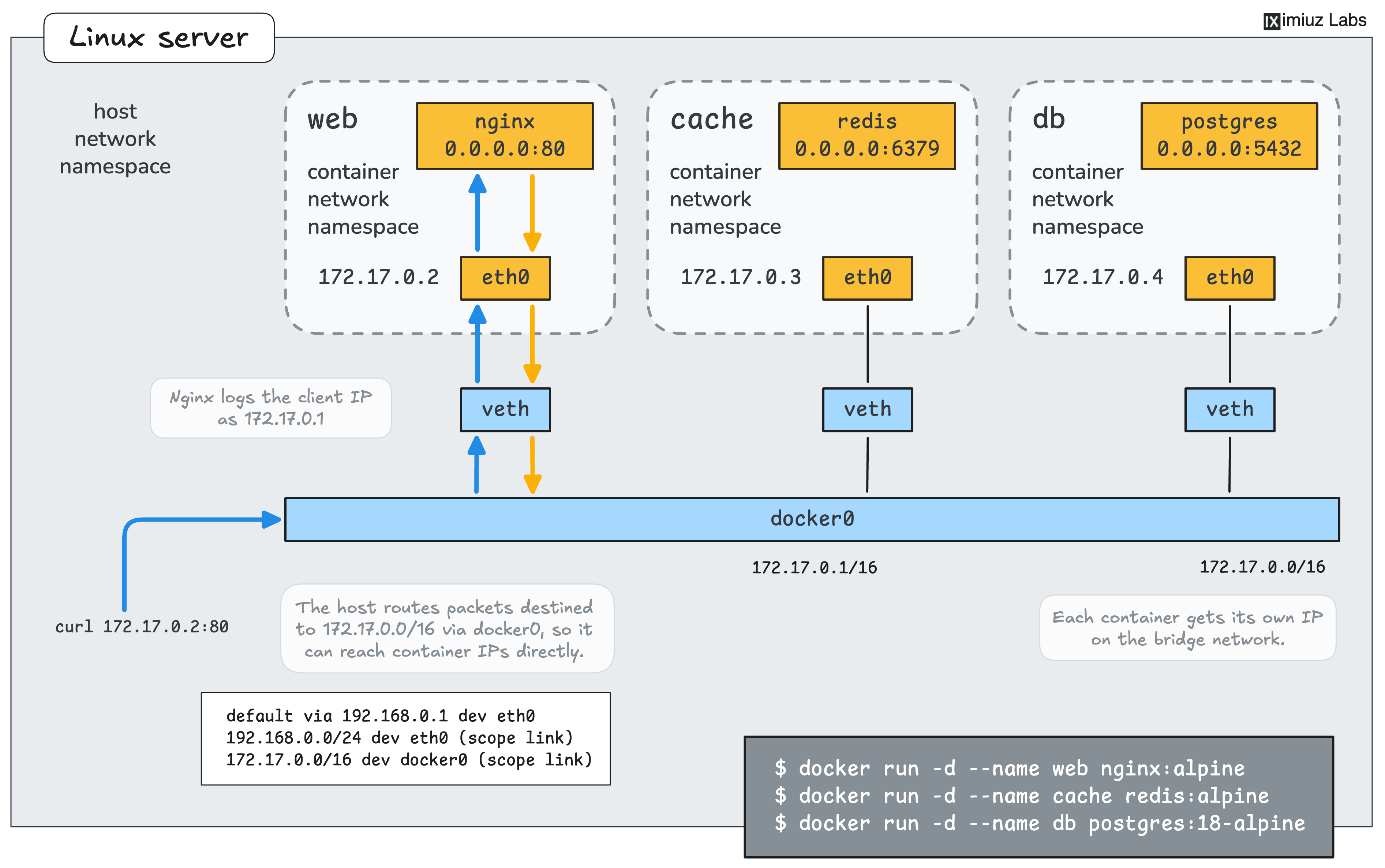
The IP addresses on the diagram may not match the actual IP addresses of the container in the playground.
In this challenge, the Docker host runs three containers of a small web project: an Nginx web server, a Redis cache, and a PostgreSQL database. They were started in random order with the following commands:
docker run -d --name web nginx:alpine
docker run -d --name cache redis:alpine
docker run -d --name db -e ... postgres:18-alpine
Your job is to find the IP addresses of the containers and use one of them to access the web server from the Docker host.
Find the IP Address of a Container
What is the IP address of the db container?
Hint: Where to look
The docker inspect command prints the configuration and state of a container as JSON.
The container's addresses can be found in the NetworkSettings section.
Every container gets an address of its own.
Which container has the IP address 172.17.0.3?
Hint: Looking up a container by its address
Checking the containers one by one with the docker inspect command works.
The command also accepts several containers at once,
and its --format flag can print only the fields you need, such as the container name and address.
Access the Web Server by Its IP Address
The Docker host can send traffic to the containers' addresses directly.
Nginx listens on port 80 inside the web container.
Send an HTTP request from the Docker host to the web server using the IP address of the web container:
Hint: Checking the web server logs
The Nginx container writes its access log to the container's standard output,
so the docker logs command shows every request the web server received, including the client address.