Consume an application incl. its SBOB on your own infrastructure
This entire lab demonstrates transferability. So the ideal outcome is that all functional tests have zero detections (no false positives, even on different substrate) and the attack test generate the same contrast for detection verification.
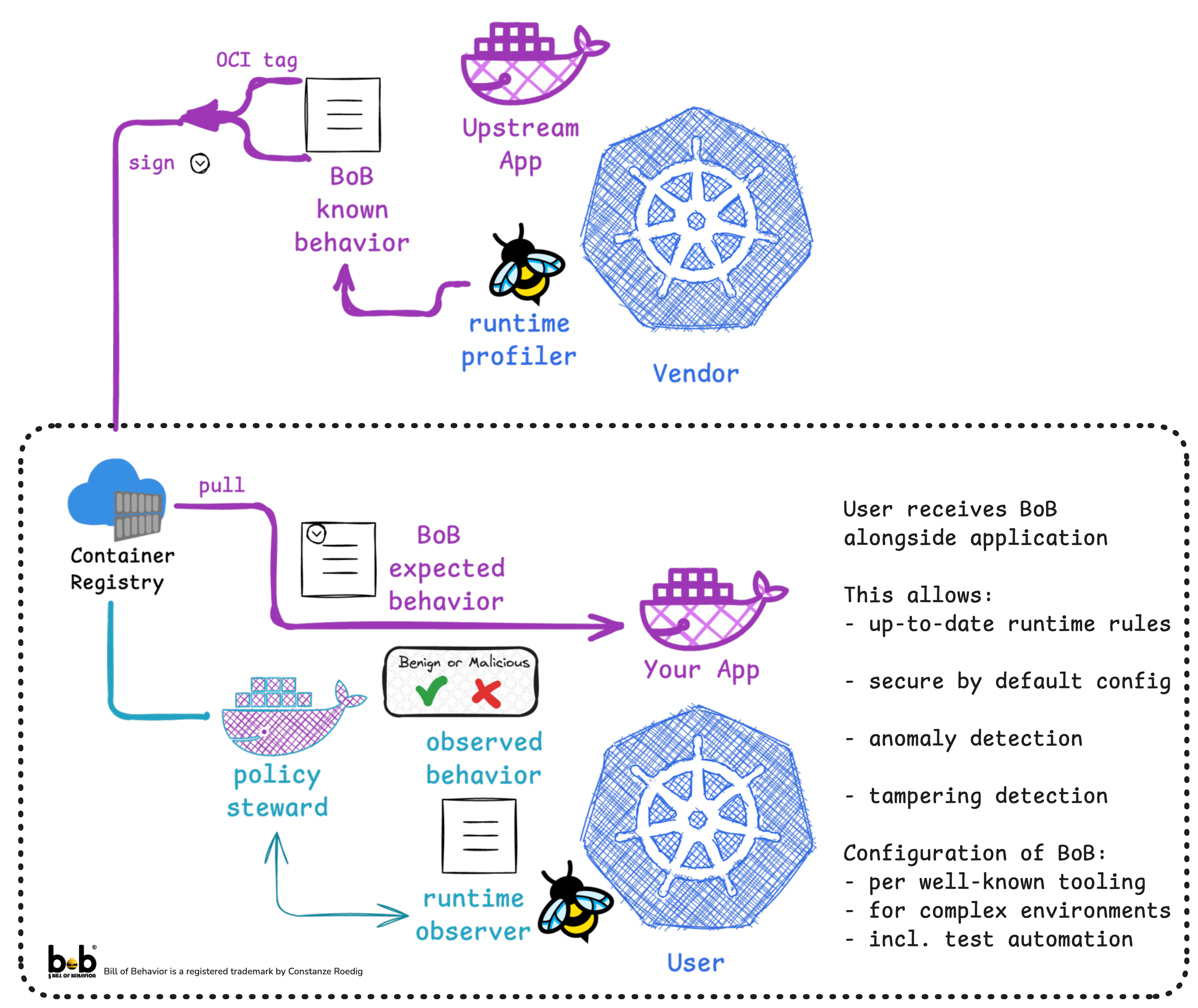
Now assuming the vendor created the SBOB on a different system thn the consumer
Step 1: Wait for the detection stack to be fully online
Yes, those are the exact same steps as on the other cluster. But if you look under the hood: the infrastructure is very different.
Again:
Please to wait until storage and node-agent are ready, open a new tab new terminal and watch the kubescape alerts:
kubectl logs -n honey -l app=node-agent -c node-agent -f
wait for
{"level":"info","ts":"2026-08-02T18:01:36Z","msg":"ContainerWatcher started successfully"}
{"level":"info","ts":"2026-08-02T18:01:37Z","msg":"ContainerWatcher started successfully"}
Side-Note: This is a so-called vanilla kubernetes cluster, whereas the earlier one was a k3s, they have different network, different storage and different
paths. Also they are from different "vendors".
Step 2: Deploy the Application
We again deploy the two redis-es but this time on this new and different infrastructure.
- a) Redis-OSS
- b) KeyDB https://docs.keydb.dev/
cd ~/bob/example/redis/distros
./deploy-distros.sh redis sbob
./deploy-distros.sh keydb sbob
in the logs, wait for
{"level":"info","ts":"2026-08-02T18:02:53Z","msg":"container has a user defined profile","profile":"redis","container":"redis","workload":"redis-master-0"}
Step 2: Execute the app (redis) under Benign Behavior
We also repeat the functional tests: this will tell us how general and how portable the SBOB was.
Side-note: this cluster is a lot slower than the other one, so there is a lot of chatter in the logs
/home/laborant/bobctl test --functional-tests functional/redis-oss.yaml -n redis
/home/laborant/bobctl test --functional-tests functional/keydb.yaml     -n keydb
There should again be no alerts in the kubectl logs ... window.
Step 3: Run the attack suite
/home/laborant/bobctl attack --attack-suite attacks/redis-oss.yaml -n redis
/home/laborant/bobctl attack --attack-suite attacks/keydb.yaml -n keydb
Whereas these tests will again validate that the detection works.

Check out the K8sStormcenter for more examples
Made with ♥️ by k8sstormcenter
Next up features:
- Adding allowlisted clients
- How to use the template languages to auto-substitute user config choices (as long as the vendor planned for them)
and of course, more and much more complex CNCF Applications
- Previous lesson
- Software Bill of Behaviour for CNCF projects