Automate Drive Provisioning With a Shell Script

Premium Challenge
Upgrade your membership to unlock this and all other premium materials.
In the previous challenges you provisioned storage step by step and by hand: created a partition table, formatted a drive, mounted filesystems, and made a mount survive a reboot. On a single server or personal machine, typing these commands interactively works fine. But when you get an entire fleet of servers with the same blank data drive, the manual workflow won't get you far enough: provisioning has to become a script that runs from cloud-init, a configuration management tool, or a first-boot hook.
To solve this problem in a scalable way, write a shell script at /usr/local/bin/provision-drive.sh that accepts two arguments -
a block device and a mount point - and turns a completely blank drive into a ready-to-use filesystem:
- Create a GPT partition table on the device.
- Add a single, optimally aligned partition spanning the whole drive.
- Format the partition as
ext4. - Mount it at the given mount point.
- Persist the mount with a UUID-based
/etc/fstabentry.
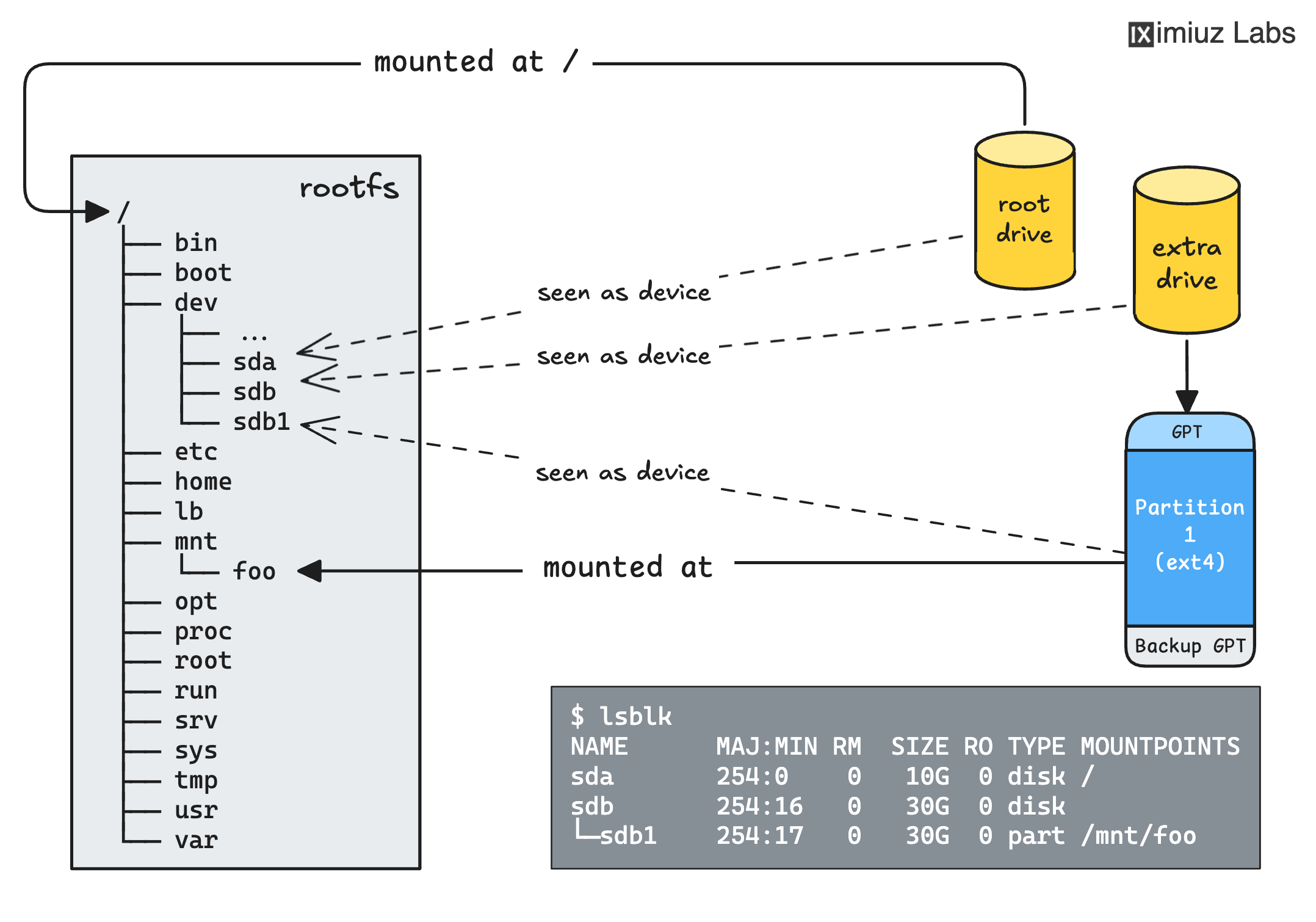
The end state the script must produce on every server of the fleet.
And two extra requirements that ensure the script you prepare is automation-ready:
- Non-interactive: the script must finish without any human input (no prompts, no confirmations).
- Idempotent: running the script a second time on an already-provisioned drive must succeed without breaking anything (and without duplicating fstab entries).
Your machine has its own blank drive (/dev/vdb) to experiment on.
The verification, however, happens elsewhere: a hidden grading machine with an identical blank drive
fetches your script and runs it non-interactively as root, with its standard input closed,
and with a randomly generated mount point - so the script must honor its arguments,
not hardcode any paths.
First, put the script in place:
Once the script exists, the grading machine copies it over, runs it on its fresh blank drive, and inspects the outcome:
Hint: parted without prompts
parted is best known for its interactive shell, but it can also take complete commands
as arguments and apply them without asking questions - look up the -s flag in man parted.
For a refresher on the manual partitioning steps, revisit the Create a GUID Partition Table challenge.
Hint: Optimal partition alignment without the math
You don't have to compute the correct start sector yourself:
the -a opt flag tells parted to align new partitions optimally,
and percentage boundaries like 0% and 100% give it the freedom
to adjust the exact offsets as needed.
Hint: Making the new partition visible
After the partition table changes, the kernel must notice the new partition before you can format it. You've already dealt with this in the drive-splitting challenge - the same tool works here.
Hint: Formatting and persisting
Formatting and mounting work exactly as in the
Create an Ext4 Filesystem challenge,
and the fstab entry follows the same rules as in the
Make a Filesystem Mount Survive a Reboot challenge.
blkid can extract the UUID of the freshly formatted partition for the fstab entry.
Finally, the grading machine runs your script one more time - on the drive that is already provisioned:
Hint: Is your script safe to run twice?
Idempotency usually means checking before creating: does the partition already exist? Does it already carry a filesystem? Is there already an fstab line for this mount point? Is the filesystem already mounted? Each step of the script can be skipped when its work is already done.