Write a Dockerfile That Excludes Dev Dependencies from the Production Image

Premium Challenge
Upgrade your membership to unlock this and all other premium materials.
In this challenge, you will write a Dockerfile to containerize a Node.js web application without including its development dependencies in the final image.
Explore the application
The application is located in the ~/app/ directory.
It's an Express.js web server with a couple of API endpoints.
Take a moment to look at the package.json:
cat ~/app/package.json
Notice that it has both dependencies and devDependencies sections.
The runtime dependency is just express - the web framework the app needs to serve requests.
The devDependencies include tools that are only useful during development:
- ESLint (
eslint,@eslint/js,globals) - a linter - Jest (
jest) - a testing framework - Supertest (
supertest) - an HTTP testing library - Nodemon (
nodemon) - a dev server that auto-restarts on file changes
You can try them out by first installing all the dependencies:
cd ~/app && npm install
Then running the linter:
npm run lint
And the tests:
npm run test
These tools are essential during development, but the production container
only needs to run node server.js - and for that, only express is required.
Including linters, test frameworks, and their transitive dependencies in the
image would add hundreds of unnecessary packages and tens of megabytes of bloat.
The task
Your goal is to:
- Create a
Dockerfilein the~/app/directory. - Build a Docker image named
my-app:v1.0.0. - Ensure the containerized application starts correctly and responds on port
3000. - Make sure the image does not contain any dev dependencies.
You can test your image at any point by running:
docker run -p 3000:3000 my-app:v1.0.0
Hint 1
A Dockerfile is a text file with instructions for building a container image.
Your Dockerfile needs at least the following instructions:
FROM- specify a base image (e.g.,node:24-slim)COPY- copy the application files into the imageRUN- install the application dependencies usingnpmCMD- specify the command to start the server
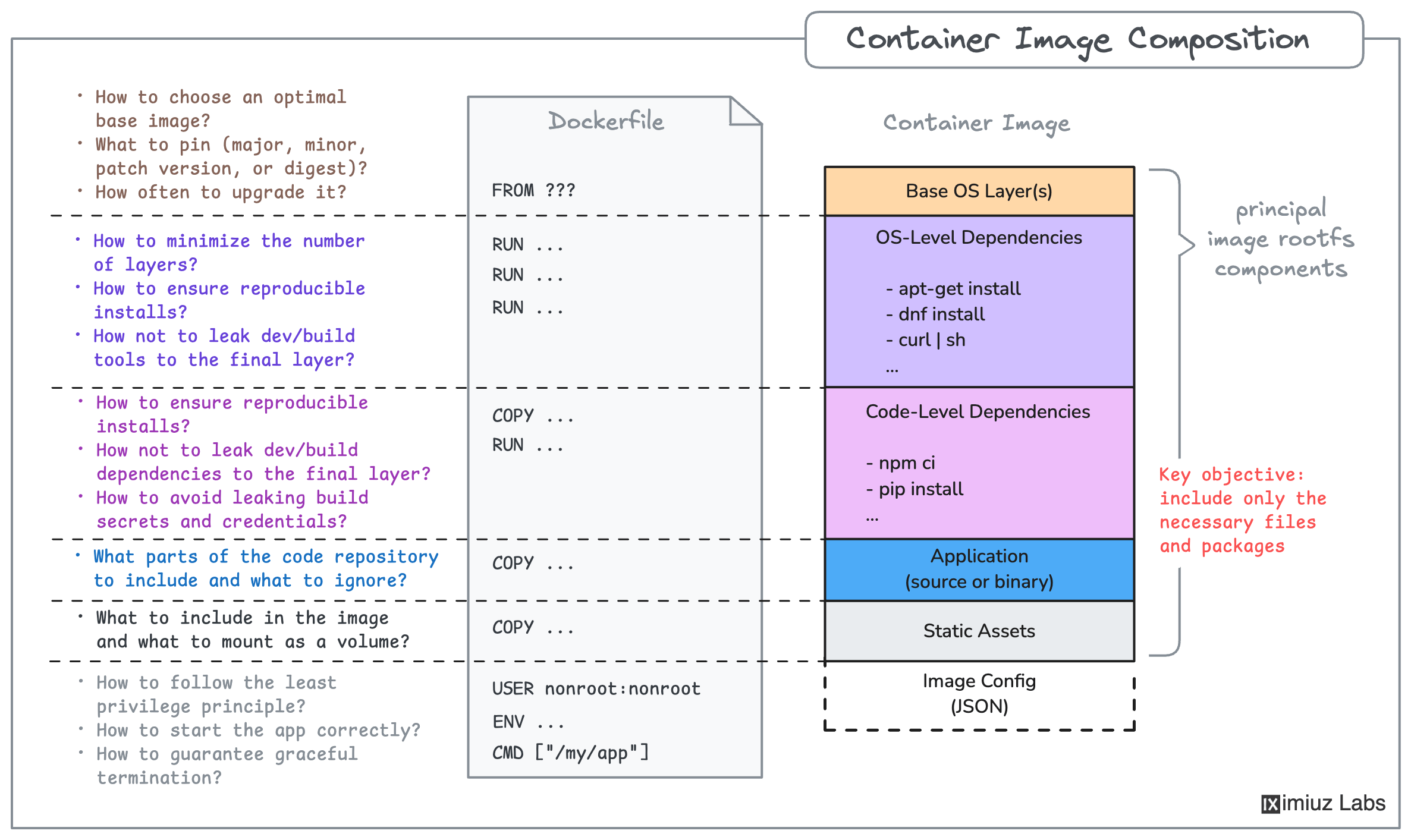
Hint 2
For a refresher on how to build a Docker image from a Dockerfile, check out this challenge:
Hint 3
If the container fails to start or the application doesn't respond, run the container in the foreground to see the error:
docker run -p 3000:3000 my-app:v1.0.0
Make sure the application dependencies are installed inside the image and the server process starts correctly.
Hint 4
By default, npm ci and npm install install all dependencies,
including devDependencies like linters and test frameworks.
However, both commands provide ways to explicitly exclude (or include) specific dependencies.
Check out the npm ci and npm install documentation for more details.