Docker 101: Tag and Push Container Images to Registries

Premium Challenge
Upgrade your membership to unlock this and all other premium materials.
Your local Docker daemon on dev-01 already has a couple of application images loaded:
IMAGE             ID             DISK USAGE   CONTENT SIZE
acme/app:v1.0.0   8a1f59ffb675       12.9MB         3.89MB
toolkit:latest    f85340bf132a       6.56MB         2.15MB
These images use short names with no registry domain(s).
Docker happily stores them locally, but you cannot docker push them as-is -
the short form will make Docker push them to Docker Hub's docker.io/library by default.
To share an image with the world (or with another machine on your network), you need
to re-tag it with a fully-qualified reference that spells out the registry domain,
repository path, and tag - and only then docker push it.
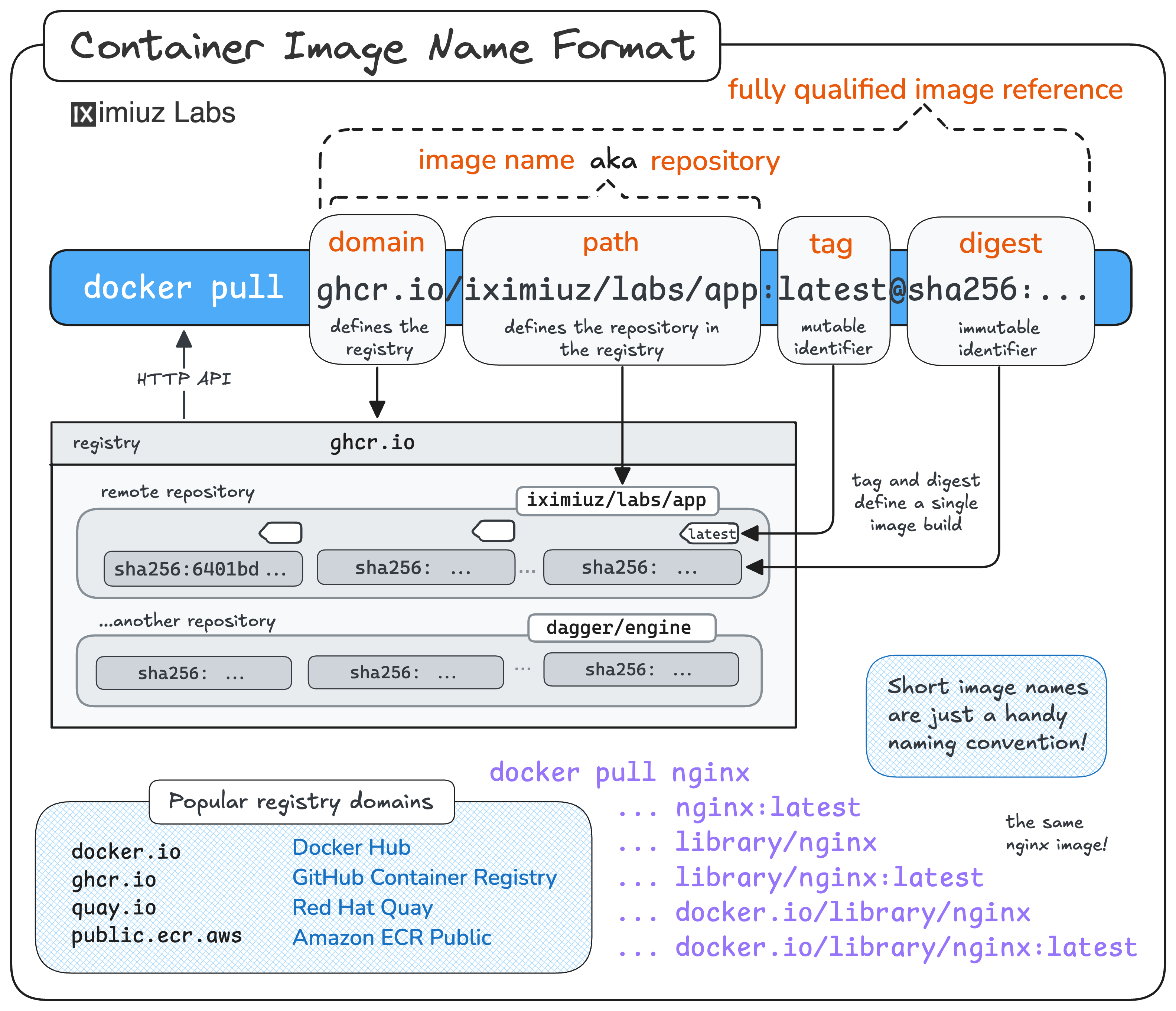
In this challenge, you'll practice tagging and pushing the two local images to three different registries.
Push to registry.iximiuz.com
First, let's publish acme/app:v1.0.0 to the playground's shared remote registry -
registry.iximiuz.com.
Push it under the repository acme/app and keep the v1.0.0 tag.
Hint 1
The <target> reference is what decides where docker push will upload the image.
Use docker tag <source> <target> to add another reference to the existing image.
Hint 2
To publish the image, you need two commands:
docker tag <local-ref> <registry>/<repo>:<tag>
docker push <registry>/<repo>:<tag>
After the push, docker images will show both references (the short and the fully-qualified one)
pointing to the same image ID.
Push to a local registry on localhost:5000
Not every registry lives on the public internet.
A very common pattern - especially during development and in CI - is to run a registry on the same machine
that produces the images.
This playground already has one running on dev-01 at localhost:5000.
Re-tag the toolkit:latest image and push it to this local registry under the repository toolkit,
keeping the latest tag.
Hint 3
When a registry listens on a non-default port, the port becomes part of the registry domain in the image reference:
<host>:<port>/<repo>:<tag>
Docker parses this correctly - it won't confuse the port with a tag.
Hint 4
Docker trusts localhost registries over plain HTTP by default, so you don't need any extra configuration
to push to localhost:5000.
Push to a remote registry on ci.internal:5555
The playground also comes with a second VM called ci - think of it as a build machine on your team's network.
A registry is running on ci.internal:5555, reachable from dev-01 by the hostname ci.internal.
Re-tag acme/app:v1.0.0 one more time and push it to ci.internal:5555/acme/app:v1.0.0.
Hint 5
The recipe is the same as before - docker tag with the new registry prefix, then docker push.
A single image can carry many tags at once, so you don't have to untag it from the previous pushes.
Hint 6
The Docker daemon on dev-01 has already been configured to treat ci.internal:5555 as a trusted
insecure registry (allowed to be accessed over plain HTTP).
See the insecure-registries entry in /etc/docker/daemon.json:
{
  "insecure-registries": ["ci.internal:5555"]
}
Without it, docker push to a plain-HTTP registry on a non-loopback host would fail.