Make a Container Restart Automatically After Docker Host Reboot

Premium Challenge
Upgrade your membership to unlock this and all other premium materials.
In this challenge, you'll make a containerized web application resilient to Docker host reboots.
A web server is already running as a background container named app-1 and serves HTTP traffic on port 8080.
You can verify it's working:
curl http://localhost:8080/
Your task is to configure the system and the app-1 container so that it automatically restarts whenever the Docker daemon restarts or the machine reboots.
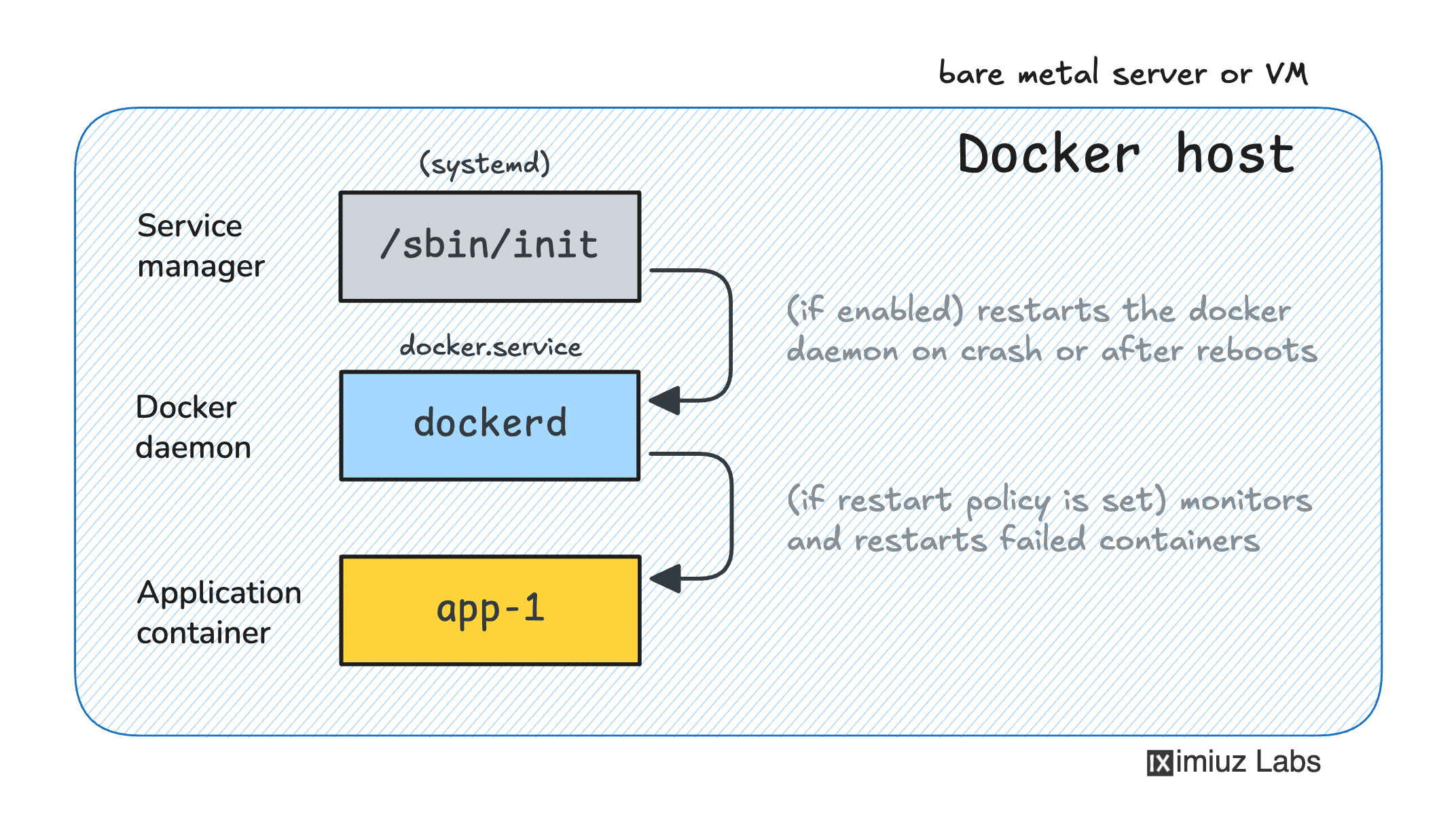
First, you need to ensure that the Docker systemd service is enabled:
Hint: Enabling the Docker systemd service
The fact that the docker.service is currently running does not guarantee that it's enabled (i.e. will start automatically on boot).
Depending on the server's Linux distribution and configuration,
the default Docker installation procedure may or may not enable the service by default,
so it's always a good idea to ensure it's enabled.
Next, you need to configure the app-1 container's restart policy to make it resilient to restarts:
Hint: Setting container restart policies
Check out this challenge for a refresher on setting container restart policies:
Once the Docker service is enabled in systemd and the container's restart policy is set, reboot the machine:
sudo reboot
Now let's check if the app-1 container survived the reboot and came back online automatically with the same container ID: