Understand Volumes in Kubernetes: emptyDir vs hostPath

Scenario
You are exploring how Kubernetes handles storage across two different volume types. Each volume type stores data differently—understanding where the data physically lives on the node is essential for debugging and designing reliable workloads.
A volume-explorer Pod needs to be created with both an emptyDir and a hostPath volume. Once it is running, you will locate the exact path where the emptyDir volume stores its data on the Kubernetes node filesystem.
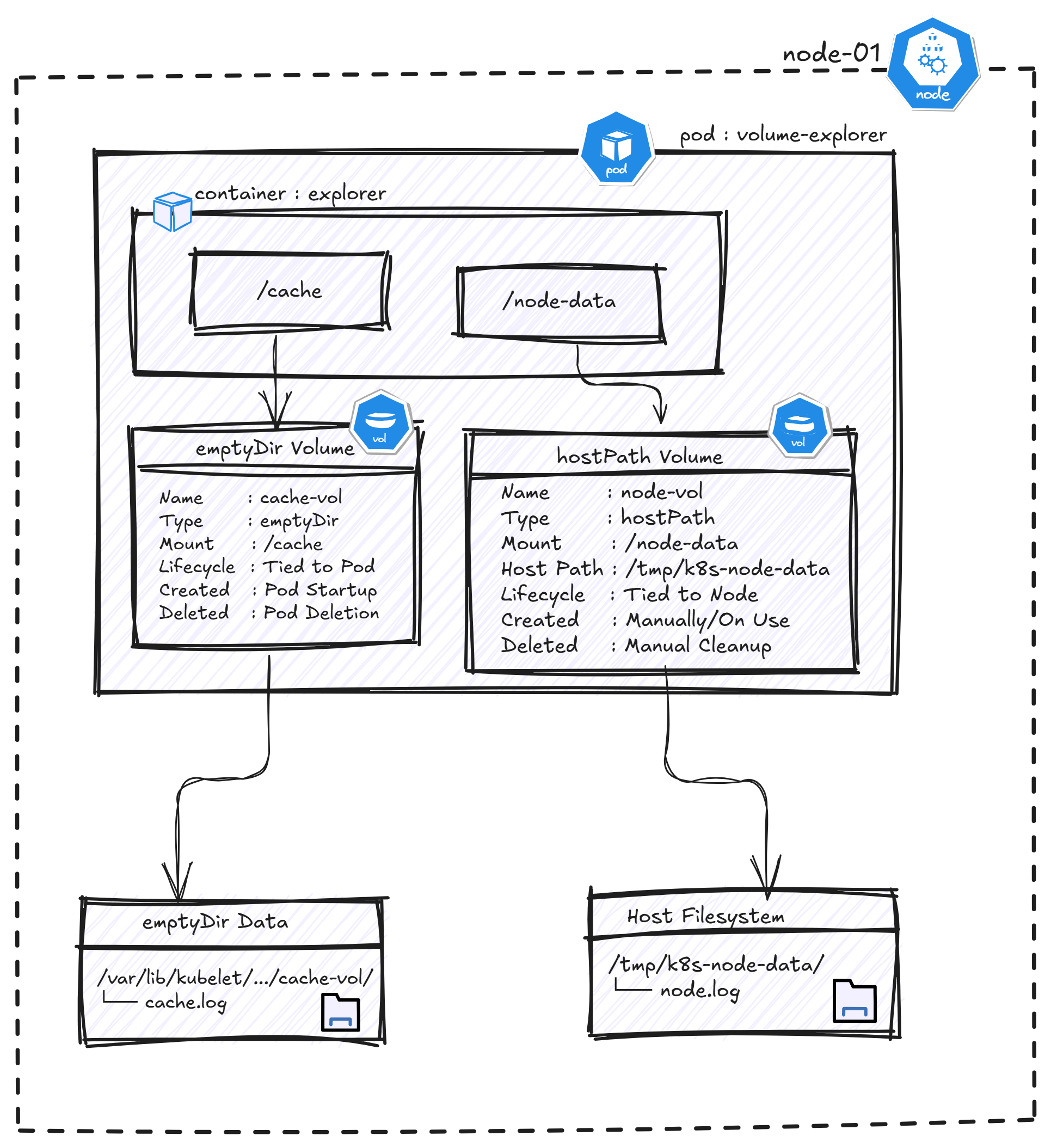
Figure: emptyDir and hostPath volume architecture showing mount points, lifecycle, and storage locations on the Kubernetes node.
Task
- Create a Pod named
volume-explorerin thestorage-labnamespace usingbusybox:stable, with a container namedexplorerthat mounts both volume types and writes data to each on startup:
emptyDir— volume namecache-vol, mounted at/cachehostPath— volume namenode-vol, host path/tmp/k8s-node-data, mounted at/node-data
- Use the following command so the Pod writes to both volumes on startup and stays running:
- /bin/sh - -c - | echo 'cache volume data' > /cache/cache.log && echo 'hostpath volume data' > /node-data/node.log && sleep 3600 - Once the Pod is running, find the exact path on the node where the
emptyDirvolume (cache-vol) is stored and enter it below :
Hint 1 — Volume types and structure
Both volume types are defined under spec.volumes and referenced in spec.containers[].volumeMounts:
emptyDir: {}— created fresh when the Pod starts, deleted when the Pod is removedhostPath.path— maps a real directory from the node into the Pod
Documentation
Hint 2 — Finding the emptyDir path on the node
On a kubeadm cluster, emptyDir volumes are stored on the node under a path that includes the Pod's UID and the volume name. Get the Pod UID first:
kubectl get pod volume-explorer -n storage-lab -o jsonpath='{.metadata.uid}'
Then look for the volume under the kubelet directory on the node where the Pod is running.
Documentation