Switch Live Traffic from Blue to Green Using Kubernetes Services

Scenario
You are running a live web application web-app-blue in the ios namespace, served by a Service named web-app-service exposed on NodePort 32222. A new version of the application is ready to go live.
Rather than performing a rolling update, the team is using a blue-green deployment strategy — running both versions simultaneously and switching traffic instantly by updating the Service selector.
The web-app-service currently routes all traffic to the blue deployment. Your job is to deploy the green version and cut over traffic with zero downtime.
Task
1. Create a Deployment named web-app-green in the ios namespace using the same structure as the Blue deployment:
- Image:
public.ecr.aws/docker/library/nginx:stable-perl - Replicas:
3 - Labels:
app: web-app,color: green - Mount the existing ConfigMap
web-app-green-configat/usr/share/nginx/html/index.htmlusingsubPath
2. Do not route traffic to it yet — wait until all 3 green pods are Running.
3. Switch the Service selector on web-app-service from color: blue to color: green — traffic will instantly shift to the green deployment.
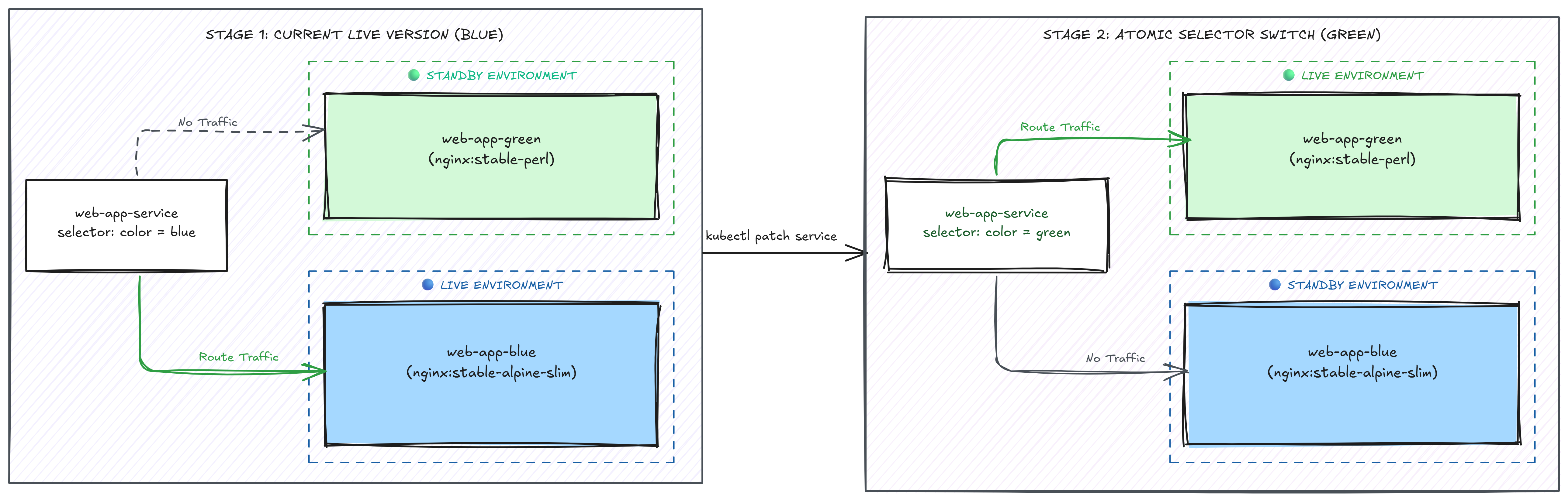
Blue-Green Switching: Updating the Service selector from Blue to Green instantly reroutes traffic with zero downtime.
After switching, confirm the green page is served on NodePort 32222:
curl cplane-01:32222
Hint 1
Use the same structure as the blue deployment but with the green image, green labels, and the web-app-green-config ConfigMap:
kubectl get deployment web-app-blue -n ios -o yaml
Once green pods are running, patch the Service selector to point to green.
Use this as a reference to create the green deployment with the updated image and labels: