Kubernetes - Multi-Container Pod Design Patterns

Container design patterns span three levels: single-container patterns for how one container manages itself, single-node multi-container patterns for containers cooperating in one Pod, and multi-node patterns for distributed algorithms. Sidecar, ambassador, and adapter, the patterns most people picture when they hear the term, fall under the single-node multi-container level, and come from "Design Patterns for Container-Based Distributed Systems", published by Brendan Burns and David Oppenheimer. That paper is not an exhaustive list. Most new scenarios still fall under one of its categories, or a mix of them.
- Sidecar: no request or response relationship at all, it does not intermediate anyone's call. It just autonomously extends a capability, for example syncing files into a volume. Neither the app nor an external party is calling it.
- Ambassador: the app inside the Pod is the client. It calls out through the ambassador to reach something external, without knowing the complexity of that external thing.
- Adapter: something outside the Pod is the client. It calls in expecting a standard interface, and the adapter translates that into whatever native interface the main container actually speaks.
This challenge also covers init containers and native sidecars, two related mechanisms that come up alongside these patterns.
Task 1 - Sidecar
An application container often needs a capability it does not implement itself, pulling data from a remote source, rotating credentials, shipping logs, without knowing where any of it comes from. A sidecar container in the same Pod can provide that, using nothing more than a shared volume. A sidecar does not intermediate a request for anyone, it just adds a capability the main container lacks.
This task's Pod has two containers, logger and app, sharing one volume named shared-vol. The logger container appends a new timestamp to log.txt every 2 seconds, the app container only reads what is already there with tail -f.
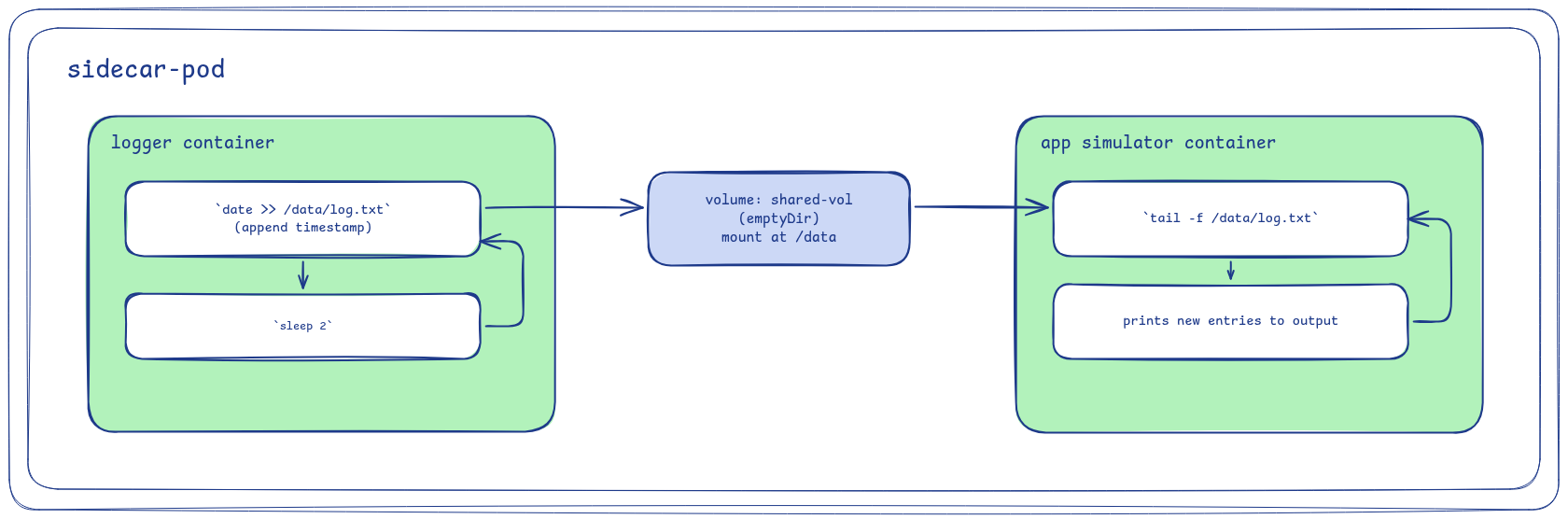
Steps:
- Create a Pod named
sidecar-pod:- Add a volume named
shared-vol, anemptyDir - Create container named
logger, imagebusybox, mountsshared-volat/data, runningsh -c "while true; do date >> /data/log.txt; sleep 2; done" - Create container named
app, imagebusybox, mountsshared-volat/data, runningsh -c "tail -f /data/log.txt"
- Add a volume named
tail -f blocks and prints each new line to stdout as soon as it is written.
- Watch it live with
kubectl logs -f sidecar-pod -c app. A new timestamp appears roughly every 2 seconds, as soon as theloggercontainer appends it.
Task 2 - Adapter
Adapter examples are often about reformatting something like logs, taking one line format and rewriting it into another. This one works at the interface level instead: the app container, a go-httpbin instance running in this same Pod, only serves /uuid, it has no idea /legacy-id exists. adapter exposes /legacy-id, coming from the nginx config in adapter.conf, an interface the app container never had, and proxies it over localhost to the real path. That config is already written to ~/adapter.conf in the home directory by the setup task.
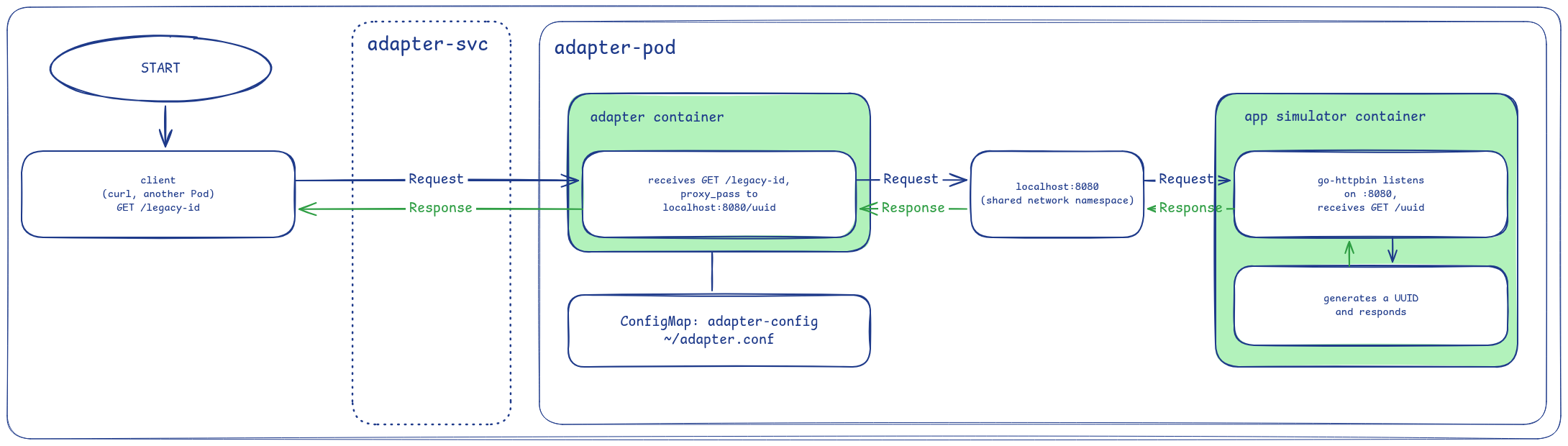
Steps:
- Create a ConfigMap named
adapter-configwith a data keyadapter.conffrom the nginx config at~/adapter.conf - Create a Pod named
adapter-podwith labelrun: adapter-pod:- Create container named
app, imageghcr.io/mccutchen/go-httpbin - Create container named
adapter, imagenginx:alpine, mounts the ConfigMap at/etc/nginx/conf.d
- Create container named
- Create a Service named
adapter-svcof typeClusterIPwith selectorrun: adapter-pod(matching the Pod's label), port80targeting container port80
To see the translation happen rather than just trust the result:
- Get the ClusterIP with
kubectl get svc adapter-svc -o jsonpath='{.spec.clusterIP}'. - Call
curl http://<cluster-ip>/legacy-id. The response is a UUID, even though theappcontainer has no/legacy-idpath of its own, only/uuid.
Task 3 - Ambassador
In the ambassador pattern, the app container is the client that initiates the request. It only ever talks to localhost, unaware of what is actually handling the connection or where the request ends up. An ambassador does not have to just forward bytes unchanged either, it can also modify the request on the way out.
This task uses three pieces. httpbin is a small HTTP test service, already running as a Service in the infra namespace. It echoes back whatever it receives, so its /headers endpoint reflects every header a request arrived with. The app container sends a plain request to localhost with no headers of its own. ambassador receives that request and adds an X-Api-Key header before forwarding it on to httpbin, using the nginx config already written to ~/default.conf.
Once ambassador is configured, the response the app container gets back should include a header it never sent, proof the request was modified on the way out rather than just relayed.
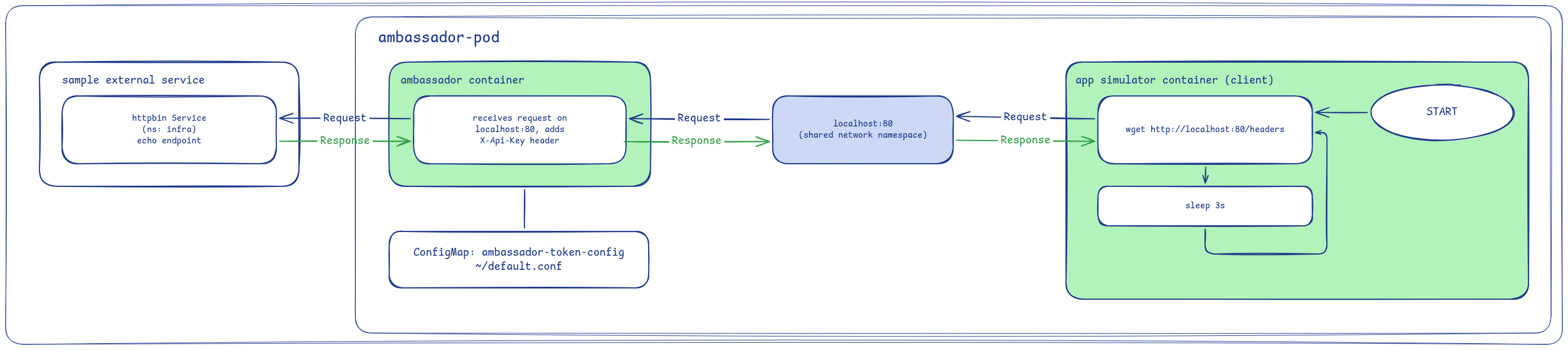
Steps:
- Create a ConfigMap named
ambassador-token-configwith a data keydefault.conffrom the nginx config at~/default.conf - Create a Pod named
ambassador-pod:- Create container named
app, imagebusybox, runningsh -c "while true; do wget -qO- http://localhost:80/headers; echo; sleep 3; done" - Create container named
ambassador, imagenginx:alpine, mounts the ConfigMap at/etc/nginx/conf.d
- Create container named
To see the mutation happen rather than just trust the result, compare the two paths directly:
- Exec into the
appcontainer and callhttpbin.infraon the Service withkubectl exec ambassador-pod -c app -- wget -qO- http://httpbin.infra/headers, bypassingambassadorentirely. That response has noX-Api-Keyheader. - Call
kubectl exec ambassador-pod -c app -- wget -qO- http://localhost:80/headers. The header is there this time.
The only difference between the two calls is whether the request passed through ambassador.
Task 4 - Init Containers
Init containers run in sequential order. Each one must exit 0 before the next one starts. Once every init container has exited, the main containers start. This makes them suited to one-time setup work: pulling configs, rendering templates, etc.
The init1 container and the init2 container both append to the same file, so the file's contents prove the order held. The app container reads the file once, after both init containers have already exited. That read always finds both lines, in order.
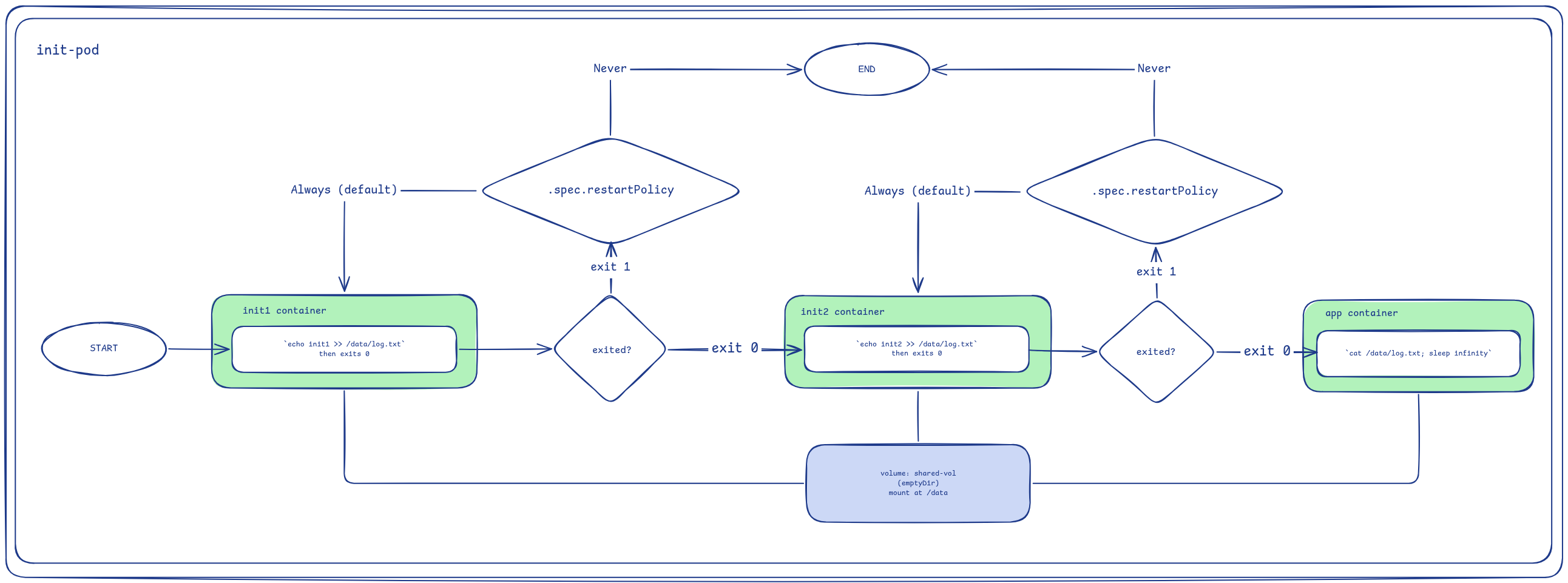
Steps:
- Create a Pod named
init-pod:- Add a volume named
shared-vol, anemptyDir - Create an init container named
init1underinitContainers, imagebusybox, mountsshared-volat/data, runningsh -c "echo init1 >> /data/log.txt" - Create a second init container named
init2underinitContainers, listed after theinit1container, imagebusybox, mountsshared-volat/data, runningsh -c "echo init2 >> /data/log.txt" - Create the main container named
app, imagebusybox, mountsshared-volat/data, runningsh -c "cat /data/log.txt; sleep infinity"
- Add a volume named
kubectl get pod init-pod -wshows the Pod's status transitions live.
Task 5 - Native Sidecar
A sidecar container starts at the same time as the main container, with no guarantee it is ready first. A plain init container guarantees order, but it must exit before the main containers start, so it cannot keep running as an ongoing capability like a proxy or log shipper needs to. Adding restartPolicy: Always on the container itself (.spec.initContainers[].restartPolicy, not the Pod's .spec.restartPolicy) and a startupProbe to an initContainers entry changes that behavior: kubelet waits for the probe to pass, not for the container to exit, before starting the main containers. That combination is a native sidecar: the ordering guarantee of an init container, with the lifespan of a sidecar.
The app container here reads the file once, right when it starts, expecting data the logger container already wrote. It then runs sleep infinity to simulate a long-running app.
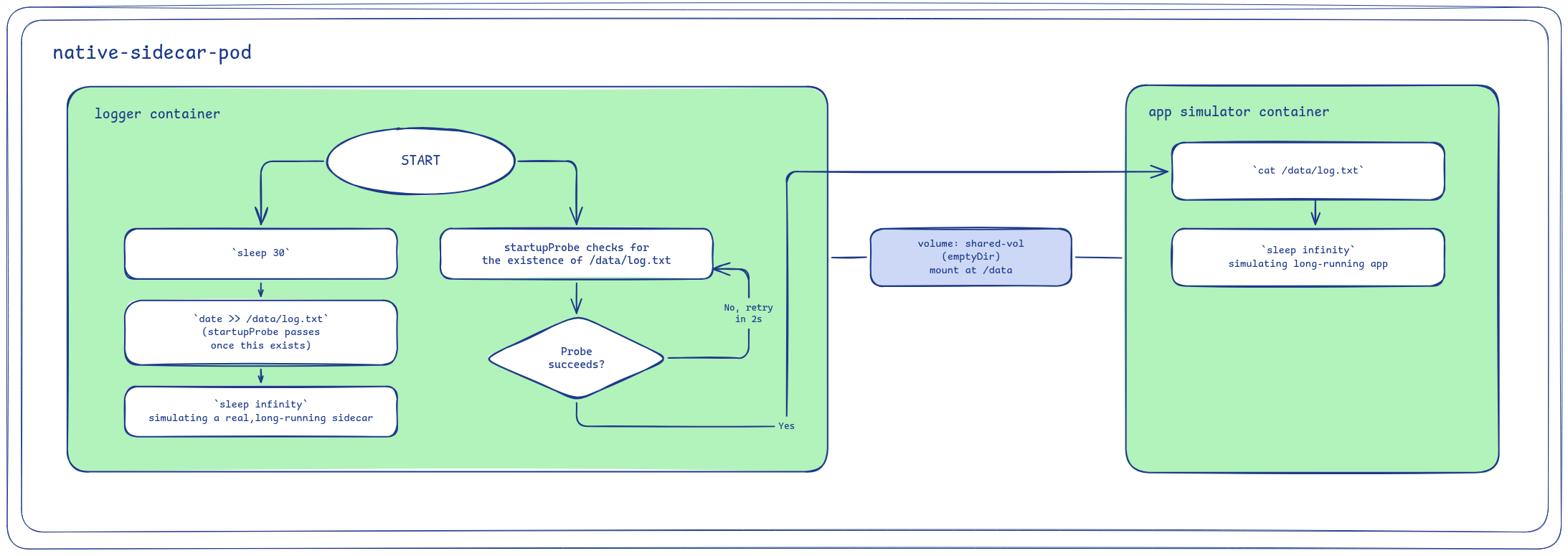
Steps:
- Create a Pod named
native-sidecar-pod:- Add a volume named
shared-vol, anemptyDir - Create the native sidecar
loggerunderinitContainers, imagebusybox,restartPolicy: Always, mountsshared-volat/data, runningsh -c "sleep 30; date >> /data/log.txt; sleep infinity" - Add a
startupProbeon theloggercontainer usingexecrunningtest -s /data/log.txt,periodSeconds: 2,failureThreshold: 30 - Create the main container named
app, imagebusybox, mountsshared-volat/data, runningsh -c "cat /data/log.txt; sleep infinity"
- Add a volume named
kubectl get pod native-sidecar-pod -wshows the Pod's status transitions live.