Set and Use Secrets in a Kubernetes Deployment

Scenario
You are working with a Kubernetes Deployment in the orbit namespace.
An existing Deployment named config-deployment is already running.
A Secret YAML file has been prepared for you on the dev-machine at:
/opt/course/extra-config-secret.yaml
Tasks
- Create a Secret named
config-secretin theorbitnamespace with:username=appuserpassword=apppass
- Expose those Secret values as environment variables in
config-deployment:CONFIG_SECRET_USERNAME→ keyusernameCONFIG_SECRET_PASSWORD→ keypassword
- Apply the second Secret from the YAML file already present on the dev-machine at
/opt/course/extra-config-secret.yaml. Mount that Secret as a volume inside the Deployment. The mount path inside the pod is/tmp/extra-config. - Ensure the Deployment rolls out successfully with all changes applied.
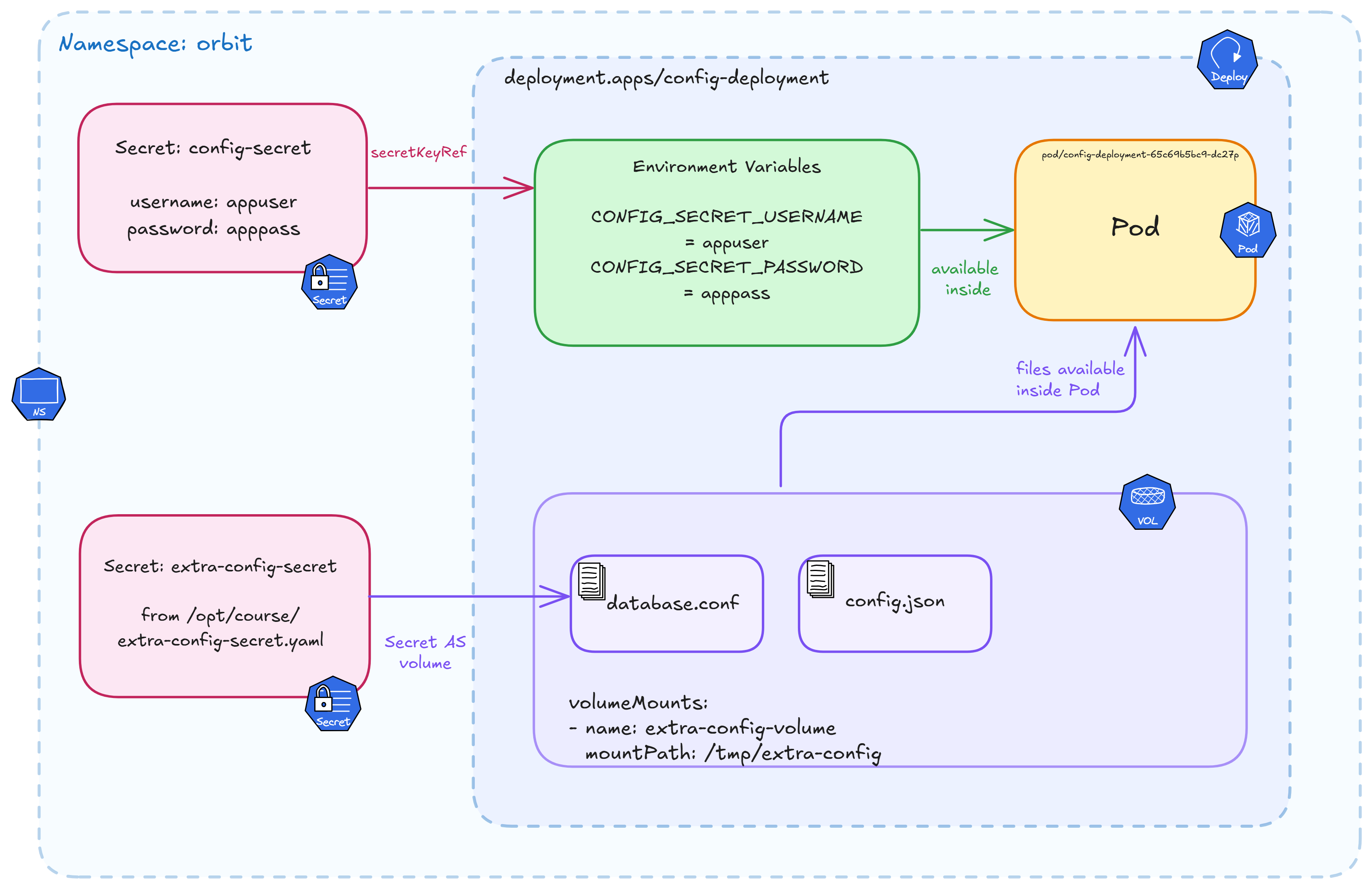
Kubernetes Secrets flow in the orbit namespace — config-secret exposed as environment variables and extra-config-secret mounted as a volume at /tmp/extra-config inside config-deployment.
Hint 1 — Inspect the existing Deployment
Before making any changes, check what is already running in the orbit namespace.
Look at the Deployment spec and its current pod state to understand the baseline.
kubectl get all -n orbit
kubectl describe deployment config-deployment -n orbit
Documentation
Hint 2 — Create a Secret imperatively
kubectl can create Secrets directly from the command line without a YAML file.
Look into the kubectl create secret generic command and its --from-literal flag
to pass key-value pairs inline.
Don't forget to target the correct namespace.
Documentation
Hint 3 — Expose Secret keys as environment variables in a Deployment
Kubernetes lets you reference individual Secret keys as environment variables
inside a container using secretKeyRef under the env field.
Export the current Deployment spec to a file, edit it to add the env entries
referencing config-secret, then reapply with kubectl apply.
Check the Kubernetes docs for the exact structure of valueFrom.secretKeyRef.
Documentation
Hint 4 — Apply the second Secret from a YAML file
A Secret manifest has already been prepared for you on the dev-machine at:
/opt/course/extra-config-secret.yaml
Inspect the file to understand its structure, then use kubectl apply to create
the Secret in the cluster. Confirm it lands in the correct namespace.
Documentation
Hint 5 — Mount a Secret as a volume inside the Deployment
To make Secret data available as files inside a container, you need two things in the Deployment spec:
- A
volumeentry under.spec.template.specthat references the Secret by name - A
volumeMountentry under the container that maps that volume to a path
The target mount path inside the container is:
/tmp/extra-config
This path is inside the running pod, not on the dev-machine.
After applying the changes, use kubectl rollout status to confirm the Deployment
updated successfully, then exec into the pod to verify the files are present.
Documentation