Use a Kubernetes Job to Check NATS Pub/Sub Between Namespaces

Scenario
NATS, a message broker, runs in the platform-nats-server namespace. Services exchange messages through it with publish/subscribe: a publisher sends a message to a subject, and NATS delivers it to every subscriber of that subject.
platform-nats-server: the NATS broker, reached through thenatsService on port4222.payment-service: thepayment-processorsubscribes topayments.requestsand prints every message it receives in its logs.checkout: empty. This is where you create the test Job.
The checkout team wants to prove that a Job in checkout can publish a payment request that the payment service receives.
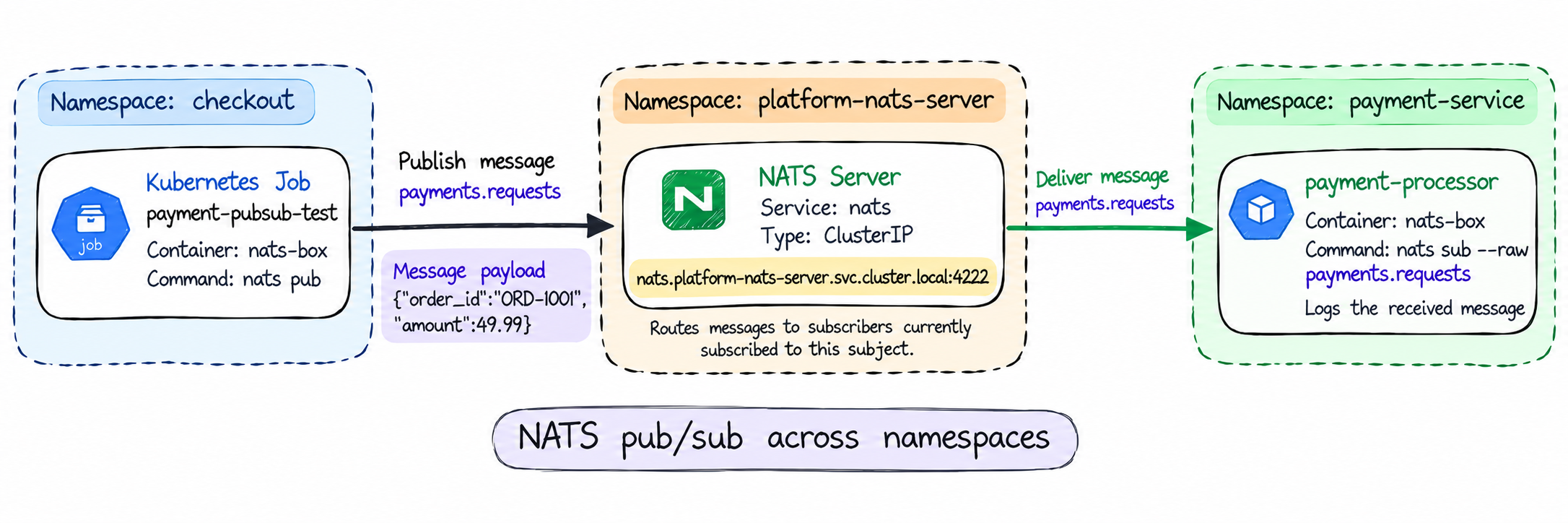
A message published in checkout reaches payment-service through the NATS server.
Core NATS does not store messages. Only subscribers that are connected when a message is published receive it, so a successful publish alone does not prove delivery. The payment service logs do.
Task
Create a Job in checkout that publishes a test payment request, so you can check that it reaches the payment service. The Job must have these settings:
| Setting | Value |
|---|---|
| Name | payment-pubsub-test |
| Namespace | checkout |
| Image | natsio/nats-box:0.20.1 |
| Container command and args | Shown below the table |
| Successful Pods needed | 1, one Pod at a time |
| Retries of a failed Pod | At most 1 |
| Time limit for the whole Job | 15 seconds |
| A failed container | Is not restarted inside the same Pod |
| Clean up | The Job is deleted automatically 1 hour after it finishes |
Command and args of the Job container:
command: ["/bin/sh", "-c"]
args:
- |
  echo "sending payment request ORD-1001"
  nats pub -s nats://nats.platform-nats-server.svc.cluster.local:4222 payments.requests '{"order_id":"ORD-1001","amount":49.99}'
The Job must complete, and the payment-processor logs must show the payment request ORD-1001.
Do not change anything in the platform-nats-server and payment-service namespaces. If your Job fails, delete it, fix it and create it again.
NATS is not NAT. NAT (Network Address Translation) is a networking feature that rewrites IP addresses. NATS is a message broker: applications publish and subscribe to messages through it, in the same family as Apache Kafka or RabbitMQ.
Hint 1 | How the message travels with NATS pub/sub
The Job is the publisher: nats pub connects to the broker, sends one message to the subject payments.requests, and exits. The payment-processor is the subscriber: it stays connected and prints every message on that subject.
Watch the subscriber while you test, in a second terminal:
kubectl logs -n <namespace> deployment/<name> -f
If the message arrives, a new line with the message appears there.
Docs:
- Publish-Subscribe (NATS)
- Subjects (NATS)
- DNS for Services and Pods (Kubernetes)
Hint 2 | Running a shell script in a Job
The script has two lines, so a shell must run it. A container can override the image's start command. Look at the container fields that set what runs, and start from a generated Job skeleton:
kubectl explain job.spec.template.spec.containers.command
kubectl explain job.spec.template.spec.containers.args
kubectl create job <name> -n <namespace> --image=<image> --dry-run=client -o yaml
Docs:
- Define a Command and Arguments for a Container (Kubernetes)
Hint 3 | Job completions, retries and time limits
Every row of the settings table is one field. Most of them are in the Job spec: how many Pods must succeed, how many run at once, how many failed Pods are retried, how long the Job may stay active, and when a finished Job is deleted. Whether a failed container restarts is set in the Pod template:
kubectl explain job.spec
kubectl explain job.spec.template.spec.restartPolicy
Docs:
- Jobs (Kubernetes)
- Automatic Cleanup for Finished Jobs (Kubernetes)
Hint 4 | Checking the result
Check the Job status, the publisher output and the subscriber output:
kubectl get job,pods -n <namespace>
kubectl logs job/<job-name> -n <namespace>
kubectl logs -n <namespace> deployment/<name>
The Job log only shows that the message was published. Core NATS does not confirm delivery, so the subscriber log is what proves the message arrived.
If the Job fails, its events tell you why, for example BackoffLimitExceeded or DeadlineExceeded. A Job's Pod template cannot be changed, so delete the Job, fix it and create it again:
kubectl describe job <job-name> -n <namespace>
Docs:
- Jobs (Kubernetes)
- Publish-Subscribe (NATS)