Mount Only the Required ConfigMap Keys as Files to Run a Node.js Application

Scenario
A Deployment named orders-api-reader exists in namespace production, but its Pods are failing because the application configuration is missing.
A ConfigMap named app-config exists in the same namespace and contains multiple configuration keys for a Node.js application. However, the application requires only three keys: api.url, app.port, and app.order.
The Deployment manifest is located on dev-machine:
/home/laborant/nodejs-deployment.yaml
Task
Mount only the following three keys from the app-config ConfigMap as files inside /etc/app/config using a volume named app-config-vol. No other keys from app-config should be accessible inside the Pod.
api.url
app.port
app.order
Edit /home/laborant/nodejs-deployment.yaml and apply the updated manifest after making changes.
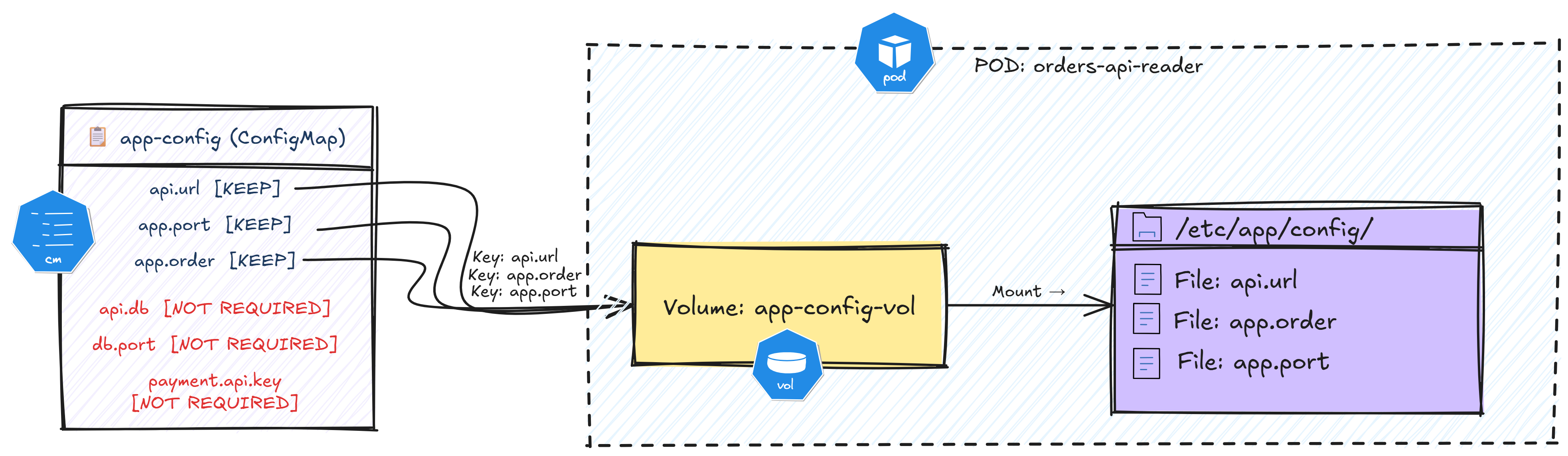
The diagram shows only selected ConfigMap keys mounted as files inside the Pod.
⚠️ Add only the required YAML changes; do not modify or add anything unnecessary.
Hint 1 — Understand Why the Pod Is Failing
Start by checking why the pod is failing. Look at the pod logs and events to understand what the application is trying to read and what is missing:
kubectl get pods -n production -l app=orders-api-reader
kubectl describe pod -n production -l app=orders-api-reader
kubectl logs -n production -l app=orders-api-reader
The application reads configuration files from /etc/app/config/. Check
what files it expects versus what is actually mounted inside the container.
Documentation
Hint 2 — Mount Only Specific ConfigMap Keys as Files
The app-config ConfigMap has 6 keys but only 3 are needed. When you mount
a ConfigMap as a volume without specifying which keys to include, all keys
are mounted as files. To mount only specific keys, use the items field
inside the volume definition.
Look at the existing volume definition in /home/laborant/nodejs-deployment.yaml
and add a second volume for app-config that mounts only the three required
keys as files at /etc/app/config.
cat /home/laborant/nodejs-deployment.yaml
kubectl get configmap app-config -n production -o yaml
Documentation