Mount a ConfigMap and Secret into a Single Directory Using a Projected Volume

Scenario
The exam namespace already has two resources waiting for you:
- ConfigMap
app-config— holds three configuration files:database.conf,cache.conf, andapp.properties - Secret
app-secret— holds three sensitive keys:db-password,api-key, andjwt-secret
A new Pod needs to read all six files from a single directory /etc/app.
The security policy requires the mount to be read-only.
Task
- Create a Pod named
appin theexamnamespace using thebusyboximage with the commandsleep 3600. - Define exactly one volume named
app-config-volthat combines bothapp-config(ConfigMap) andapp-secret(Secret) into a single volume using a projected volume. - Mount the volume at
/etc/appasreadOnly.
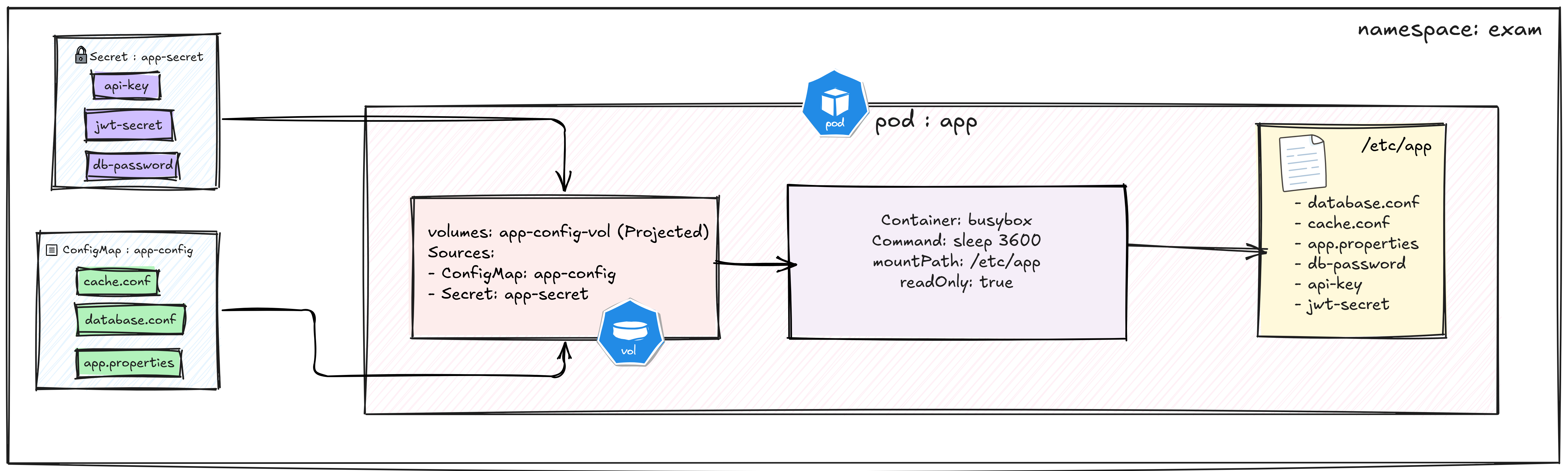
Both the ConfigMap (app-config) and Secret (app-secret) are projected into a single read-only directory (/etc/app) using one projected volume (app-config-vol).
Hint 1 — Why a Normal Volume Won't Work Here
A standard configMap volume or secret volume can only reference one
source. If you define two separate volumes and two separate mounts, you will
have two directories — not one. The task requires a single volume and
a single mount path that surfaces files from both sources simultaneously.
The volume type that solves this is called a projected volume.
Documentation
Hint 2 — Structure of a Projected Volume
A projected volume uses the projected key instead of configMap or
secret. Under it, sources accepts a list — each item is either a
configMap or a secret block referencing the resource by name.
Both are top-level sibling entries in the same sources list:
volumes:
- name: app-config-vol
  projected:
    sources:
    - configMap:
        name: app-config
    - secret:
        name: app-secret
Documentation
Hint 3 — Making the Mount Read-Only
readOnly is set on the volumeMount inside the container spec, not on
the volume definition itself. Reference the volume by the exact name
app-config-vol and set readOnly: true:
volumeMounts:
- name: app-config-vol
  mountPath: /etc/app
  readOnly: true
After applying, verify with:
kubectl exec app -n exam -- ls /etc/app
Documentation