Migrate a Traefik Ingress to the Gateway API and Cut Traffic Over

Scenario
Two APIs run in the storefront namespace, served on shop.acme-retail.io by the Ingress storefront-web. It uses the Traefik controller that ships with k3s and terminates TLS with the storefront-tls Secret.
| Endpoint | Service |
|---|---|
/api/catalog | catalog-api |
/api/orders | orders-api |
MetalLB owns two addresses:
| Address | Owner |
|---|---|
192.168.1.240 | Traefik Service in kube-system, where the domain points now |
192.168.1.241 | reserved, free for a new load balancer |
/etc/hosts on cplane-01 lists both addresses for the domain:
192.168.1.240 shop.acme-retail.io
192.168.1.241 shop.acme-retail.io
The resolver returns both addresses, and curl connects to 192.168.1.240 first, so every request goes to Traefik today. Work from that machine.
Confirm the current path works before you change anything:
curl -sk https://shop.acme-retail.io/api/catalog | jq .
To see which address a request actually connects to, print curl's remote_ip:
curl -sk -o /dev/null -w '%{remote_ip} %{http_code}\n' https://shop.acme-retail.io/api/catalog
Today that prints 192.168.1.240 200, so the domain reaches Traefik.
Task
The platform team is retiring Ingress in favour of the Gateway API. There is one domain and it must keep working, so this is a cutover rather than a parallel deployment.
- Create a Gateway named
storefront-gatewayin thestorefrontnamespace, served by thenginxGatewayClass, with an HTTPS listener on port443forshop.acme-retail.iothat terminates TLS using thestorefront-tlsSecret. - Create an HTTPRoute named
storefront-routein thestorefrontnamespace, attached tostorefront-gateway, forshop.acme-retail.io, carrying the same routing rules the Ingress serves today. - Confirm the Gateway answers both
/api/catalogand/api/orderswith200before you touch the live path. The test commands are in the box below.NoteUse the following commands to test the new Gateway and the existing Ingress independently. Replace
/api/catalogwith/api/ordersto test the second endpoint.# Gateway curl -sk -o /dev/null -w '%{http_code}\n' --max-time 5 \ --resolve shop.acme-retail.io:443:192.168.1.241 \ https://shop.acme-retail.io/api/catalog# Ingress curl -sk -o /dev/null -w '%{http_code}\n' --max-time 5 \ --resolve shop.acme-retail.io:443:192.168.1.240 \ https://shop.acme-retail.io/api/catalog - Remove the Ingress load balancer entry
192.168.1.240forshop.acme-retail.iofrom/etc/hosts, so that only192.168.1.241is left and the domain resolves to the Gateway. - Once the Gateway is serving the domain, delete the
storefront-webIngress, leaving the Gateway API as the only thing routing to these APIs.
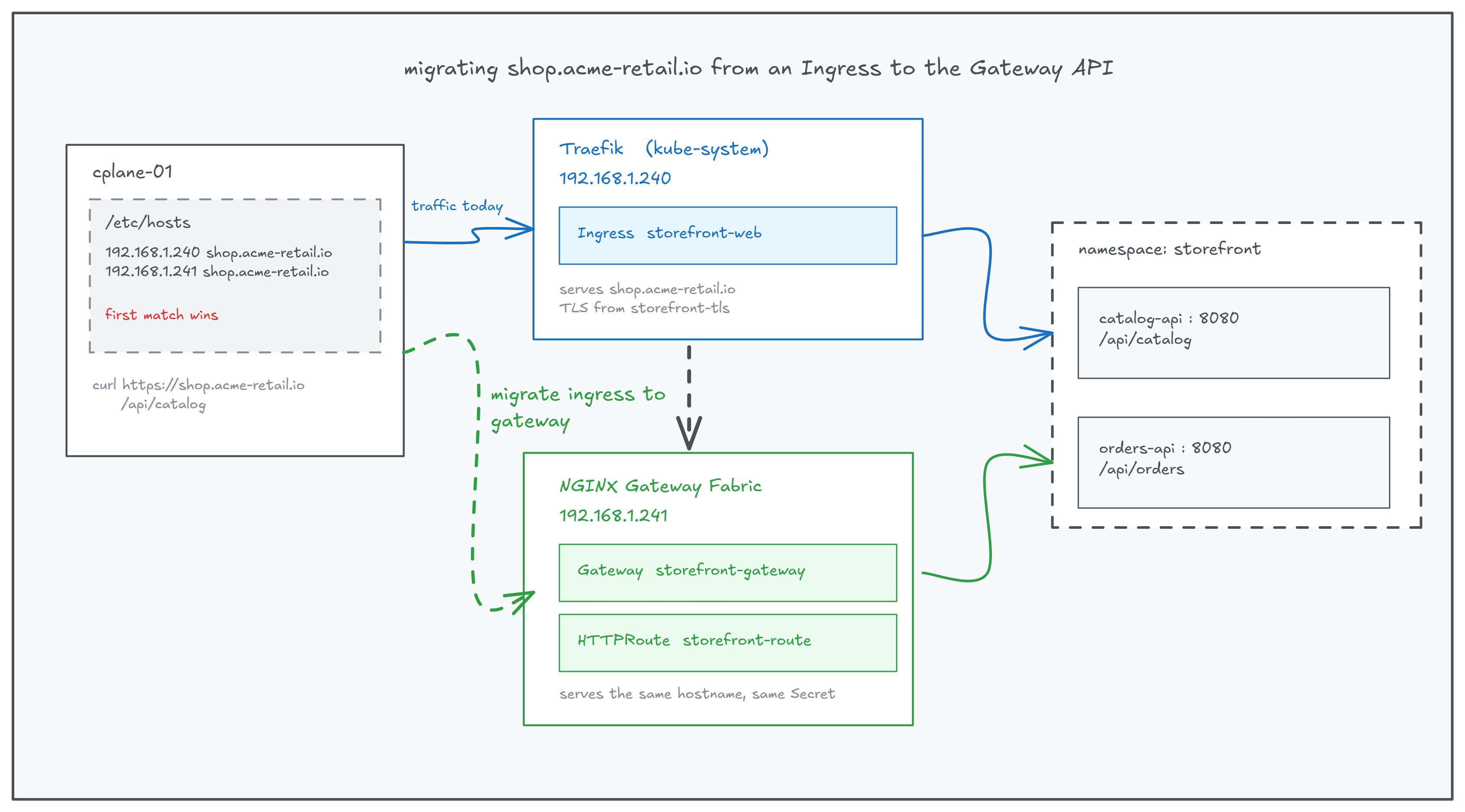
The same hostname served by two load balancers. /etc/hosts decides which one a client reaches.
Do not edit the Deployments, Services, or storefront-tls Secret. Leave Traefik installed. Only the routing layer changes. Wait up to 2 minutes for the Gateway and its LoadBalancer to be provisioned.
Hint 1 | Which resources replace an Ingress
The job an Ingress did alone is split across two objects. One owns the address, the port, the protocol, and the certificate. The other owns the hostname and the routing rules, and refers back to the first.
kubectl get gatewayclass
kubectl explain gateway.spec.listeners
kubectl explain httproute.spec.rules
Read the object you are reproducing before writing anything:
kubectl get ingress storefront-web -n storefront -o yaml
Hint 2 | The shape of each field
An Ingress tls block becomes a listener with protocol: HTTPS and a tls stanza naming the same Secret. An Ingress backend becomes a backendRefs item naming the Service and its port.
listeners:
- name: <listener-name>
  port: <port>
  protocol: <protocol>
  hostname: <hostname>
  tls:
    mode: Terminate
    certificateRefs:
    - kind: Secret
      name: <secret-name>
  allowedRoutes:
    namespaces:
      from: Same
rules:
- matches:
  - path:
      type: PathPrefix
      value: <path>
  backendRefs:
  - name: <service-name>
    port: <service-port>
See: Gateway API, Ingress migration
Hint 3 | Telling whether it is ready
Nothing here fails loudly. Both objects report status conditions instead, and the data plane takes a few seconds to appear after the Gateway is created:
kubectl get gateway storefront-gateway -n storefront -w
kubectl describe gateway storefront-gateway -n storefront
kubectl describe httproute storefront-route -n storefront
Programmed: True on the Gateway, and Accepted: True plus ResolvedRefs: True on the route, mean the configuration reached the data plane. A false condition carries a message naming the field to fix.
Hint 4 | Working with /etc/hosts
Editing the file needs sudo, and it already holds both lines for this domain:
grep acme-retail /etc/hosts
sudo vi /etc/hosts
getent hosts shop.acme-retail.io
Nothing needs to be added here, only removed. getent reports what the system will actually resolve, which is a better check than reading the file back.