Kubernetes Workloads: Jobs

A Job is a workload type that runs a task to completion rather than keeping a process alive. Once the target number of Pods finish successfully, the Job is done and stops creating new ones. Because the goal is a finite task, not a long-lived process, its Pod template can only use restartPolicy: Never or OnFailure.
Task 1 - Run a Job to Completion
A Job with no .spec.completions and no .spec.parallelism defaults both to 1 - only one Pod needs to complete successfully, and only one Pod runs at a time. Each Pod that exits with code 0 increments .status.succeeded. Once .status.succeeded reaches .spec.completions, the Job gets a Complete condition and stops. The finished Pod is not deleted, so its logs remain readable.
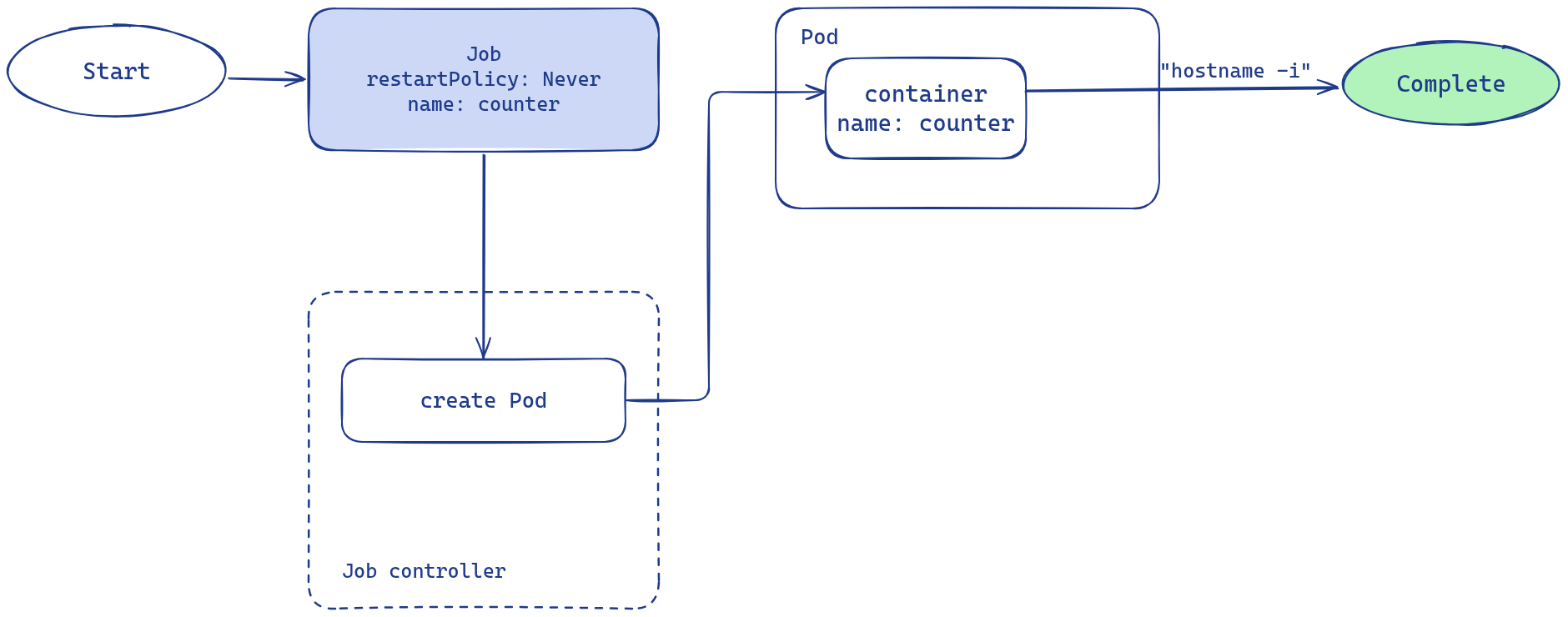
Steps:
- Create a Job named
counterwithrestartPolicy: Never, one container namedcounterusing imagebusybox, commandhostname -i - Once the Job completes, run
kubectl logs job/counterand enter the output below
Task 2 - backoffLimit with restartPolicy Never
A Job retries a failed Pod automatically. restartPolicy decides the retry mechanism. .spec.backoffLimit sets how many retries are allowed before the Job is declared Failed with reason BackoffLimitExceeded.
With restartPolicy: Never:
- Each fail creates a new Pod. Failed Pods are not deleted.
- Each failed Pod increments
.status.failedon the Job. - The Job fails once
.status.failedexceeds.spec.backoffLimit- limit 2 means 3 failed Pods.
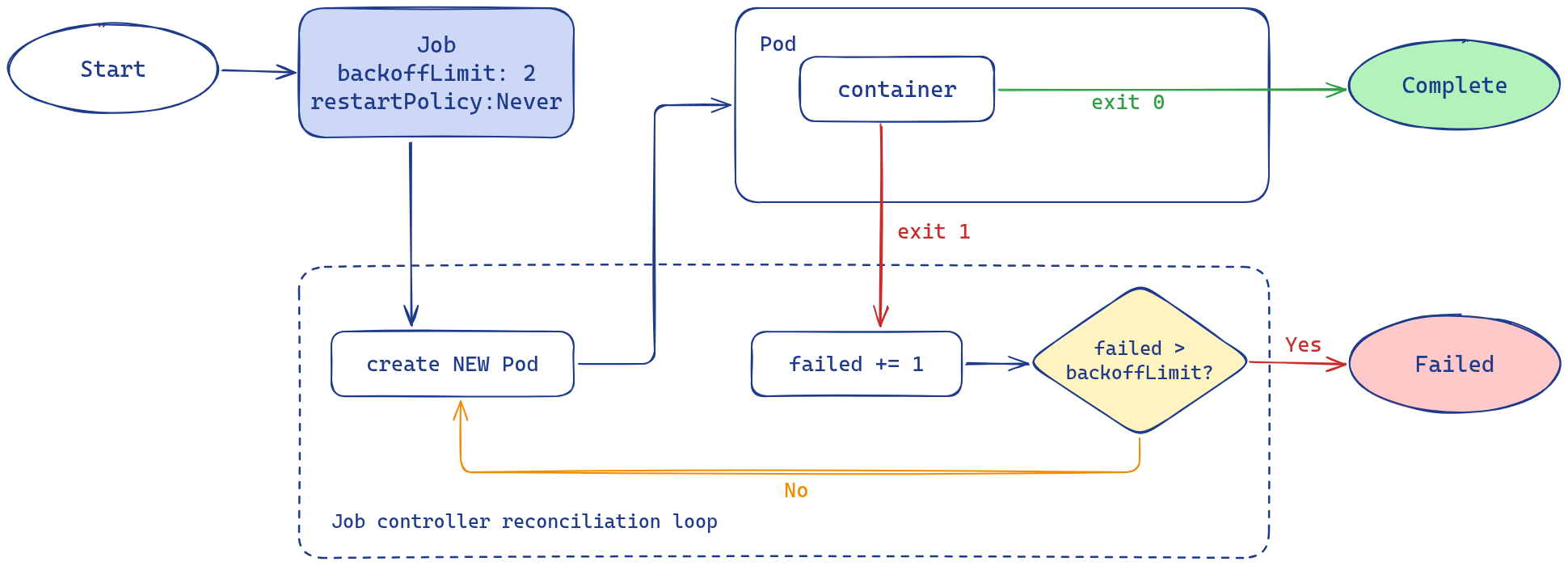
Steps:
- Create a Job named
failing-jobwith.spec.backoffLimit: 2,restartPolicy: Never, one container namedfailing-jobusing imagebusybox, commandsh -c "exit 1"
Once the Job fails, kubectl describe job failing-job shows a condition of type Failed with reason BackoffLimitExceeded. Run kubectl get job failing-job -o yaml or use -o jsonpath to read .status.failed directly - it will be 3, one more than .spec.backoffLimit. Run kubectl get pods -l job-name=failing-job to see all 3 Pod objects that were created, one per attempt.
Task 3 - backoffLimit with restartPolicy OnFailure
With restartPolicy: OnFailure:
- The kubelet restarts the failing container in place. Only one Pod object exists.
- Each restart increments
.status.containerStatuses[*].restartCounton the Pod. - The Job fails once the sum of
.status.containerStatuses[*].restartCountacross containers reaches.spec.backoffLimit, and the controller deletes the Pod.
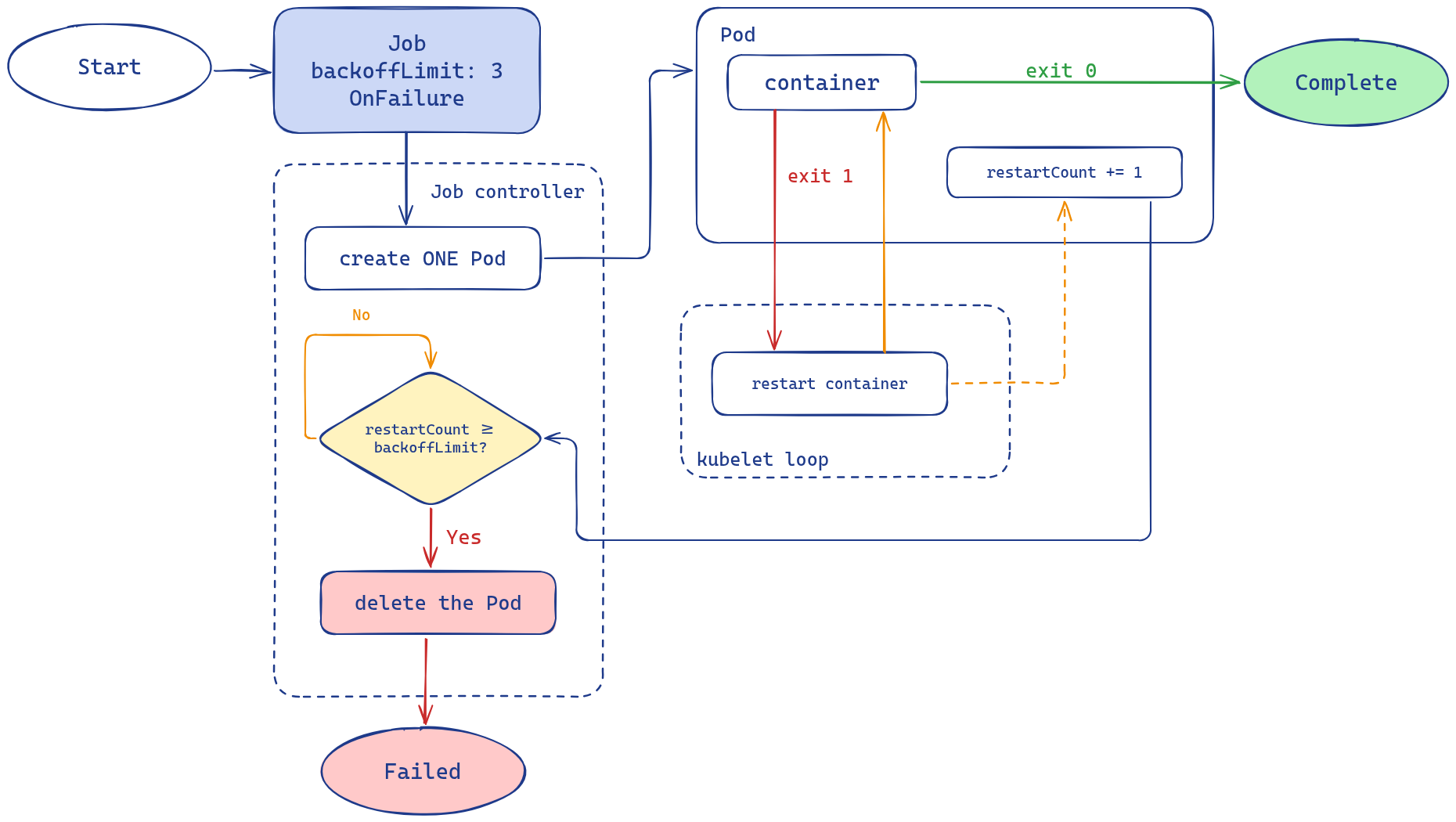
Steps:
- Create a Job named
retry-inplacewith.spec.backoffLimit: 3,restartPolicy: OnFailure, one container namedretry-inplaceusing imagebusybox, commandsh -c "exit 1"
While retry-inplace is running, run kubectl get pods -l job-name=retry-inplace - only one Pod exists and its RESTARTS column increments with each retry. Once BackoffLimitExceeded is reached, the controller deletes that Pod, and its logs are lost with it. .status.failed on the Job shows 1 because it counts Pods, not restarts.
Task 4 - Parallel Job Execution
.spec.completions sets how many Pods must complete successfully before the Job is done. .spec.parallelism limits how many Pods run at the same time. With .spec.completions: 4 and .spec.parallelism: 2, the Job runs 2 Pods at a time. When a Pod finishes, the controller starts a new one, until 4 Pods have succeeded.
Steps:
- Create a Job named
batchwith.spec.completions: 4,.spec.parallelism: 2,restartPolicy: Never, one container namedbatchusing imagebusybox, commandsh -c "sleep 20 && echo task done"
Run kubectl get pods -l job-name=batch while batch is in progress. Two Pods are active at a time. As each Pod finishes, a new one starts to keep 2 running until all 4 succeed. kubectl get job batch shows .status.succeeded increasing toward 4.
Task 5 - Automatic Cleanup with ttlSecondsAfterFinished
A finished Job and its Pods stay in the cluster until deleted manually. .spec.ttlSecondsAfterFinished changes this. Once the Job finishes, the TTL controller waits that many seconds and then deletes the Job and its Pods automatically. No manual kubectl delete is needed.
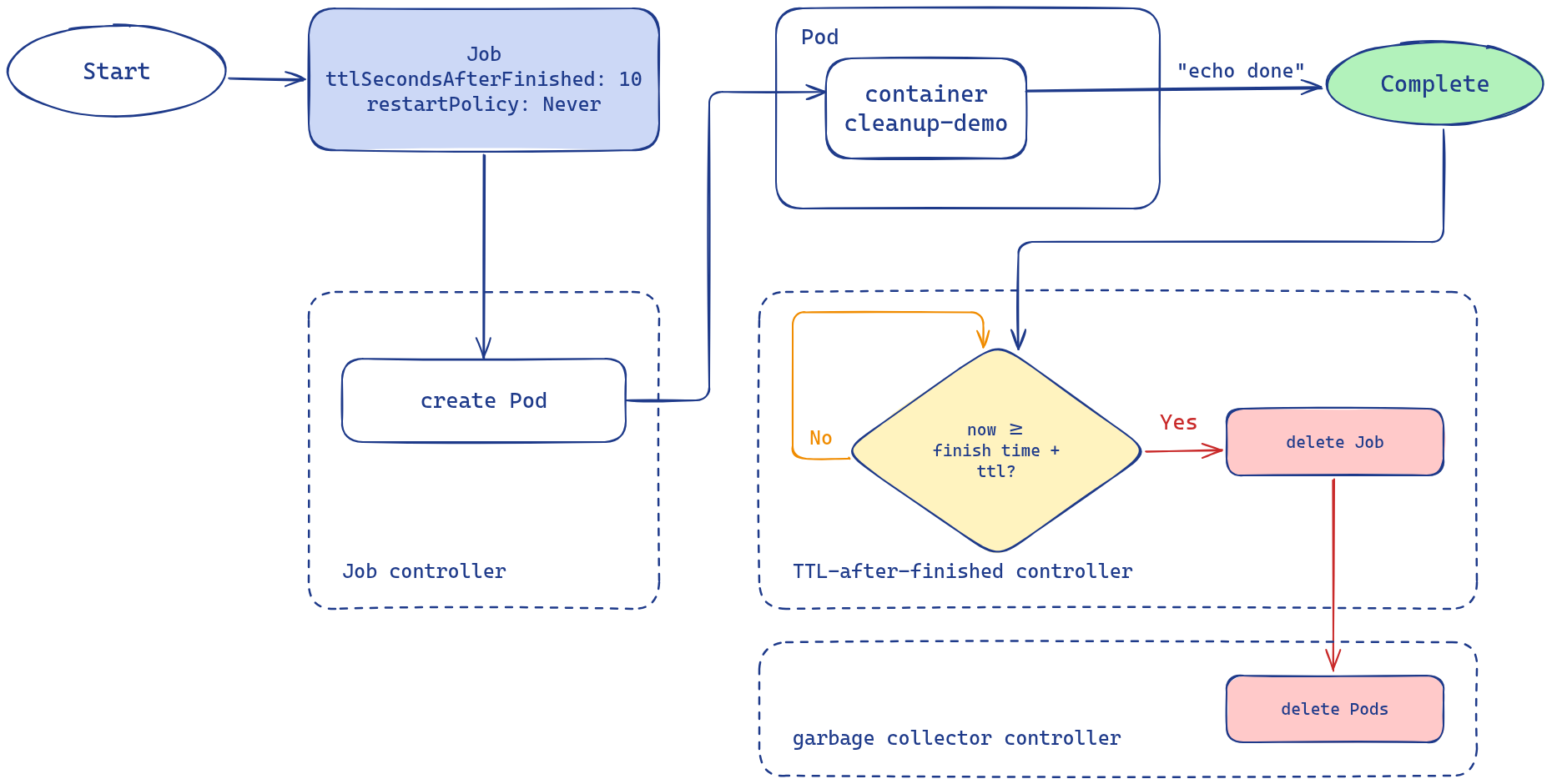
Steps:
- Create a Job named
cleanup-demowith.spec.ttlSecondsAfterFinishedbetween5and30,restartPolicy: Never, one container namedcleanup-demousing imagebusybox, commandecho done
Once the TTL elapses, kubectl get job cleanup-demo returns NotFound. The Pods are deleted with it - kubectl get pods -l job-name=cleanup-demo also returns empty.
Task 6 - Suspend a Running Job
Setting .spec.suspend: true on a running Job stops it without losing progress. The controller deletes all active Pods immediately, but .status.succeeded keeps the count of Pods that already finished. Setting .spec.suspend: false resumes the Job, and the controller creates new Pods to reach .spec.completions.
Steps:
- Create a Job named
slow-batchwith.spec.completions: 5,.spec.parallelism: 1,restartPolicy: Never, one container namedslow-batchusing imagebusybox, commandsleep 20 - While it is running, set
.spec.suspend: trueonslow-batch
While slow-batch is suspended, run kubectl get pods -l job-name=slow-batch - the active Pod is gone. .status.succeeded still shows the count of Pods that finished before the suspension. Setting .spec.suspend: false resumes the Job - new Pods appear to complete the remaining runs.
Task 7 - Enforce a Deadline with activeDeadlineSeconds
.spec.activeDeadlineSeconds sets a wall-clock limit for the whole Job, separate from .spec.backoffLimit. Once the Job has been running longer than this value, the controller terminates it with reason DeadlineExceeded, even if .spec.backoffLimit has not been reached yet.
Steps:
- Create a Job named
deadline-demowith.spec.activeDeadlineSeconds: 10,.spec.backoffLimit: 5,restartPolicy: Never, one container nameddeadline-demousing imagebusybox, commandsleep 60,terminationGracePeriodSeconds: 5(optional - for a faster Pod kill)
Once the deadline passes, kubectl describe job deadline-demo shows DeadlineExceeded in the conditions. Unlike BackoffLimitExceeded from Task 2, the Job stopped because of elapsed time - not because of retry count. .status.failed shows the pod that was running when the deadline fired - well below .spec.backoffLimit.