Grant Read-Only Access to a Developer Using RBAC Role and RoleBinding

Scenario
A developer named siddhi from the development team requires read-only access to the production namespace. She needs to inspect Pods, view logs, and check Deployments — but must not be able to create, update, or delete any resources.
The siddhi user is already configured on the dev-machine in the kubeconfig with a dedicated context siddhi-context.
Task
- Create a
Rolenamedprod-reader-rolein theproductionnamespace with the following permissions:Resource Subresource API Group Allowed Verbs pods— Core ( "")get,list,watchpodslogCore ( "")get,list,watchdeployments— appsget,list,watch - Create a
RoleBindingnamedprod-reader-bindingin theproductionnamespace that bindsprod-reader-roleto the usersiddhi. - Switch to the
siddhicontext to verify access; she has read-only permissions on deployments, pods, and logs, so she cannot create or delete resources.
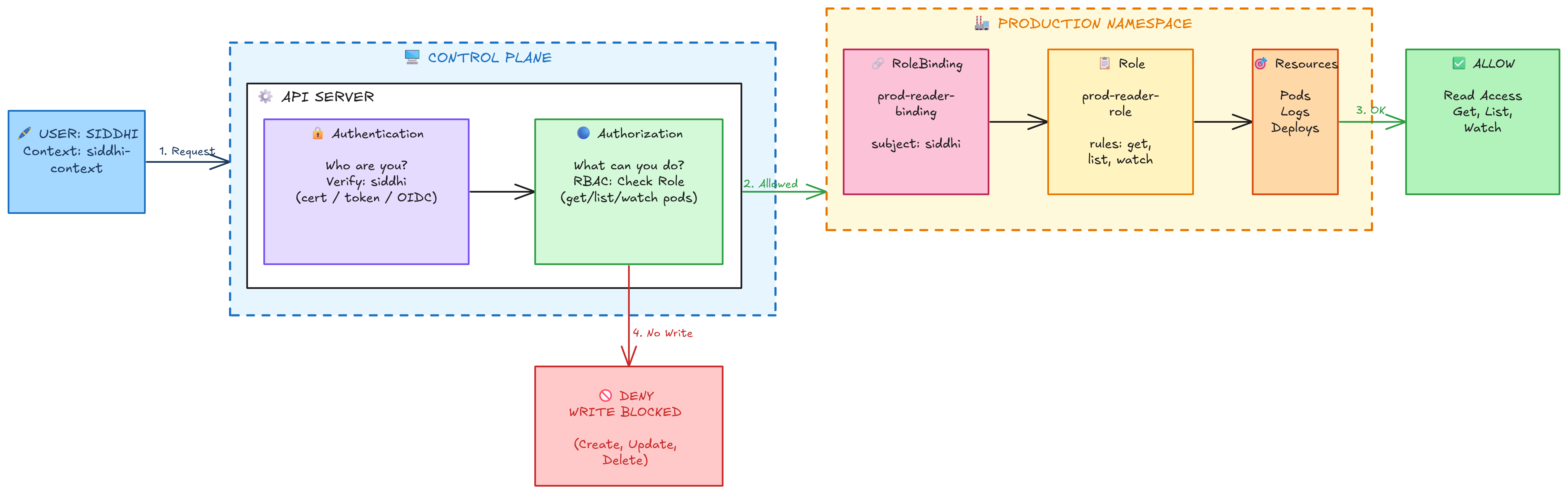
RBAC Diagram for Developer Siddhi (Read-Only Access to Production Namespace)
kubectl config use-context siddhi-context
# ===> Switch to siddhi Context
kubectl config use-context default
# ===> Switch back to the default context (administration access).
Hint 1
Use kubectl create role with the --verb and --resource flags to create the Role imperatively.
Use kubectl create rolebinding with the --role and --user flags to bind it to siddhi.
Verify access using kubectl auth can-i with --as=siddhi.
Use kubectl -h (or kubectl <command> -h) to view built-in help for commands.
See the official docs: https://kubernetes.io/docs/reference/access-authn-authz/rbac/