Fix a Node-Level Config File Without SSH Access

Scenario
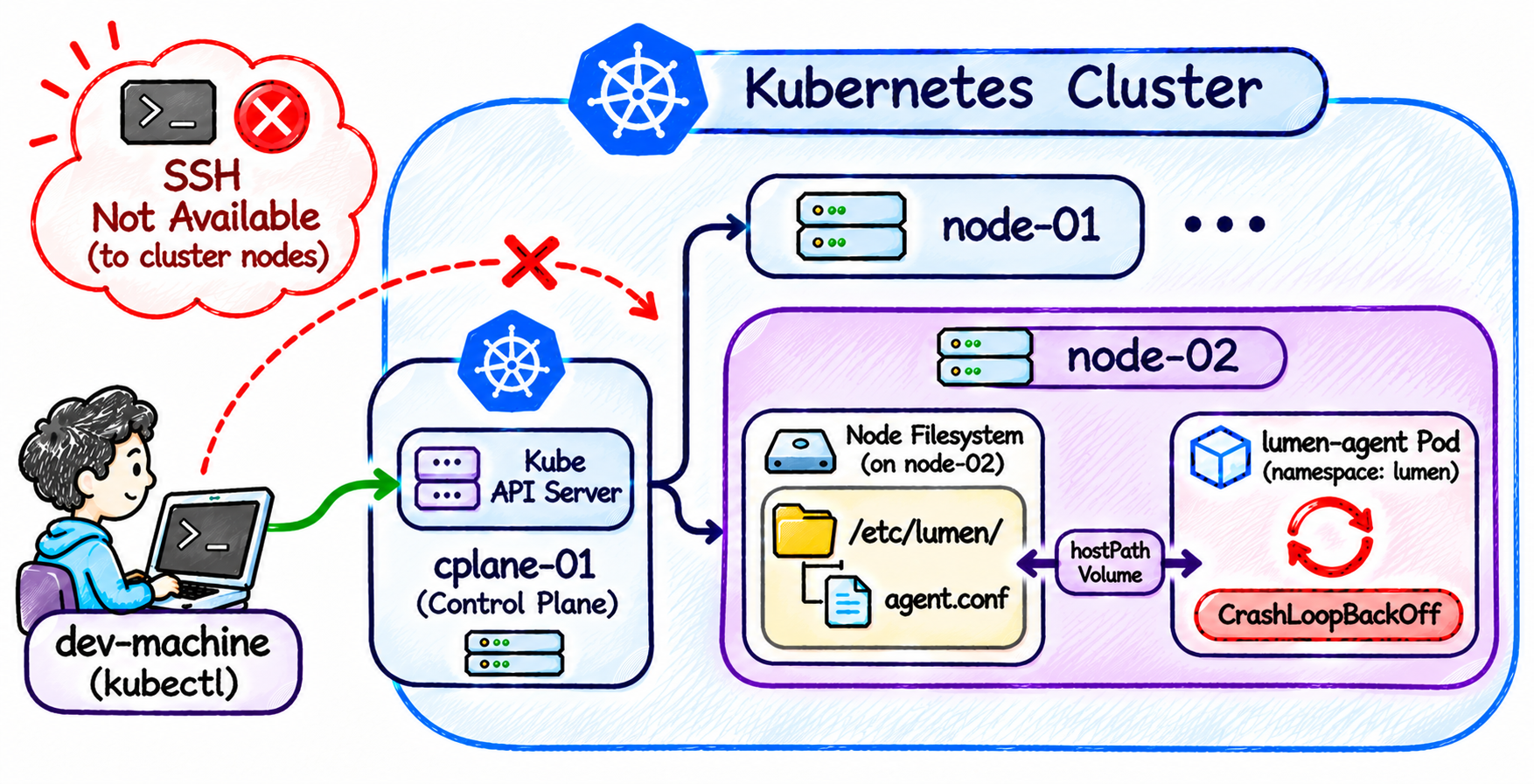
The platform team runs a small telemetry agent called lumen-agent in the lumen namespace.
It runs on node-02 and reads its settings from /etc/lumen/agent.conf.
The file exists only on the disk of node-02.
Nothing in the cluster stores a copy of it, and the Deployment mounts the node's /etc/lumen directory into the agent with a hostPath volume:
volumes:
- name: config
  hostPath:
    path: /etc/lumen
    type: Directory
Over the weekend, an engineer changed a setting in that file during a maintenance window. Since then, the agent fails right after it starts, and Kubernetes keeps restarting it:
kubectl get pods -n lumen -o wide
NAME                           READY   STATUS             RESTARTS     AGE   IP          NODE      NOMINATED NODE   READINESS GATES
lumen-agent-579dc8969f-tdhf7   0/1     CrashLoopBackOff   1 (7s ago)   13s   10.42.2.2   node-02   <none>           <none>
You work from dev-machine, where kubectl is configured for the cluster.
SSH access to the nodes was closed again when the maintenance window ended, and nobody can give you a shell on them.
The Kubernetes API is the only way you can reach node-02.
Task
Find out which setting the agent rejects and fix it in /etc/lumen/agent.conf on node-02 itself.
Before the change, its value was info.
Keep the other settings in the file as they are.
After that, the lumen-agent Pod must be running and ready.
Finally, delete any Pods you created in the cluster to reach node-02.
Do not delete the lumen-agent Deployment.
Do not change the lumen-agent Deployment, apart from restarting it.
Hint 1: A Kubernetes way onto a node
SSH to the nodes is refused, so the way onto node-02 has to go through the cluster itself.
Kubernetes can run a Pod on any node you choose, and kubectl has a subcommand made for troubleshooting.
That subcommand accepts more kinds of targets than Pods.
Read its help and look through the examples:
kubectl <subcommand> --help
Docs:
- Debugging Kubernetes Nodes With Kubectl (Kubernetes)
Hint 2: Finding the node's files
Once you have a shell on node-02, check whether /etc/lumen exists.
The container you are in has its own root filesystem, so the node's files are mounted somewhere else.
List the top-level directories to find them:
ls /
Hint 3: Editing the file
The node's /etc/lumen/agent.conf is under the path where the node's root filesystem is mounted.
Edit it with any tool the container image has, such as vi or sed.
Hint 4: Restarting the agent
The agent reads its config only when it starts. After each failed start, the kubelet waits longer before the next restart, up to 5 minutes. You do not have to wait for it. A new Pod from the Deployment starts at once and reads the fixed file.
Docs:
- Container restart policy (Kubernetes)
Hint 5: What is left behind
Leaving a shell does not delete the Pod it ran in. List the Pods in the namespace where you started your session on the node.