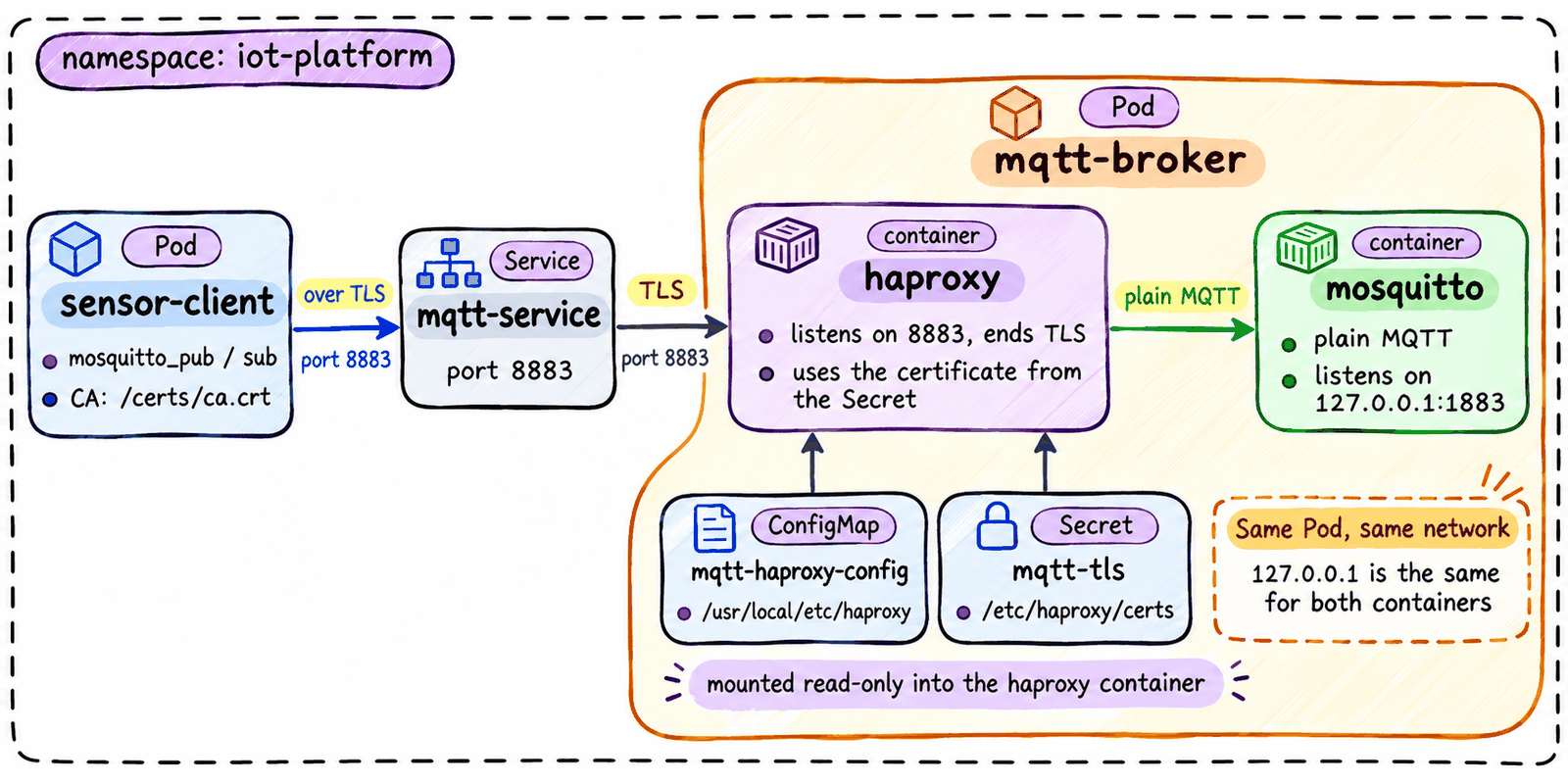
Add an HAProxy Sidecar to Serve an MQTT Broker over TLS

Scenario
Temperature sensors in a factory send their readings over MQTT to a broker. A sensor publishes a reading to a topic, such as factory/line1/temperature, and every client subscribed to that topic receives it. The broker is Eclipse Mosquitto, running as the mqtt-broker Deployment in the iot-platform namespace.
In this lab, the Pod sensor-client plays the role of a sensor. It has the Mosquitto client tools and the CA certificate at /certs/ca.crt. The broker account for clients is user sensor with the password Sens0r-Pass-2026.
Mosquitto speaks plain MQTT only and listens on 127.0.0.1:1883. The security team requires every client to connect with MQTT over TLS on port 8883, and the platform team chose HAProxy to handle the TLS. Today, sensor-client fails when it connects to mqtt-service:8883, because nothing in the broker Pod listens on that port.
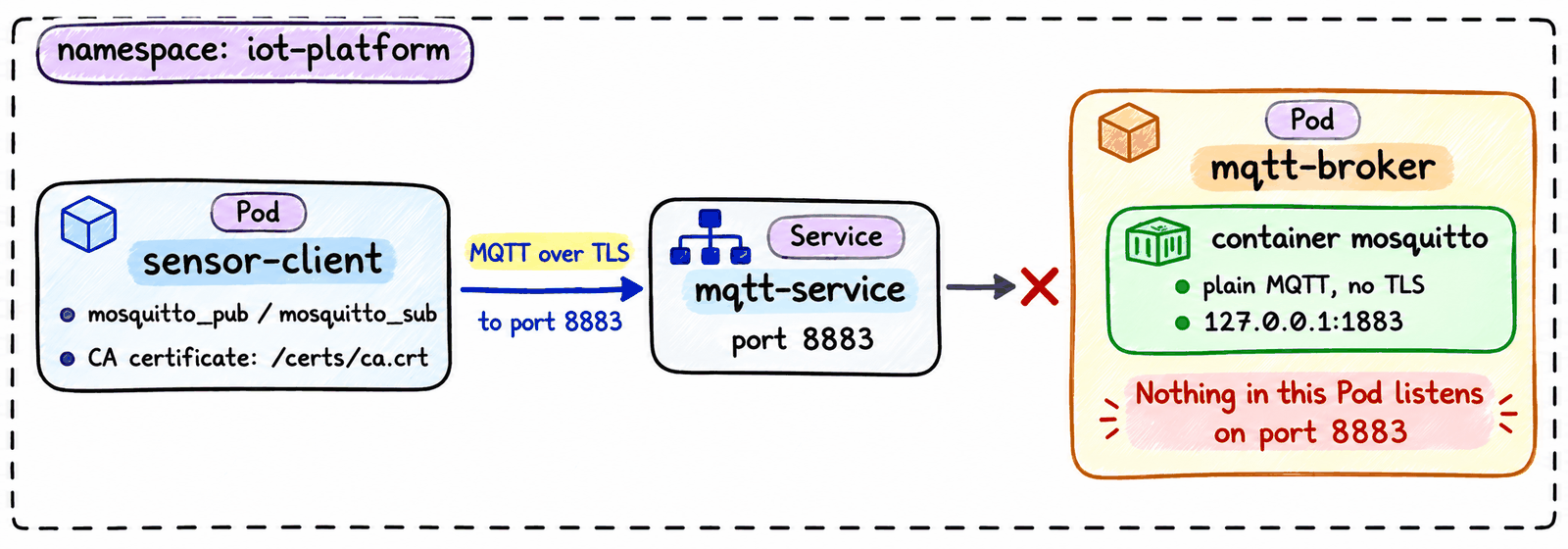
The manifests of the broker are already applied. They are in /home/laborant/mqtt-broker/ on dev-machine:
/home/laborant/mqtt-broker/
├── deployment.yaml                 # Deployment mqtt-broker (Mosquitto only)
├── haproxy-configmap.yaml          # ConfigMap mqtt-haproxy-config
├── mosquitto-configmap.yaml        # ConfigMap mosquitto-config
├── mosquitto-passwd-secret.yaml    # Secret mosquitto-passwd
└── service.yaml                    # Service mqtt-service on port 8883
One more object is not in the folder: the Secret mqtt-tls in iot-platform, created by the security team. It holds mqtt.pem, the server certificate and its private key for mqtt-service.
Task
Update /home/laborant/mqtt-broker/deployment.yaml so that HAProxy runs in the broker Pod and terminates TLS for Mosquitto, then apply it. HAProxy must meet these requirements:
| Setting | Value |
|---|---|
| Container name | haproxy |
| Image | public.ecr.aws/docker/library/haproxy:3.2.26-alpine |
| Container port | 8883, named mqtt-tls |
| HAProxy configuration | ConfigMap mqtt-haproxy-config, mounted read-only at /usr/local/etc/haproxy |
| TLS certificate | Secret mqtt-tls, mounted read-only at /etc/haproxy/certs |
mosquitto container | Keep it as it is |
After the rollout, the broker Pod must show both containers ready, and sensor-client must be able to publish and receive messages through mqtt-service:8883 over TLS.
Check pub/sub over TLS
In Terminal 1, subscribe and wait for one message:
kubectl exec -n iot-platform sensor-client -- mosquitto_sub -h mqtt-service -p 8883 --cafile /certs/ca.crt -u sensor -P Sens0r-Pass-2026 -t factory/line1/temperature -C 1 -v
In Terminal 2, publish a reading:
kubectl exec -n iot-platform sensor-client -- mosquitto_pub -h mqtt-service -p 8883 --cafile /certs/ca.crt -u sensor -P Sens0r-Pass-2026 -t factory/line1/temperature -m 21.5
Pub/sub works when the subscriber in Terminal 1 prints factory/line1/temperature 21.5 and exits. If it keeps waiting, the message did not reach it.
The broker logs show the same message on its way through Mosquitto, from the publisher (Received PUBLISH) to the subscriber (Sending PUBLISH):
kubectl logs -n iot-platform deployment/mqtt-broker -c mosquitto
Check that the connection uses TLS
Save the CA certificate to a file:
kubectl get configmap mqtt-ca -n iot-platform -o jsonpath='{.data.ca\.crt}' > /home/laborant/ca.crt
In Terminal 1, forward local port 8883 to the Service. The command keeps running:
kubectl port-forward -n iot-platform service/mqtt-service 8883:8883
In Terminal 2, open a TLS connection through it:
openssl s_client -connect localhost:8883 -servername mqtt-service -verify_hostname mqtt-service -CAfile /home/laborant/ca.crt -brief < /dev/null
TLS works when the output shows Protocol version: TLSv1.3, Verification: OK and Verified peername: mqtt-service. Stop the port-forward in Terminal 1 with Ctrl+C.
Change only deployment.yaml. Do not change the other files in the folder, the Secret mqtt-tls or the sensor-client Pod.
Hint 1: Adding a sidecar container
A sidecar is a second container in the same Pod as the application. It runs next to the application container and adds a feature, here TLS, without changing the application image. It goes into the Pod template of the Deployment, next to the existing container:
kubectl explain deployment.spec.template.spec.containers
kubectl explain deployment.spec.template.spec.containers.ports
All containers in one Pod share the same network namespace, so the sidecar reaches the application on 127.0.0.1. Compare where HAProxy forwards traffic with where Mosquitto listens:
cat <folder>/<haproxy-configmap-file>
cat <folder>/<mosquitto-configmap-file>
A native sidecar, an entry in initContainers with restartPolicy: Always, also works for this challenge.
Docs:
- Sidecar Containers (Kubernetes)
- Pods with multiple containers (Kubernetes)
Hint 2: Mounting a ConfigMap and a Secret
A ConfigMap or a Secret becomes files inside a container in two parts: a volume in the Pod template that points to the ConfigMap or the Secret, and a volume mount in the container that places it in a directory. Each key becomes a file with the same name. A volume mount can also be made read-only:
kubectl explain deployment.spec.template.spec.volumes.configMap
kubectl explain deployment.spec.template.spec.volumes.secret
kubectl explain deployment.spec.template.spec.containers.volumeMounts
The mount paths in the task are where HAProxy looks for the files: the HAProxy image reads haproxy.cfg from /usr/local/etc/haproxy, and the bind line in haproxy.cfg loads /etc/haproxy/certs/mqtt.pem.
Docs:
- Volumes: configMap (Kubernetes)
- Volumes: secret (Kubernetes)
- haproxy image (Docker Hub)
Hint 3: Applying the manifest and watching the rollout
A change to the Pod template creates a new Pod. Check the file before you apply it, then watch the rollout:
kubectl apply -f <file> --dry-run=server
kubectl apply -f <file>
kubectl rollout status deployment/<name> -n <namespace>
kubectl get pods -n <namespace>
The new Pod must show 2/2 in READY. The old Pod stays Terminating for a few seconds, so wait until only the new Pod is listed before you read logs. If the sidecar does not start, read its logs:
kubectl logs deployment/<name> -n <namespace> -c <container>
Docs:
- Updating a Deployment (Kubernetes)
- Declarative Management of Kubernetes Objects Using Configuration Files (Kubernetes)
Hint 4: When a check fails
The client error tells you how far the connection got:
Error: Bad file descriptor: nothing in the broker Pod accepts connections on port8883yet.Error: Protocol error: the TLS handshake failed because the client does not trust the broker certificate. Keep--cafilein the command and use the Service name as the host. Add-dto the command to see the OpenSSL error.
Then check the Pod and the logs of the sidecar:
kubectl get pods -n <namespace>
kubectl logs deployment/<name> -n <namespace> -c <container>
Docs:
- mosquitto_pub (Eclipse Mosquitto)
- mosquitto_sub (Eclipse Mosquitto)